41
3
Pending Files (Pending)
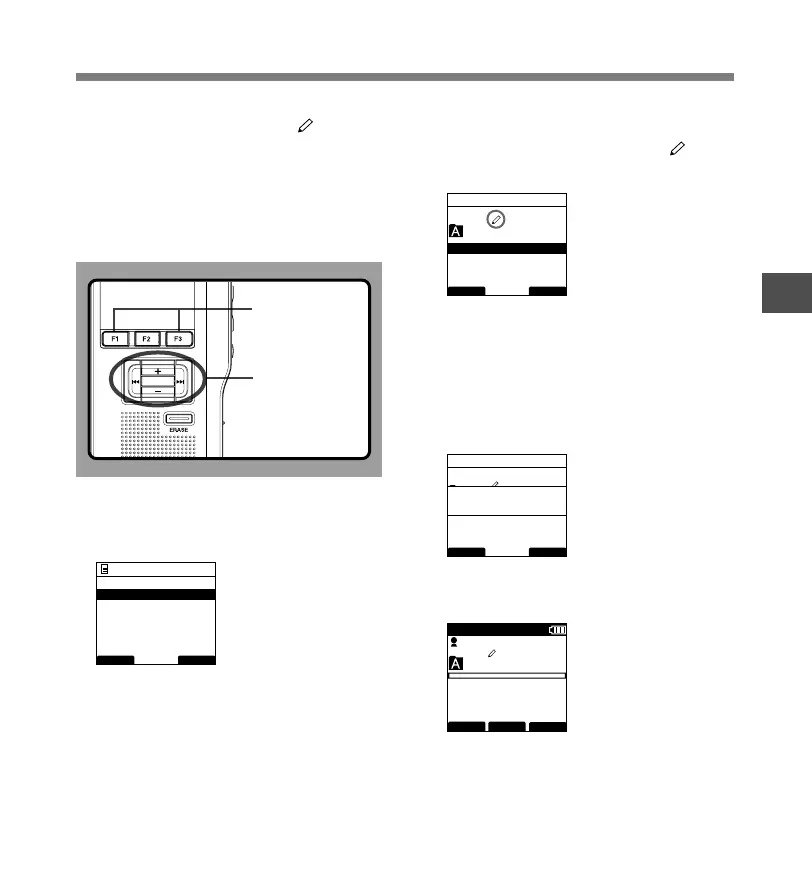
When you set [Pending] to the file, the file becomes
“Pending file” and the editing sign of will appear
on the display. If “Download file” is set to “Finished
file” by DSS Player, the [Pending] file is not
transferred and only [Finished] file (edited file) will
be transferred to your PC.
For details, see “Recording” in the “Customizing the
Recorder” (☞ P.58).
1
Select [Pending] at the [File Menu] screen,
then press the PLAY/OK or 9 button.
Refer to P.33 regarding each menu item settings.
2
Press the + or
–
button to select
[Pending] or [Finished].
Pending...Sets to a file of “Editing” and appears
on the display.
Finished...Sets to a file of “already edited”.
3
Press the PLAY/OK button to complete
the setup screen.
[Pending Set] or [Finished Set] will light up on the
display, and it will return to the [File Menu] screen.
If you press the 0 or F1
(
BACK
)
button the setting
will be cancelled and it will return to the [File Menu].
Pressing the F3(EXIT) button will cancel the
contents being set and take you out of the MENU.
4
Press the F3
(
EXIT
)
or 0 button to
complete the setting.
F1, F3 button
PLAY/OK,
+, –,
9, 0
button
BACK EXIT
File Menu
Pending
Lock
Priority
Work Type
Information
029 / 030
BACK EXIT
Pending
Pending
Finished
029 / 030
BACK EXIT
Pending
Finished
Pending
Set
029 / 030
FOLDER
PRIOR
MENU
DS3400
E
QP CONF
New File
02
M
10
s
3
H
0 8
M
0 5
s
PLAY/OK
Pending Files



 To Next Page