121
EN
Sttooting
Setting the Shooting
mode
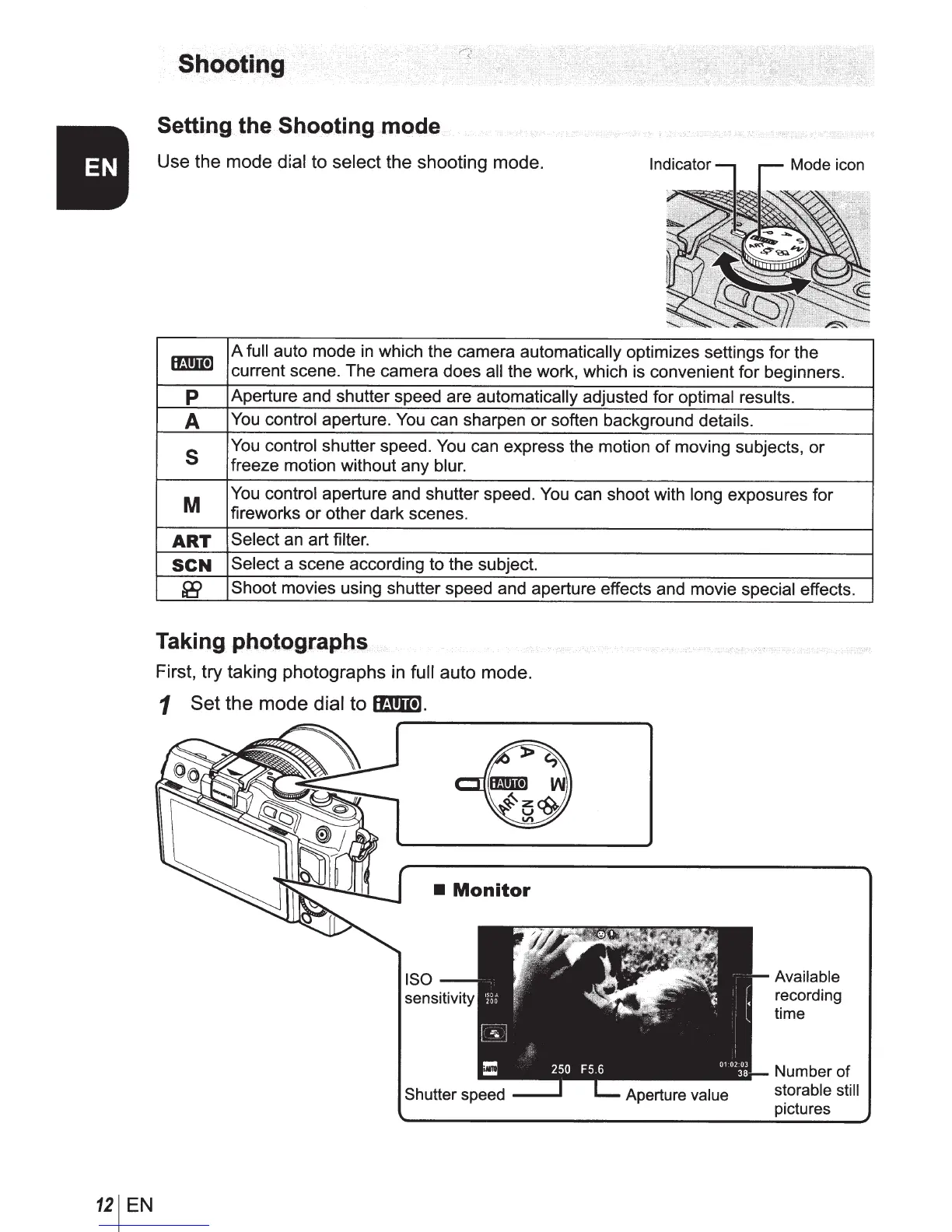
Use the mode
d;al
to
select
the shooting mode.
mmm
A
full
auto mode
in
which the camera
automatically
optimizes settings for the
current scene. The camera does
all
the work, which is convenient for beginners.
p
Aperture and shutter speed are
automatically
adjusted for optimal results.
A
You
control aperture.
You
can sharpen or soften background details.
s
You
control shutter speed.
You
can express the motion
of
moving subjects, or
freeze motion without any blur.
M
You
control aperture and shutter speed.
You
can shoot with long exposures for
fireworks or other dark scenes.
ART
Select
an art filter.
SCN
Select
a scene according to the subject.
&9
Shoot
movies using shutter speed and aperture effects and movie special effects.
Taking
photographs
First, try taking photographs
in
full
auto mode.
1
Set
the mode
dial
to
lli!!m].
•
Monitor
Available
recording
time
Number
of
storable still
pictures



 To Next Page