181
EN
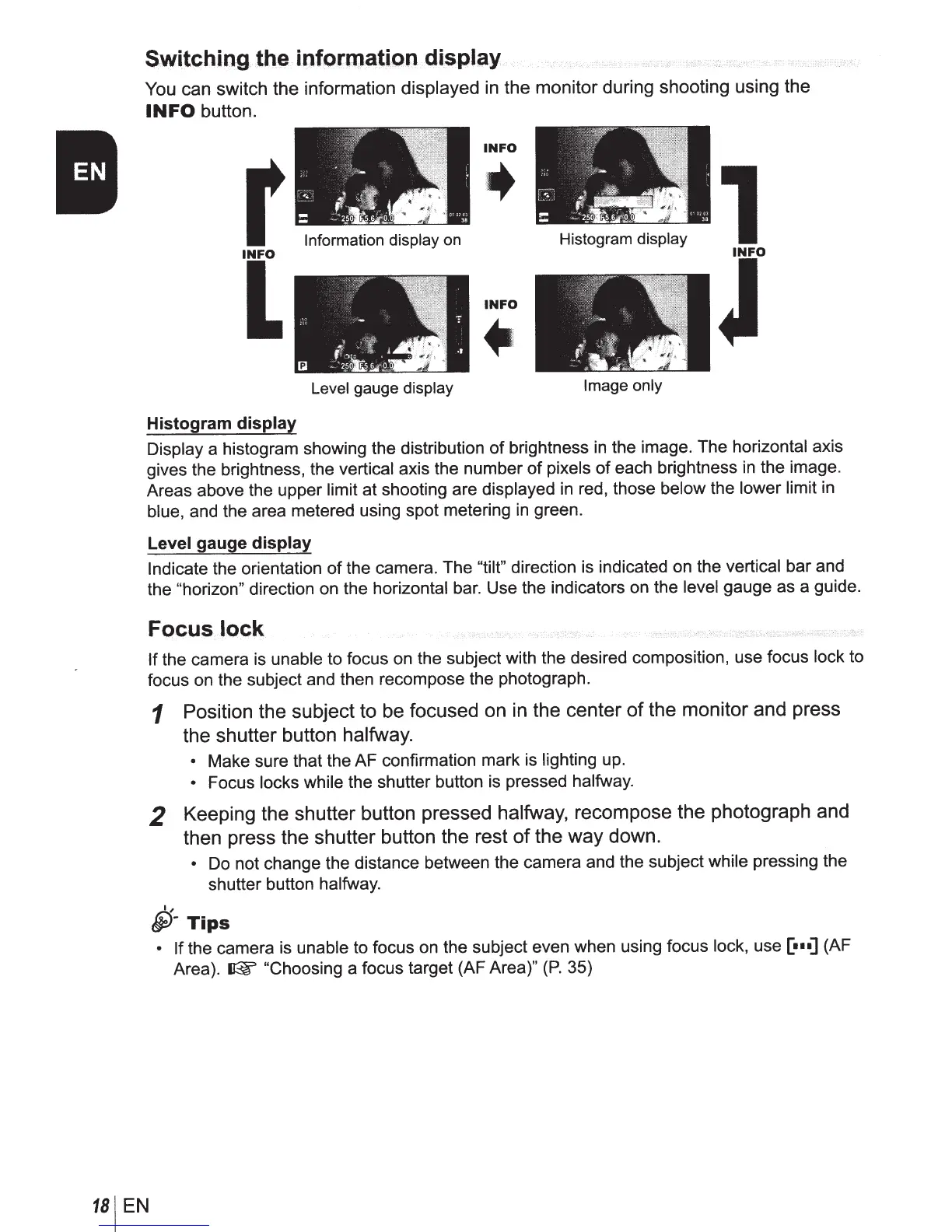
Switching
the inforroati.on display
You
can switch the information displayed
in
the monitor during shooting using the
INFO
button.
r
I[
Histogram
display
Information display on
Level
gauge display
INFO
INFO
~
·
~
Histogram
display
Image only
Display a histogram showing the distribution
of
brightness
in
the image. The horizontal axis
gives the brightness, the vertical axis the number
of
pixels
of
each brightness
in
the image.
Areas above the upper limit at shooting are displayed in red, those below the lower limit in
blue, and the area metered using spot metering
in
green.
Level
gauge
display
Indicate
the orientation
of
the camera. The
"tilt"
direction is indicated on the vertical bar and
the
"horizon" direction on the horizontal bar. Use the indicators on the level
gauge as a guide.
Focus lock
If
the camera is unable to focus on the subject with the desired composition, use focus lock to
focus on the subject and then recompose the photograph.
1
Position the subject to be focused on in the center
of
the monitor and press
the shutter button
halfway.
•
Make sure that the AF confirmation mark is lighting up.
•
Focus locks while the shutter button is pressed halfway.
2
Keeping the shutter button pressed
halfway,
recompose the photograph and
then press the shutter button the rest
of
the way down.
•
Do not change the distance between the camera and the subject while pressing the
shutter button halfway.
I,
~-Tips
• If
the camera
is
unable to focus on the subject even when using focus lock, use
[•n]
(AF
Area).
~
"Choosing
a focus target (AF Area)"
(P.
35)



 To Next Page