You
can use the touch screen during
playback
or
when framing pictures
in
the monitor.
You
can also
use the touch screen to adjust settings
in
the
live
guides and
LV
super
control panel.
Lj~~
guides
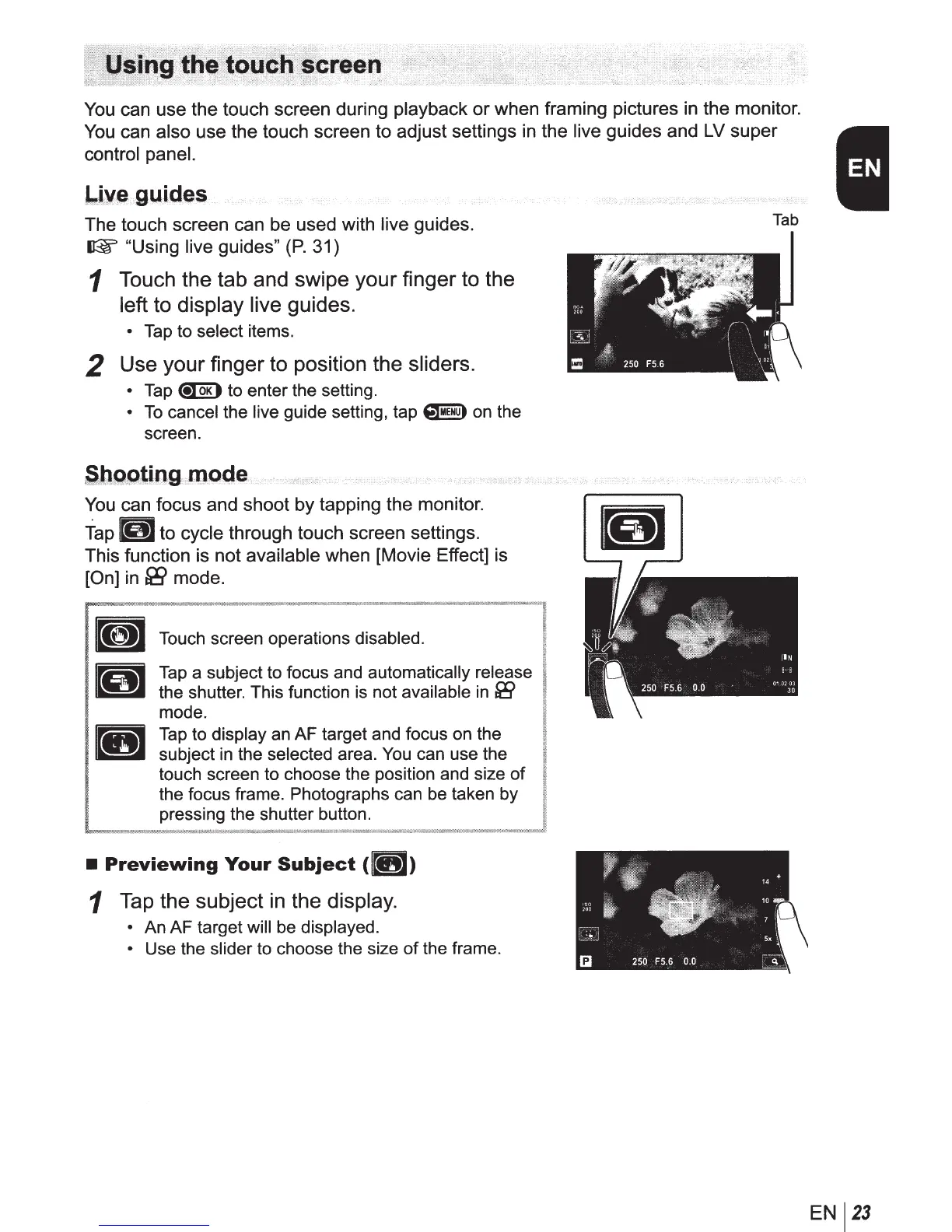
The touch screen can be used with
live
guides.
~
"Using live guides"
(P.
31)
1
Touch
the
tab and
swipe
your
finger to the
left to
display
live
guides.
•
Tap
to
select
items.
2
Use
your
finger
to position the
sliders.
•
Tap
~
to enter the setting.
•
To
cancel
the
live
guide setting, tap
~
on the
screen.
,S,
b.o.ot
.
i.n
.g
.i
m.ode
You
can focus and shoot by tapping the monitor.
Tap
j(lijj
to cycle
through touch screen settings.
This function is not
available
when [Movie Effect] is
[On]
in
fi9
mode.
Touch screen operations
disabled.
Tap
a subject to focus and
automatically release
the shutter. This function is not
available
in
&9
mode.
Tap
to
display
an AF target and focus on the
subject
in
the
selected
area.
You
can use the
touch screen to choose the position and size
of
the focus frame. Photographs can be taken by
pressing the shutter button.
•
Previewing
Your
Subject
(
lit
)
1
Tap
the
subject
in the
display.
•
An AF target
will be displayed.
•
Use the
slider
to choose the size
of
the frame.
Tab
EN
23



 To Next Page