221
EN
Monitor
dls.play
durin.g
play.back
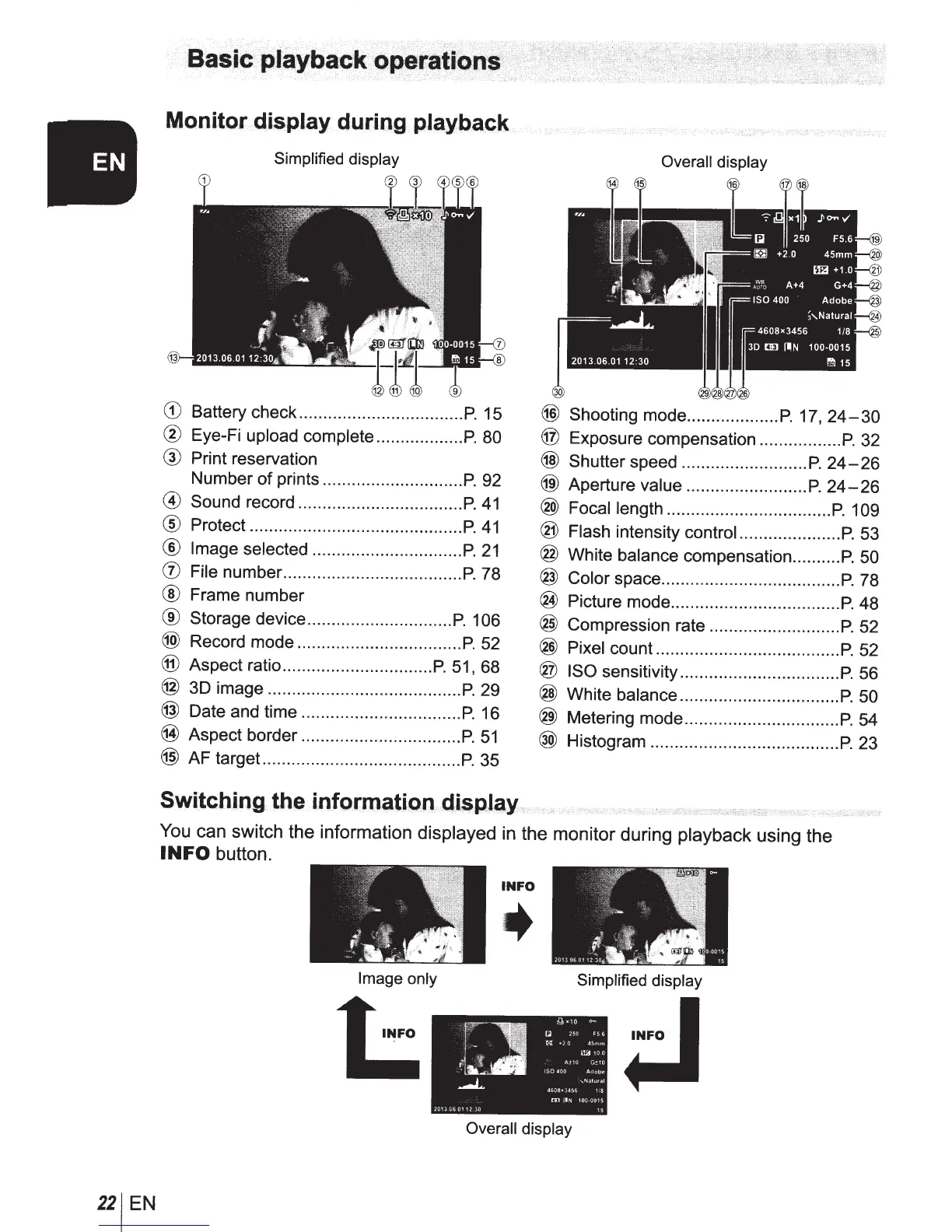
Simplified display Overall display
CD
Battery check ..................................
P.
15
@)
Shooting mode ...................
P.
17,
24-30
®
Eye-Fi upload complete ..................
P.
80
@
Exposure compensation .................
P.
32
@
Print reservation
@)
Shutter speed ..........................
P.
24-26
Number of prints .............................
P.
92
@)
Aperture value .........................
P.
24-26
@ Sound record ..................................
P.
41
@
Focal length ..................................
P.
109
®
Protect ............................................
P.
41
@
Flash intensity
controi
.....................
P.
53
®
Image selected ...............................
P.
21
@
White balance compensation ..........
P.
50
(j)
File number .....................................
P.
78
@
Color space .....................................
P.
78
® Frame number
®
Picture mode ...................................
P.
48
®
Storage device ..............................
P.
1
06
@
Compression rate ...........................
P.
52
(@
Record mode ..................................
P.
52
®
Pixel count ......................................
P.
52
®
Aspect ratio ...............................
P.
51
, 68
®
ISO
sensitivity .................................
P.
56
@
3D image ........................................
P.
29
@
White balance .................................
P.
50
@
Date and time .................................
P.
16
@
Metering mode ................................
P.
54
@
Aspect border .................................
P.
51
@)
AF target .........................................
P.
35
@
Histogram .......................................
P.
23
Switching
th
.e info(lnatlon
..
d.i
..
$p.lay
You can switch the information
displayed in the monitor during playback
using the
INFO button.
INFO
Image only Simplified display
Overall display



 To Next Page