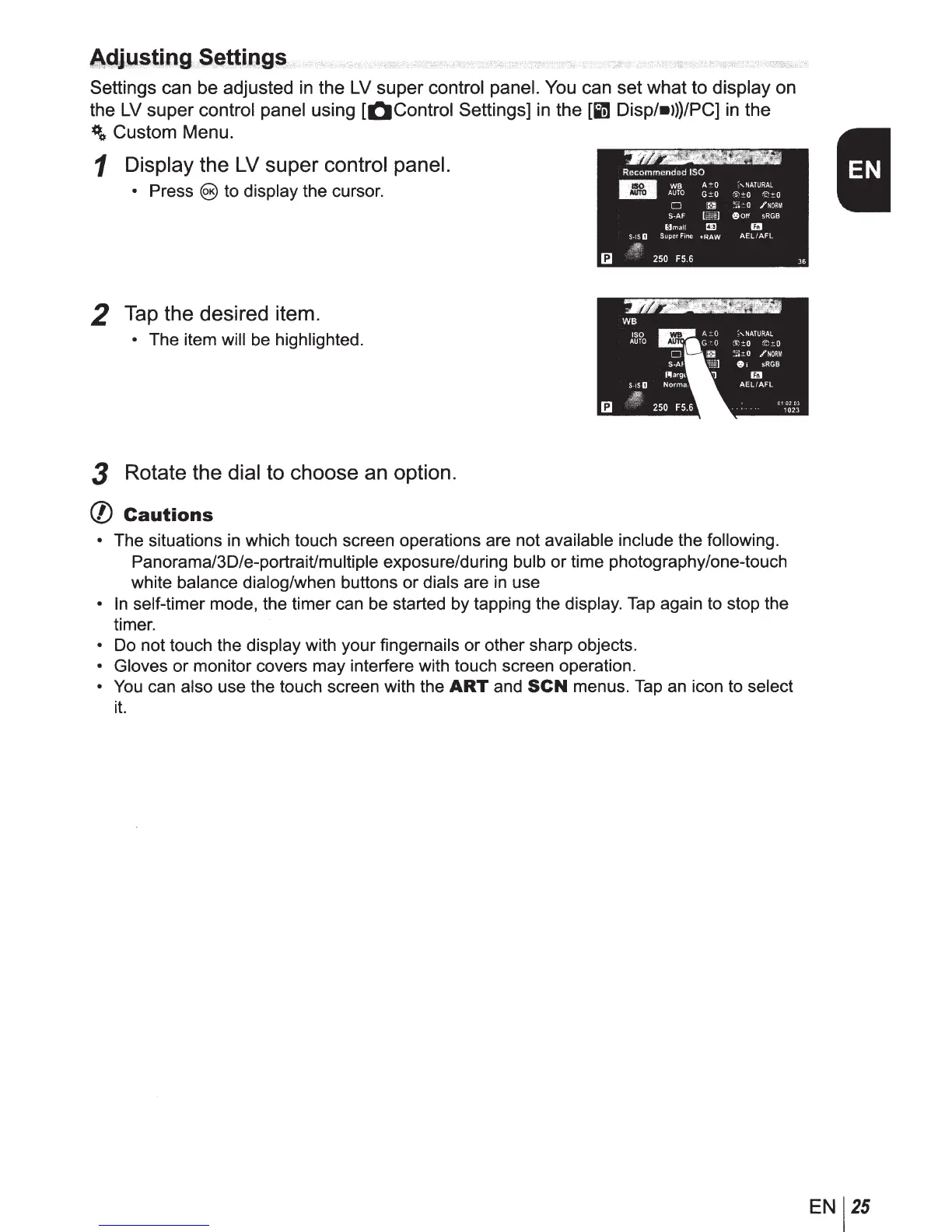
Settings can be adjusted
in
the
LV
super control panel.
You
can set what to display on
the
LV
super control panel using
[QControl
Settings]
in
the [in Disp/•>))/PC]
in
the
#o Custom Menu.
1 Display the LV
super
control panel.
• Press @)to display the cursor.
2 Tap the desired item.
• The item will be highlighted.
3 Rotate the dial to choose an option.
(/)
Cautions
• The situations
in
which touch screen operations are not available include the following.
Panorama/30/e-portrait/multiple exposure/during bulb
or
time photography/one-touch
white balance dialog/when buttons or dials are
in
use
•
In
self-timer mode, the timer can be started by tapping the display. Tap again to stop the
timer.
• Do not touch the display with your fingernails or other sharp objects.
• Gloves or monitor covers may interfere with touch screen operation.
•
You
can also use the touch screen with the
ART
and
SCN
menus.
Tap
an icon to select
it.
EN
25



 To Next Page