The
menus
contain shooting and
playback
options
that
are
not
displayed
by
the
live
control, and let you
customize
the
camera
settings
for
easier
use.
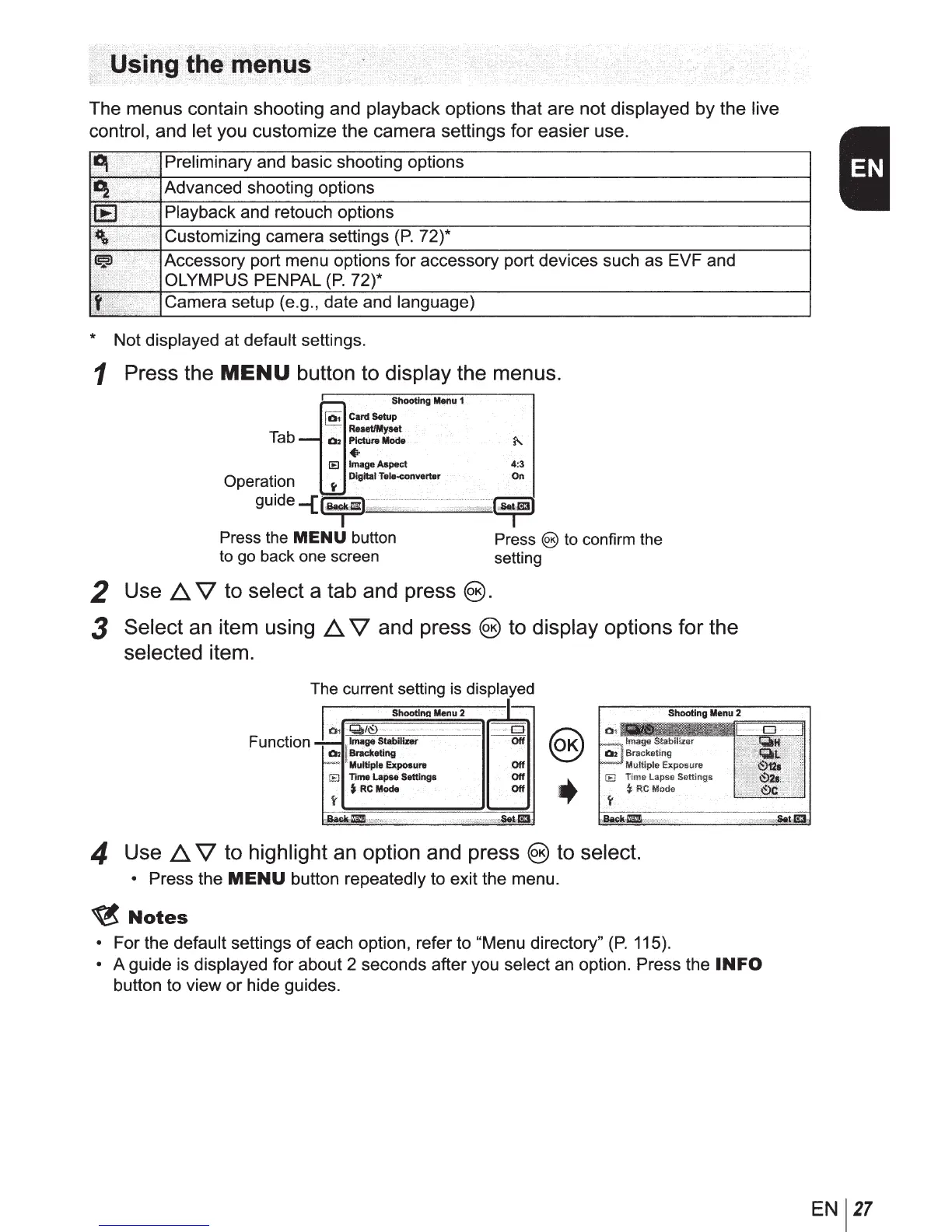
Preliminary and basic shooting options
1
,....
2
>•·····•·····>>
1
Advanced shooting options
Playback and retouch options
Customizing camera settings
(P.
72)*
Accessory port menu options for accessory port devices such as EVF and
OLYMPUS PENPAL
P.
72 *
Camera setup (e.g., date and language)
* Not displayed at default settings.
1 Press the
MENU
button to display the menus.
]
Card
Setu:hooting
Menu
1
Reset/My&et
Tab Picture
Mode
Operation
~=
guide
-{iia)
.....
; .....
mm
••
4:3
On
·;~
Press the
MENU
button
to go back one screen
Press
@)
to confirm the
setting
2 Use
~
V to select a tab and press
@).
3 Select an item using
~
V and press
@)
to display options
for
the
selected item.
The current setting is displayed
I
Function
_l~l-7r=n:--"'~=~.-=-f==~:.~•na_M_en_u_
2
-n~
1
EJ====;,
'-~
Multiple
Exposure
Off
s
Time
Lapse
Settings
Off
~.
RC
Mode
Off
@)
+
arackating
Multiple Exposure
IE
Time
lapse
Settings
~
RCMode
4 Use
~
V to highlight an option and press
@)
to select.
• Press the
MENU
button repeatedly to exit the menu.
~Notes
• For the default settings of each option, refer to "Menu directory"
(P.
115).
• A guide is displayed for about 2 seconds after you select
an
option. Press the
INFO
button to view or hide guides.
EN
27



 To Next Page