58
EN
Shooting
2
Using a fl ash (fl ash photography)
The fl ash can be set manually as required. The fl ash can be used for fl ash
photography in a variety of shooting conditions.
1
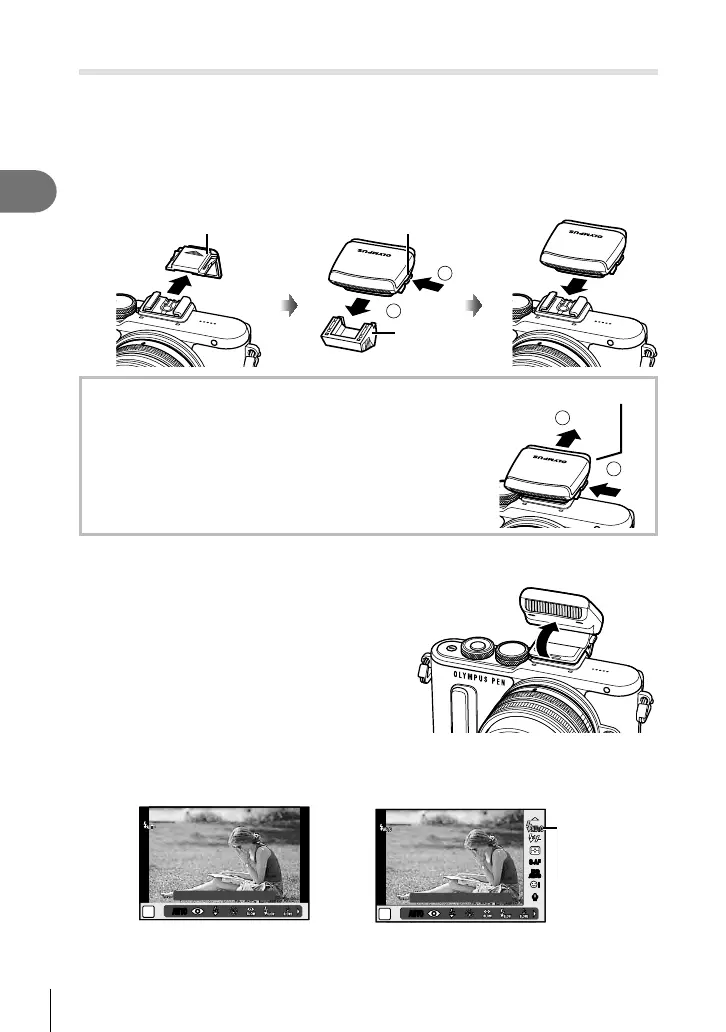
Remove the connector cover from the fl ash unit and attach the fl ash to
the camera.
• Slide the fl ash unit all the way in, stopping when it contacts the back of the shoe and
is securely in place.
2
1
UNLOCK switchHot shoe cover
Connector cover
Removing the fl ash unit
Press the UNLOCK switch while removing the fl ash unit.
2
1
UNLOCK switch
2
Raise the fl ash head.
• Lower the fl ash head when the fl ash is not in use.
3
Press the # button (I) to display the fl ash mode control.
• You can also set by pressing the z button to display the live control, and selecting
fl ash mode item using FG.
AUTOAUTO
P
AUTOAUTO
Flash Auto
WB
AUTO
WBWBWB
AUTOAUTOAUTO
AUTOAUTO
P
Flash Auto
AUTOAUTO
ISO
AUTO
ISOISOISO
AUTOAUTOAUTO
RR
S-AFS-AF
ii
Flash mode


 To Next Page