3.6 Inspection of ancillary equipment
33
TB-0545PC/IC/FC, TB-0535PC/IC/FC, TB-0520IC, TB-0510IC
INSTRUCTION MANUAL
Ch.3
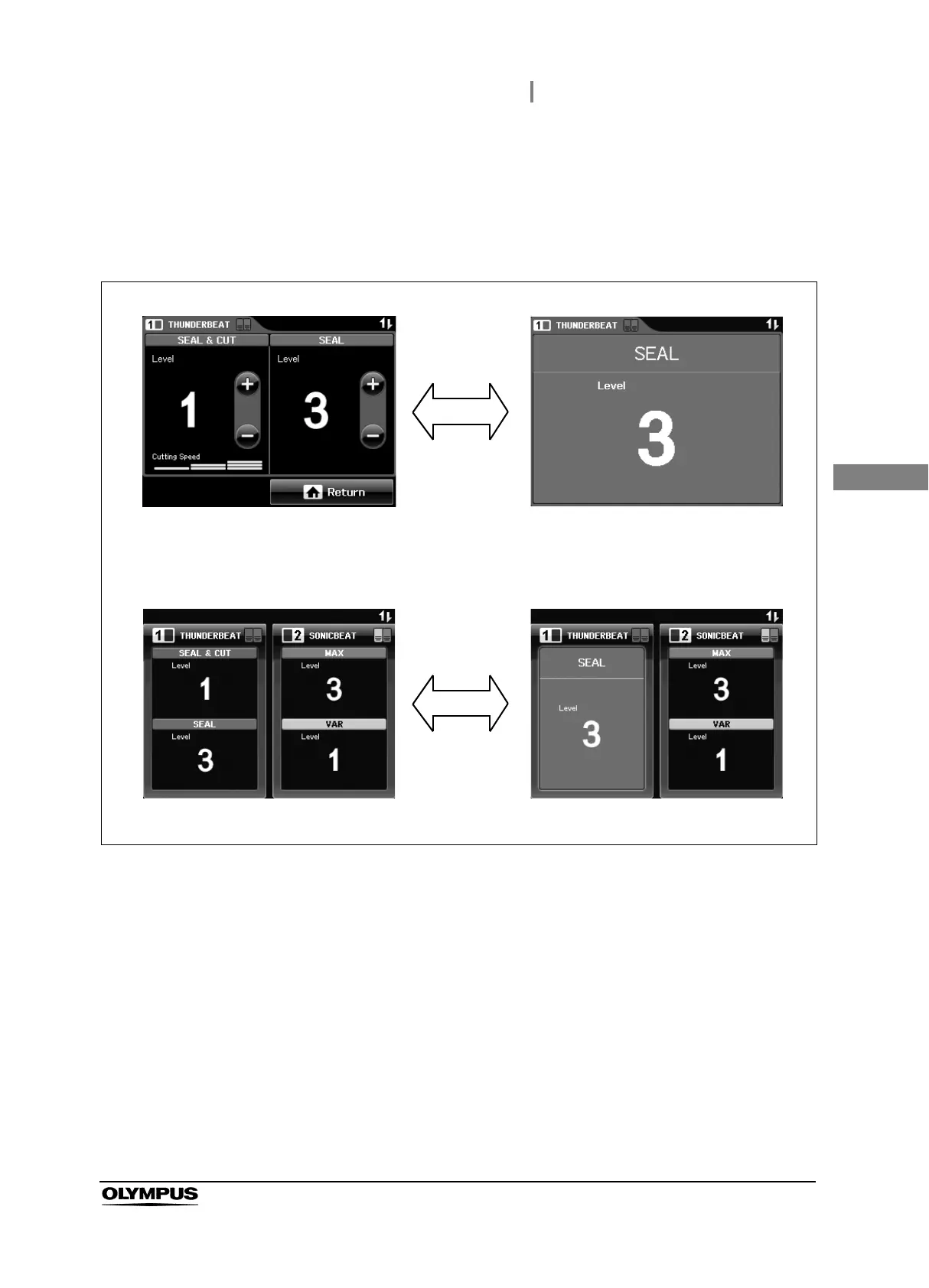
4 Confirm the following items during the SEAL mode output:
• During activating, the activation in “All screen” or “Set screen” is displayed on the
touch-screen of the ultrasonic generator, no error window (see Figure 3.12).
• The output tone sounds from the compatible electrosurgical generator.
Figure 3.12
5 After the confirmation, take the probe tip and the grasping section out of the saline
and release the SEAL button of the handswitch or the SEAL pedal of the footswitch.
6 Wipe any remaining saline on the probe tip with dry, sterile gauze.
Output inspection when only the THUNDERBEAT is connected
Output inspection when both the THUNDERBEAT and the SONICBEAT are connected
Set screen Activation in Set screen
with SEAL mode
All screen Activation in All screen
with SEAL mode







 To Next Page