4.2 Operation
45
TB-0545PC/IC/FC, TB-0535PC/IC/FC, TB-0520IC, TB-0510IC
INSTRUCTION MANUAL
Ch.4
Setting the output level
Coagulating and cutting tissues and vessels
When SEAL mode is selected and the device detects a change in the state of
tissue and/or the vessel during activation, a short tone different from the output
tone sounds and the output automatically stops.
1 Confirm that the output level displayed on the touchscreen is appropriate for the
procedure.
2 Press the plus or minus button to change the output level, if desired.
Set the appropriate output level by referring to “ Output mode” on page 29.
3 When both the THUNDERBEAT and SONICBEAT are connected to the ultrasonic
generator, press the “THUNDERBEAT” or “SONICBEAT” button on the touch-screen
of the ultrasonic generator as described in the generator’s instruction manual to
display the set screen for each output mode, and then set the output level as desired
for the procedure.
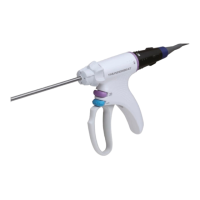
1 For a laparoscopic surgery, close the grasping section and carefully insert the
THUNDERBEAT into the trocar.
2 When exfoliating tissue, use the tip of grasping section.
3 Grasp the tissue or vessel to be coagulated/cut or sealed by manipulating the control
handle. Squeeze the control handle until the control handle strikes the grip handle to
stop, and confirm that the grasping section and probe tip are not in contact with
surrounding tissues.







 To Next Page