SECTION 7 LEARNING TO RIDE YOUR OMEO EVOLUTION
55
|
OMEO EVOLUTION USER MANUAL
Activate Seat Control (ASC)
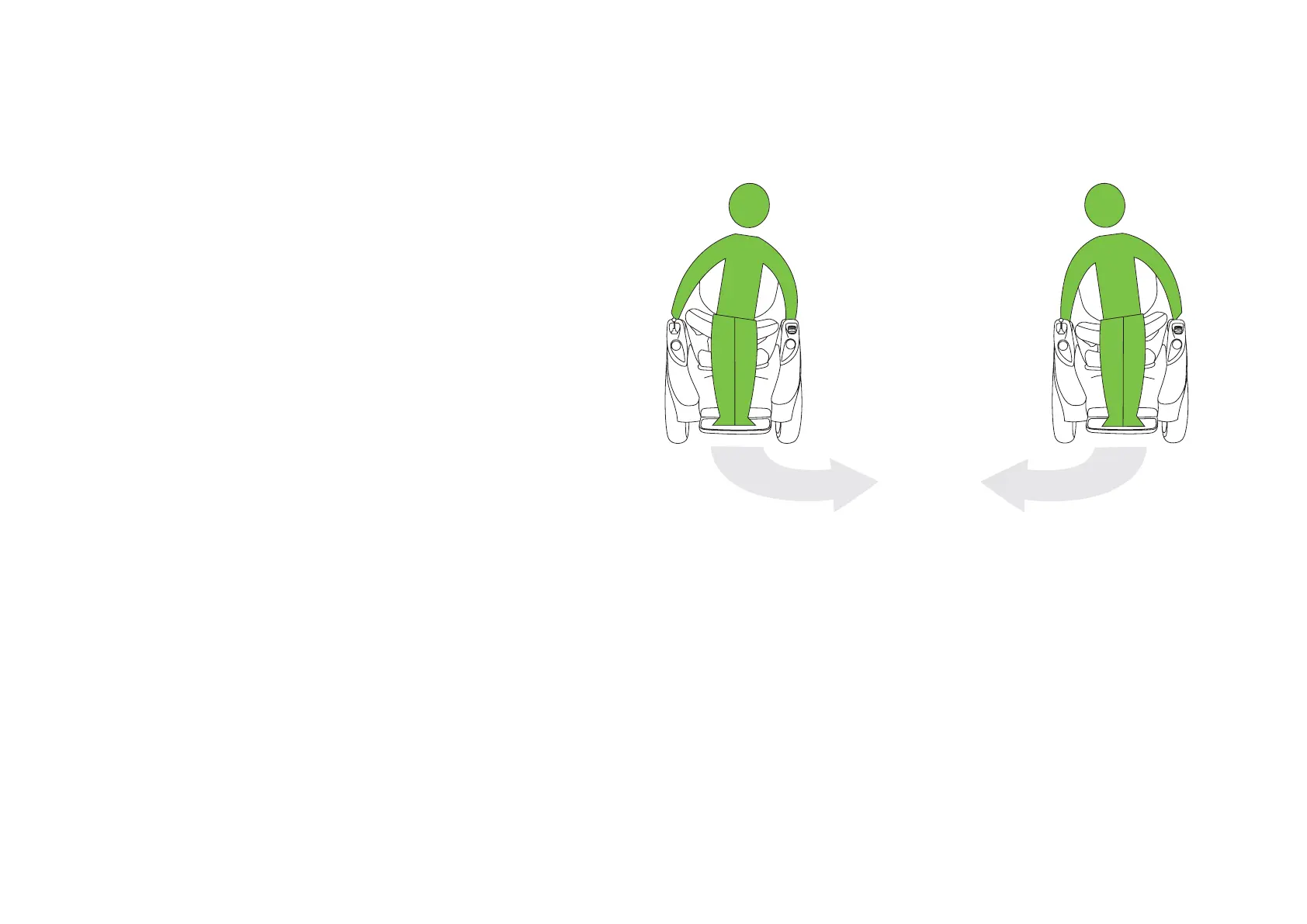
ASC allows you to steer by applying downward
pressure from either side of your hips. This can be
done hands-free or by leveraging your torso using
your arms through the Hand Grips.
To activate ASC, you first need to be in Balance
Mode, then turn the Steering Selection Lever to
a horizontal position (covering the Main Control
Switch).
Using ASC to steer:
1. Your Spotter must be on standby, in the ‘Ready
to Help’ position in case of need
2. You need to remain stationary, in Neutral
Balance.
3. Hold onto the Hand Grips throughout
4. Switch the Steering Selection Lever to
a horizontal position. (Refer to Steering
Selection Lever, Pg. 31). Your Omeo will now
be in ASC Mode and the Seat is a live platform
and able to move in all directions
5. With both hands on the Hand Grips, lean
gently from side to side to create rotational
movement on the spot
6. Now ride forward and turn a quarter of a circle
and stop. Repeat this until you have completed
a circle
Learning to Ride (cont.)
Figure 28: Directional riding using the ASC Steering.


 To Next Page