OMEO EVOLUTION USER MANUAL
SECTION 11 CUSTOMISATIONS
88
|
Seat Location
Seat Pan Forward and Back
The Seat Pan on your Omeo is adjustable forward
and back in 20mm (0.78in) increments. Adjustment
may be necessary to help you find the centre of
balance. You will know when the Seat is centred
as it should require the same amount of eort to
lean forward and return to centre as it does to lean
back and return to centre.
To adjust the Seat forward and back:
1. Sit as far back in the Seat as possible in an
upright position (making contact with the
Seat Back)
2. Have an assistant or Spotter hold onto the
top of the Seat Back, ready to take control if
required
3. Push the Main Control Switch to go to Balance
Mode and test. Your goal is to be stationary
in Balance Mode to identify your centre of
balance in a front to rear axis
4. If you have to lean forward to maintain a
stationary position, then the Seat Pan will need
to be adjusted forward
5. If you have to lean back to maintain a
stationary position, then the Seat Pan will need
to be adjusted backward
6. Do one adjustment at a time
7. Repeat the process until you are in a
comfortable upright position whilst remaining
stationary.
How to adjust the Seat Pan:
1. Remove the Seat Cushion by releasing the
Velcro on the underside and rear then slide
forward
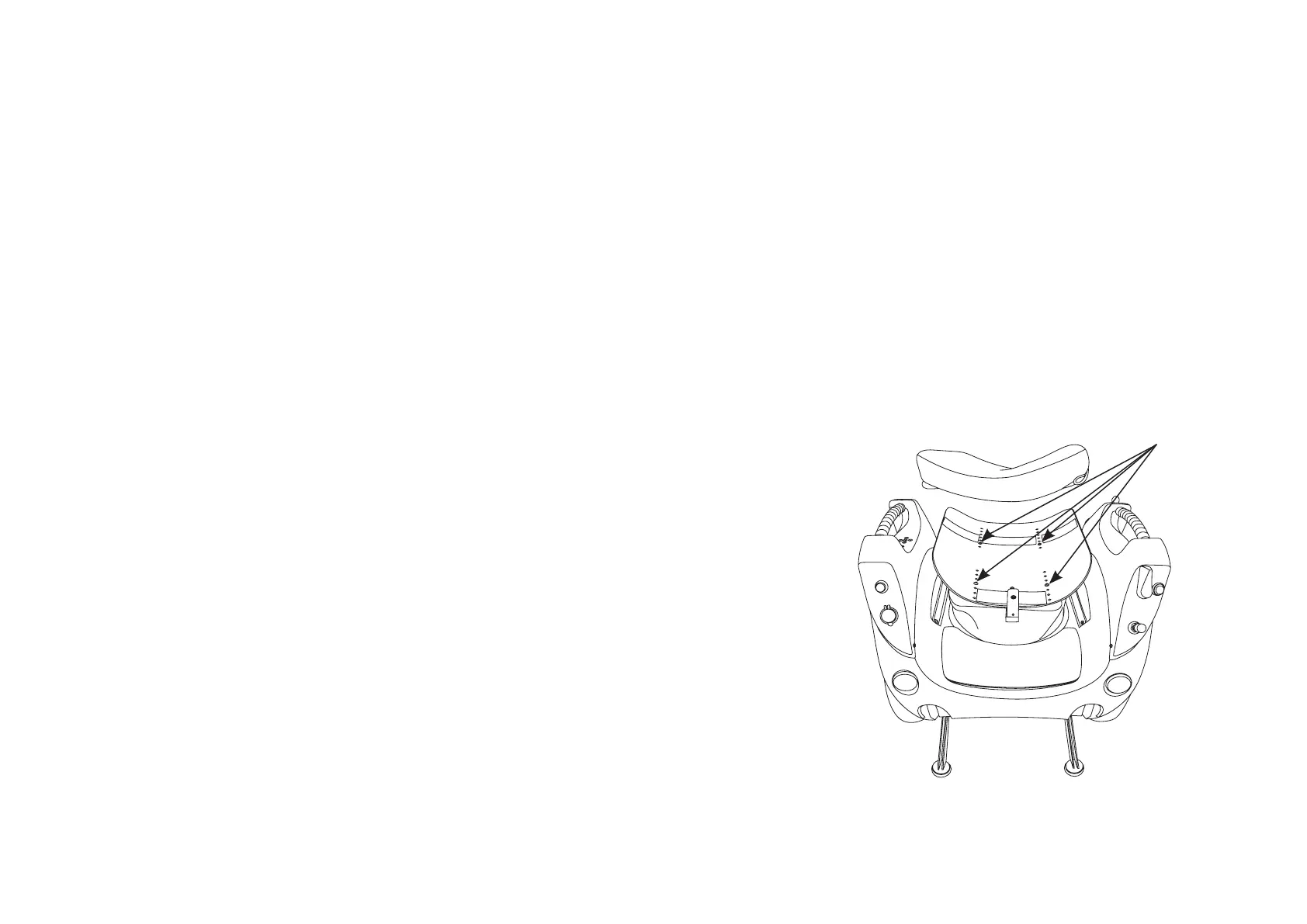
2. Remove the 4 screws from the top of the Seat
Pan as shown in Figure 43
3. Move the Seat Pan forward or back as
required. Align the 4 holes, insert the screws
then tighten (hand tight) before reattaching
the Seat Cushion.
NOTICE
Make sure that the number of holes between
the forward and rear screws remains the
same throughout the adjustment to keep the
Seat height and dump (angle or rake of seat)
constant.
Figure 43: Adjusting the Seat Pan.
Seat Pan screws
1
2
3
4


 To Next Page