OMEO EVOLUTION USER MANUAL
SECTION 11 CUSTOMISATIONS
90
|
Seat Location (cont.)
How to raise and lower the Seat height:
1. Remove the Seat Cushion
2. Undo and remove the four mounting screws
from the top of the Seat Pan (Figure 43:
Adjusting the Seat Pan, Pg. 88)
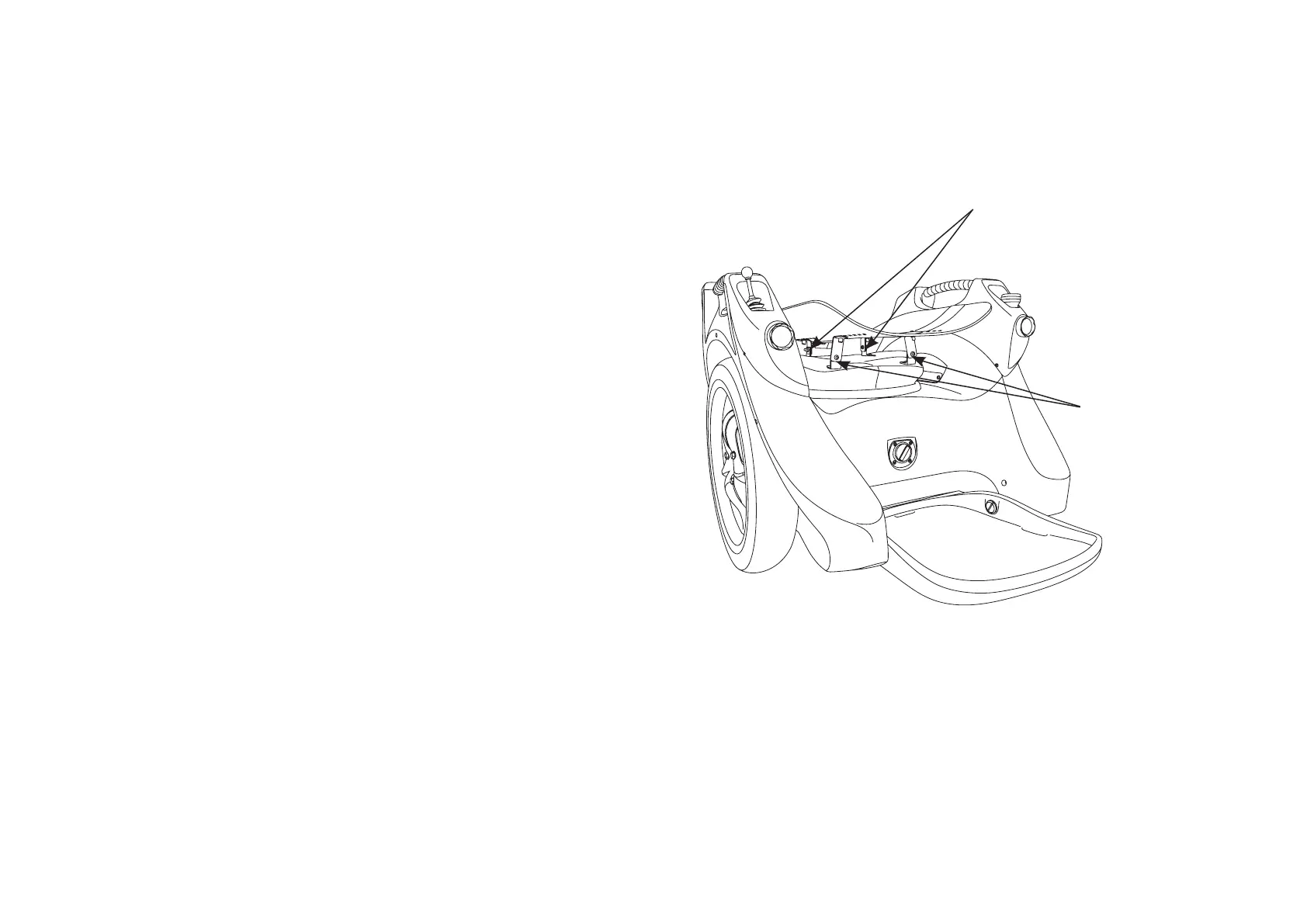
3. Using the 5mm Allen key and 10mm
Spanner provided, loosen the 4 screws on
the Mounting Arms (as located in Figure 44).
This will allow you to move the Mounting
Arms (brackets) up or down to suit.
How to adjust the Seat Dump (sometimes
referred to Angle or Rake):
To adjust the dump (the rear of the seat lowered or
front raised):
1. Follow the same procedure as above however
you are only adjusting the front or the rear
Mounting Arms
2. For a finer adjustment for dump, washers
can be added between the Seat Pan and the
Mounting Arm.
Figure 44: The Omeo Seat showing the Mounting Arms.
Front
Mounting Arms
Rear
Mounting Arms


 To Next Page