Troubleshooting
46
Troubles hooting
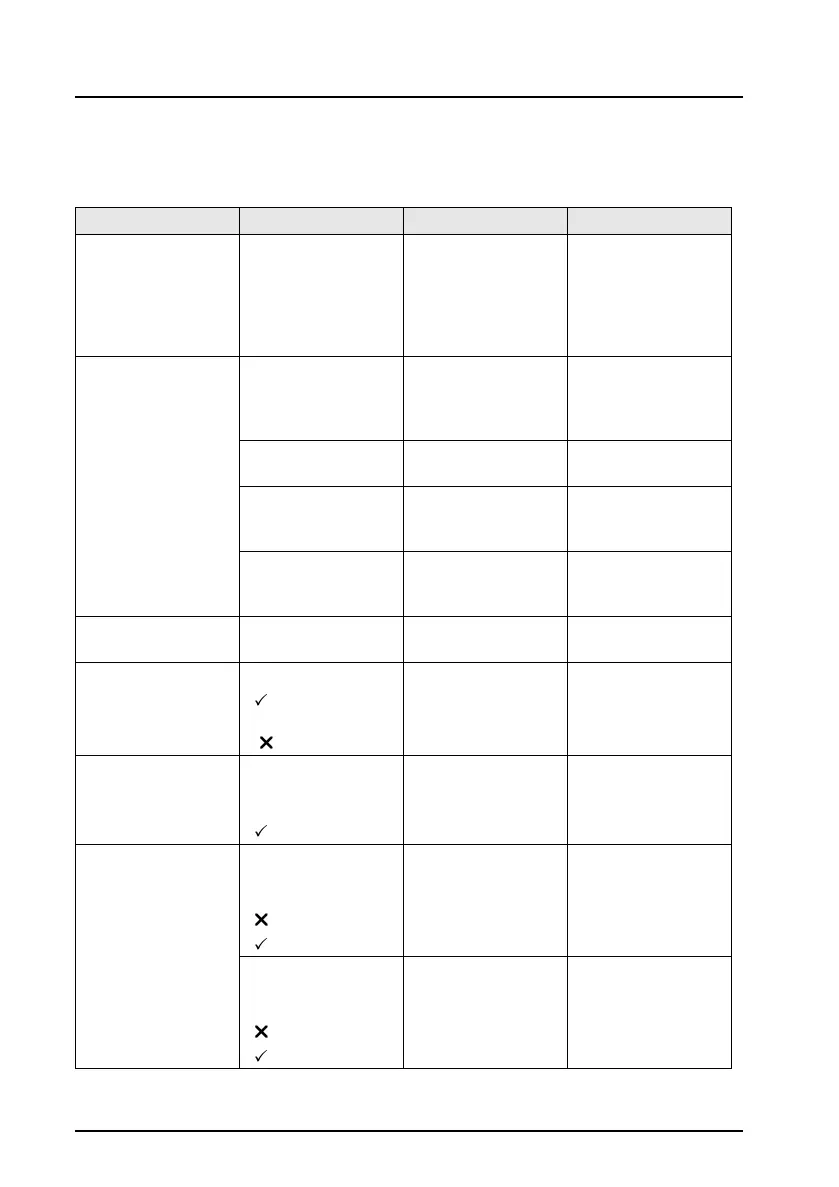
OmiSmoke Error and Warning Messages
Symptom/ Fault Message Cause Action
Blank handset
screen
N/A Battery voltage
too low or power
not received by
handset
Battery may
require charging.
Attach external
power supply/
charger. Check
fuse and cable.
Self test fail WARNING Battery
Low. Connect
power supply to
avoid shutdown.
Batter level below
10.5V
Attach external
power supply/
charger.
Error 1010 Limits
not set
Limits are not set
up EEPROM
Contact Omitec
Helpdesk
Error 1000
Incorrect Filter
Values
Filter values in
EEPROM are
invalid
Contact Omitec
Helpdesk
Error 1002 Fan
Control Returned
Error State
Fan control fault Contact Omitec
Helpdesk
Linearity check fail Use Correct Filter
or Check Filter
Failed LIN check Contact Omitec
Helpdesk
Oil probe failure Remove Oil Probe
-Bypass Oil
Tem p
- Cancel Test
Oil probe failure
during oil
temperature
measurement
Check oil probe
cabling
EEPROM failure Unable to
read/write to the
EEPROM. Press
to continue.
Unable to acces
the EEPROM
Contact Omitec
Helpdesk
Smoke comms.
error
No response
Received. Check
the cable.
- Reset
- Retry
No response
came back from
the smoke head
Check the
handset cable
Smoke Head
reported illegal
data value.
- Reset
- Retry
Smoke head
received illegal
data value
Contact Omitec
Helpdesk


 To Next Page