Omnitronix DL50 User’s Manual
Page 8
2.2 - Parts Identification
Standard Equipment
The base DL50 comes with the following standard onboard equipment:
• 2 DB9 male RS-232 serial ports
• 12VAC power
• Internal battery backup
In addition to the above components, the standard unit is shipped the following accessories:
• This product manual
• 1 Female DB9 to Female DB9 null modem serial cable
• Power supply (not included for –48VDC equipped units)
Each of the following components is optional and may be installed on a DL50:
• Ethernet adapter
• 33.6Kbps modem or external modem adapter
• -48VDC power receptacle, no power supply
• 5VDC power receptacle and power supply
The DL50 may come with any of the following accessories as well, depending on the
configuration or order:
• Additional Female DB9 to Female DB9 null modem serial cable
• Female DB9 to male DB25 serial cables
• 19 inch 1U rack mount adaptor flanges
• Omnitronix Alarm Manager software
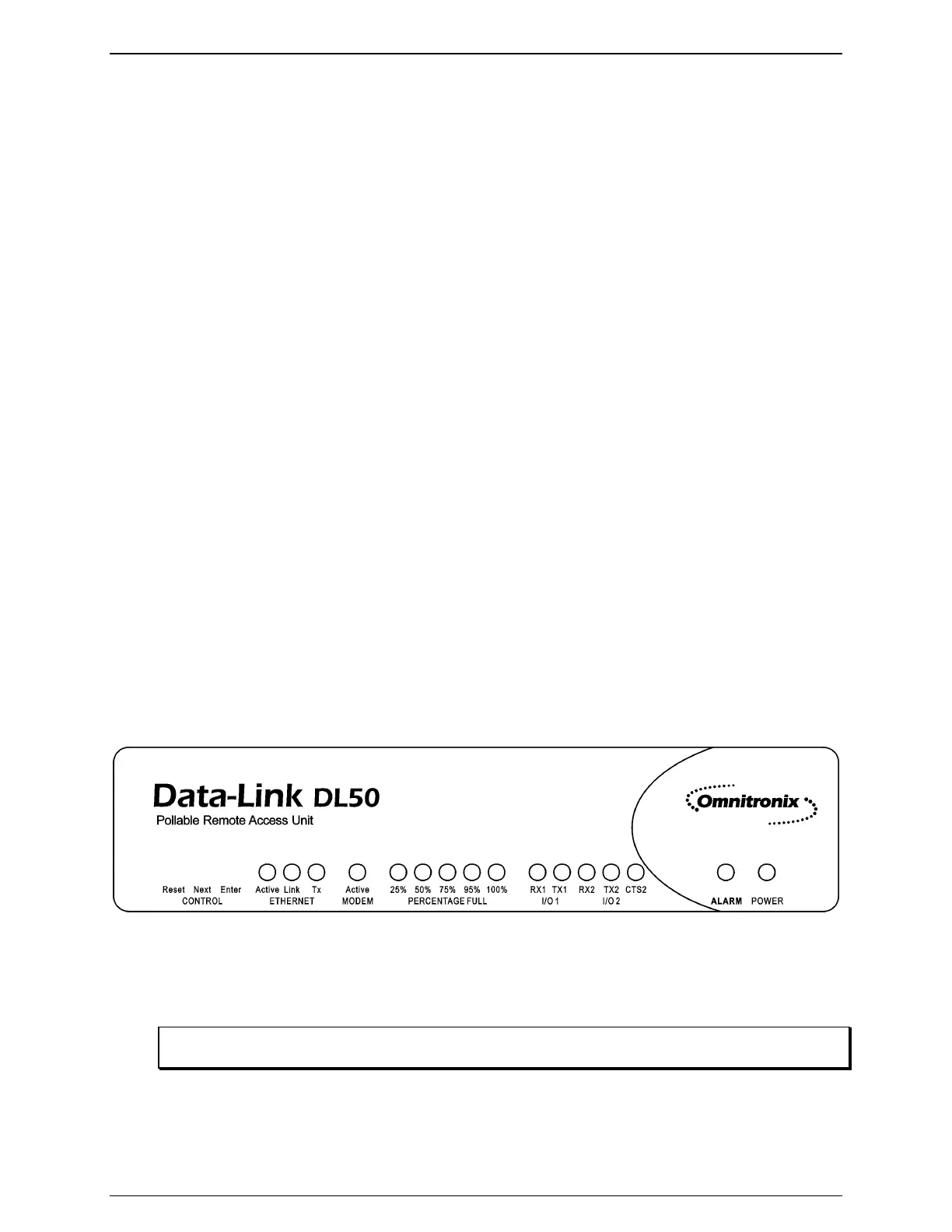
2.3 - Front Panel
Figure 3: DL50 Front Panel
The front panel of the DL50 carries 3 push buttons and 22 LED indicators. This section will
explain the function of each of these indicators.
Note: The Next and Enter buttons on the front panel have no current functionality and are reserved for
future use.



 To Next Page