F3SG-SR/PG
33
Receiver (F3SG-SR)
*1. Refer to Troubleshooting on page 64 for more information on blinking patterns.
*2. Configurable by SD Manager 3.
*3. This is the case for the Standard Muting mode. For other muting modes, refer to User's Manual.
*4. The Area Beam Indicator closer to the "TOP" mark on the F3SG-SR blinks.
*5. The Area Beam Indicator closer to the "BTM" mark on the F3SG-SR blinks.
*6. DIP switches is on the Intelligent Tap.
Note: In the SETTING state to make settings with the SD Manager 3, the TEST, LONG and CODE indicators on the emitter and the CFG, PNP
and CODE indicators on the receiver blink. (TEST: Yellow, LONG/CODE: Green, CFG/PNP/CODE: Green)
For more information on the statuses of the LED indicators in the SETTING state, refer to User's Manual.
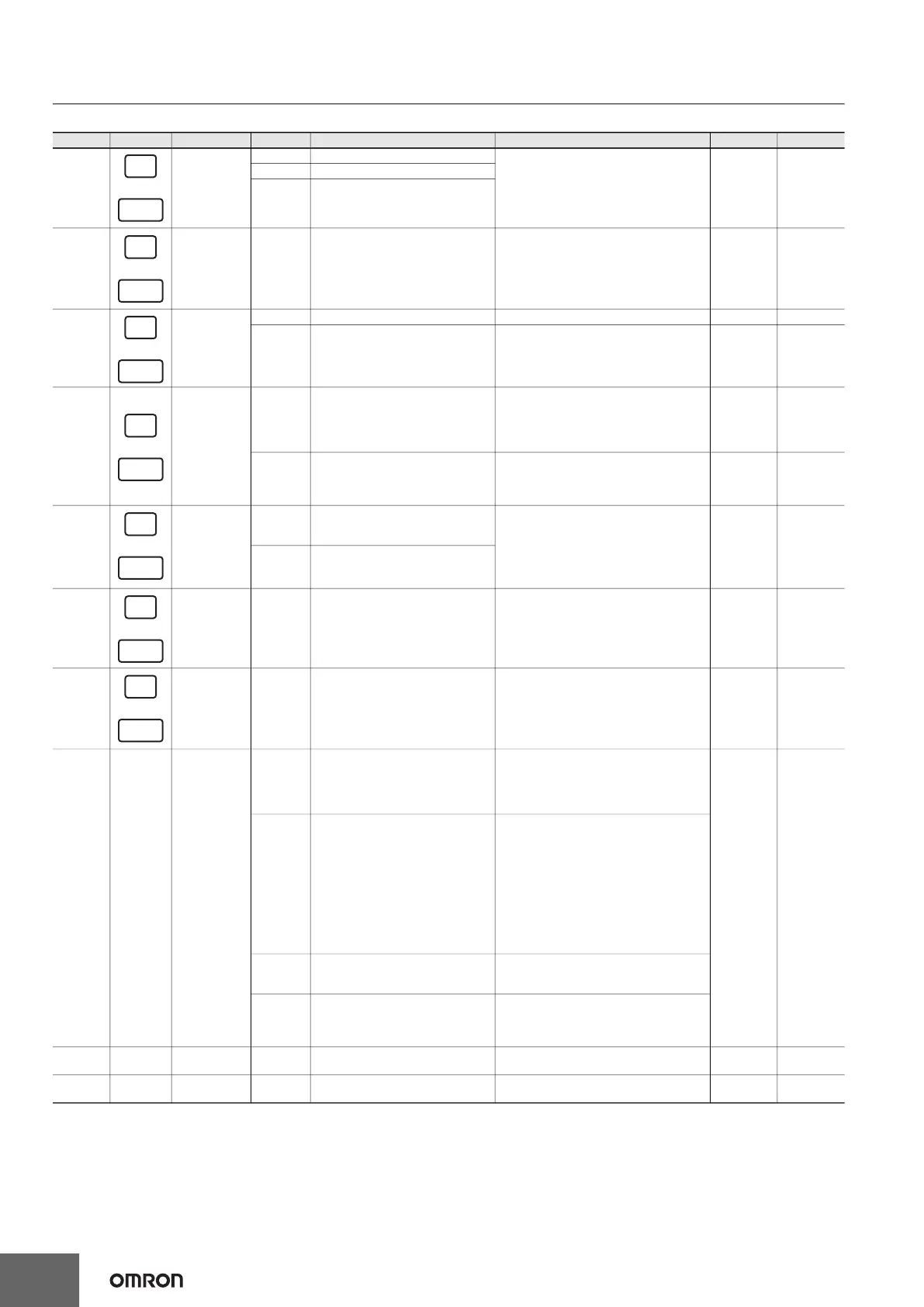
Location
Indicator
Name Color Illuminated Blinking
F3SG-SRA F3SG-SRB
1 Scan code
Green Code A is selected
--- X X
Orange Code B is selected
OFF
Automatic interference prevention by
wired synchronization being
performed
2 Lockout Red
LOCKOUT state. The indicator is
illuminated in the receiver of another
sensor segment than that having a
lockout error (when in cascade
connection or between the emitter and
receiver in the Wired Synchronization)
LOCKOUT state. The indicator is
illuminated in the receiver of a sensor
segment having a lockout error
X X
3 ON/OFF
Green Safety outputs are in ON state --- X X
Red Safety outputs are in OFF state
LOCKOUT state due to Safety output error,
or error due to abnormal power supply or
noise
X X
4 Maintenance
Red
LOCKOUT state due to a
recoverable error (When in cascade
connection, the indicator of only the
sensor segment having the error is
illuminated)
LOCKOUT state due to a replacement-
recommended error (When in cascade
connection, the indicator of only the sensor
segment having the error blinks)
X X
Orange
Safety outputs are instantaneously
turned OFF due to ambient light,
vibration or noise. Or sequence error
in Muting, Pre-Reset or PSDI
Intelligent Tap is in the LOCKOUT state X X
5
PNP/NPN
mode
Green PNP is configured
Polarity of PNP is changed to NPN, or vice
versa, during operation, and internal circuit
is defective
X X
OFF NPN is configured
6 Configuration Green
Fixed or Floating Blanking, Reduced
Resolution, Warning Zone or Slow
mode of Response Time Adjustment
is enabled. Or after the Muting zone
is determined by the Dynamic Muting
function.
TEACH-IN mode, zone measurement
being performed by Dynamic Muting, or
LOCKOUT state due to Blanking
monitoring error, Configuration error or
Parameter error
X X
7 Sequence Yellow INTERLOCK state
Sequence or sequence error in Muting,
Pre-Reset or PSDI (*1) or Teach-in error
X X
8 ---
Area Beam
Indicator (ABI)
Green
The target beams of the ABI are
unblocked and the safety outputs are
turned ON
MUTING or OVERRIDE state. In the
MUTING state, only the ABI indicators in
the muting zone are blinking. Or the target
beams of the ABI are blocked
instantaneously
X ---
Orange
Incident light level of the target
beams of the ABI is 170% (factory
default setting (*2)) or less of ON-
threshold (for 5 to 10 s)
Incident light level of the target beams of
the ABI is 170% (factory default setting
(*2)) or less of ON threshold 5 to 10 s after
illuminated when incident light level of the
target beams of the ABI is 170% (factory
default setting (*2)) or less of ON threshold.
Or one muting input becomes the ON state
and the MUTING state has not been started
yet, or one muting input becomes the OFF
state and the other is not in the OFF state
yet. (*3)
Red
The target beams of the ABI are
blocked
LOCKOUT state due to Cap error or Other
sensor error (*4), or LOCKOUT state due to
DIP Switch setting error (*5*6)
OFF
The target beams of the ABI are
unblocked (The ABI then will be
illuminated in green when the safety
outputs are turned ON.)
---
9 TOP
Top-beam-
state
Blue The top beam is unblocked
MUTING/OVERRIDE state, or LOCKOUT
state due to Cap error or Other sensor error
--- X
10 BTM
Bottom-beam-
state
Blue The bottom beam is unblocked
MUTING/OVERRIDE state, or LOCKOUT
state due to DIP Switch setting error (*6)
--- X



 To Next Page