EasyManua.ls Logo

Omron Gentle Temp 720 - User Manual

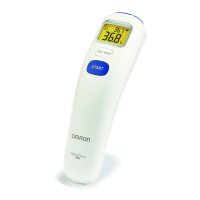
Omron Gentle Temp 720
24 pages
Print Icon
To Next Page IconTo Next Page
Loading...
English
Français
Deutsch
Italiano
Español
Nederlands

Türkçe
IM-MC-720-E-02-07/2014
0186342-2B
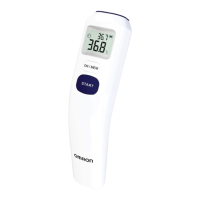
Infrared
Forehead Thermometer
Model Gentle Temp 720
Instruction Manual

Other manuals for Omron Gentle Temp 720

Question and Answer IconNeed help?

Do you have a question about the Omron Gentle Temp 720 and is the answer not in the manual?

Summary

Safety and Precautions

Safety Warnings and Hazards

Critical safety warnings regarding hazardous situations, child safety, battery handling, and temperature limits.

General Handling and Care Precautions

General precautions for handling the unit, avoiding damage, cleaning, and acclimatizing to room temperature.

OMRON Gentle Temp 720 Overview

Main Unit Component Identification

Identifies and labels the key physical components of the thermometer's main unit.

Understanding Display Indicators

Explains the various icons and readings displayed on the thermometer screen.

Device Preparation and Setup

Initial Setup: Removing Insulating Tape

Instructions on how to remove the insulating tape from the battery compartment before first use.

Temperature Unit Selection (°C;°F)

Guide on how to change the temperature display between Celsius (°C) and Fahrenheit (°F).

Setting the Audible Buzzer

Steps to activate or deactivate the audible buzzer for measurements.

Operating the OMRON Thermometer

Performing a Forehead Temperature Reading

Detailed instructions for performing a temperature measurement using the forehead mode.

Surface Temperature Measurement Mode

Guide on how to use the unit for measuring surface temperatures of objects.

Accessing Memory Function

Instructions on how to access and view previously stored measurement results.

Troubleshooting and Maintenance Guide

Interpreting Icons and Error Messages

Explains common icons and error codes displayed by the thermometer and their causes/remedies.

Common Questions and Answers

Provides answers to common questions regarding high or low temperature readings and measurement variances.

Routine Unit Maintenance

Guidance on cleaning the probe lens and proper storage to maintain the unit.

Battery Replacement Procedure

Step-by-step instructions for safely replacing the unit's battery.

OMRON Gentle Temp 720 Technical Data

Understanding Temperature Measurement

How the Infrared Thermometer Works

Explains the infrared measurement principle and algorithm for calculating oral-equivalent values.

Factors Affecting Body Temperature

Discusses body temperature, core temperature, and factors influencing forehead measurements.

Establishing Your Normal Temperature

Advice on establishing a personal baseline temperature for accurate fever detection.

Summary

Safety and Precautions

Safety Warnings and Hazards

Critical safety warnings regarding hazardous situations, child safety, battery handling, and temperature limits.

General Handling and Care Precautions

General precautions for handling the unit, avoiding damage, cleaning, and acclimatizing to room temperature.

OMRON Gentle Temp 720 Overview

Main Unit Component Identification

Identifies and labels the key physical components of the thermometer's main unit.

Understanding Display Indicators

Explains the various icons and readings displayed on the thermometer screen.

Device Preparation and Setup

Initial Setup: Removing Insulating Tape

Instructions on how to remove the insulating tape from the battery compartment before first use.

Temperature Unit Selection (°C;°F)

Guide on how to change the temperature display between Celsius (°C) and Fahrenheit (°F).

Setting the Audible Buzzer

Steps to activate or deactivate the audible buzzer for measurements.

Operating the OMRON Thermometer

Performing a Forehead Temperature Reading

Detailed instructions for performing a temperature measurement using the forehead mode.

Surface Temperature Measurement Mode

Guide on how to use the unit for measuring surface temperatures of objects.

Accessing Memory Function

Instructions on how to access and view previously stored measurement results.

Troubleshooting and Maintenance Guide

Interpreting Icons and Error Messages

Explains common icons and error codes displayed by the thermometer and their causes/remedies.

Common Questions and Answers

Provides answers to common questions regarding high or low temperature readings and measurement variances.

Routine Unit Maintenance

Guidance on cleaning the probe lens and proper storage to maintain the unit.

Battery Replacement Procedure

Step-by-step instructions for safely replacing the unit's battery.

OMRON Gentle Temp 720 Technical Data

Understanding Temperature Measurement

How the Infrared Thermometer Works

Explains the infrared measurement principle and algorithm for calculating oral-equivalent values.

Factors Affecting Body Temperature

Discusses body temperature, core temperature, and factors influencing forehead measurements.

Establishing Your Normal Temperature

Advice on establishing a personal baseline temperature for accurate fever detection.

Omron Gentle Temp 720 Specifications

General IconGeneral
TypeRemote sensing
Product colorWhite
Memory capacity25 entries
Memory functionYes
Measurement modesBody temperature, Surface temperature
Thermometer location-
Battery typeCR2032/DL2032
Number of batteries supported1
Package weight363 g
Weight and Dimensions IconWeight and Dimensions
Depth200 mm
Width120 mm
Height70 mm

Related product manuals