EasyManua.ls Logo

Omron Gentle Temp 520 - User Manual

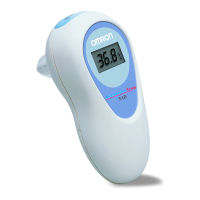
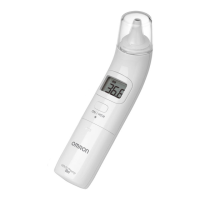
Omron Gentle Temp 520
216 pages
Print Icon
To Next Page IconTo Next Page
Loading...
1
EN
Important Safety Information
To assure the correct use of the product basic safety measures should always be followed including the precautions listed
below.
Warning:
Indicates a potentially hazardous situation which, if not avoided, could result in death or serious injury.
Conducting self-diagnosis based on the measurement results and/or treatment can be dangerous. Please follow the
instructions of your doctor. Self-diagnosis may worsen the symptoms.
A high or prolonged fever requires medical attention, especially for small children. Please contact your doctor.
Please keep still during measurement.
Do not forcibly insert the probe in the ear.
If you feel discomfort such as a pain during the measurement, stop using the unit immediately. It may injure the external
auditory canal.
Do not use this unit if suffering from ear disease such as otitis externa or otitis media. It may worsen the condition.
Do not use this unit when the external auditory canal is wet such as after swimming or taking a bath. It may injure the
external auditory canal.
Do not use this unit without attaching a probe cover.
Please ensure that the ear canal is clean and free of earwax.
If the probe cover becomes dirty with earwax or other substances, replace it with a new one.
Do not use a probe cover after someone else has used it. This can lead to cross infections such as otitis externa.
Correct measurement result may not be obtained if dirty probe covers are used.
Proper installation of the probe cover ensures accurate measurements.
When the infrared sensor becomes dirty, wipe it lightly with a soft dry cloth or a cotton swab. Do not wipe the infrared
sensor with tissue paper or a paper towel.
Do not use more than one probe cover at a time.
If there is any temperature difference between the places where the unit is stored and where you are going to measure,
leave the unit in the room where you are going to use it for more than 30 minutes to allow it to reach room temperature first,
then measure.
If the ear is cold, wait until the ear is warmed up before taking a temperature measurement. The measured result may indicate
low when you use an ice bag or an ice pack or immediately after coming in from the outside in winter.
Do not touch the infrared sensor with a finger or breathe on it.
18G1777
MC-520-E_A_M_main.book Page 1 Tuesday, July 17, 2018 11:59 AM

Table of Contents

Question and Answer IconNeed help?

Do you have a question about the Omron Gentle Temp 520 and is the answer not in the manual?

Omron Gentle Temp 520 Specifications

General IconGeneral
TypeContact
DisplayLCD
Product colorWhite
Memory capacity9 entries
Memory functionYes
Thermometer locationEar
Units of measurement°C, °F
Quantity per pack1 pc(s)

Summary

Important Safety Information

Warning

Indicates hazardous situations potentially resulting in death or serious injury.

General Safety Measures

Basic safety measures and precautions to follow for correct product use.

General Precautions

General guidelines for device usage, maintenance, and user safety.

Overview

Main Unit Components

Identifies the main components of the thermometer unit.

Display Indicators

Details the various icons and indicators shown on the device's display.

Preparation

Removing Insulating Tape

Instructions on how to remove the insulating tape from the battery compartment before first use.

Switching Temperature Units

Steps to change the temperature unit display between Celsius and Fahrenheit.

Setting the Buzzer

Guide on how to enable or disable the audible buzzer function of the thermometer.

Attaching a Probe Cover

Step-by-step instructions for correctly attaching a new probe cover to the thermometer.

Using the Unit

Taking a Temperature Reading

Detailed procedure for taking an accurate ear temperature measurement with the device.

Measuring Infant Temperature

Guidance on how to measure temperature in infants, including different positions.

Initiating Measurement

Steps to start the temperature measurement process using the START button.

Reading the Measurement Result

How to remove the unit and check the displayed temperature reading.

Turning Off the Unit

How to manually turn off the thermometer after use.

Using the Memory Function

How to access and review stored temperature readings using the memory function.

Troubleshooting and Maintenance

Icons and Error Messages

Explains common error displays, their causes, and remedies for troubleshooting.

Maintenance Procedures

Guidelines for cleaning and maintaining the thermometer to ensure its longevity and accuracy.

Replacing the Battery

Step-by-step instructions for safely replacing the battery in the thermometer.

Technical Data

Some Useful Information

Ear Temperature Measurement

Explains how the ear thermometer works and its advantages over other methods.

Understanding Normal Temperatures

Advice on practicing with the device and understanding normal vs. raised body temperatures.

Temperature Comparison

Discusses variations in normal temperature based on body location.

Frequently Asked Questions

Addresses common user queries regarding measurement frequency and high readings.

Optional Accessories

Medical Accessories

Lists available optional accessories for the thermometer, such as probe covers.

Related product manuals