EasyManua.ls Logo

Omron HBF-514C - User Manual

Omron HBF-514C
44 pages
Print Icon
To Next Page IconTo Next Page
Loading...
Instruction Manual
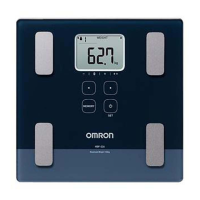
Full Body Sensor
Body Composition Monitor
and Scale
Model HBF-514

Questions and Answers

  • M
    Mary KnappAug 7, 2025
    How to fix low battery or no display on Omron Scales?
    • M
      Michael WrightAug 7, 2025
      If you see the low battery indicator, no power, or no display on your Omron Scales, first check that the batteries are installed correctly, paying attention to the polarities. If they are correctly installed, replace all four batteries.
  • M
    Maria DavisAug 13, 2025
    What to do if the weight value is abnormally low or high on Omron HBF-514C?
    • S
      Sandra SloanAug 13, 2025
      If the weight value is abnormally low or high on your Omron Scales, ensure the monitor is placed on a hard and level floor for accurate readings.
  • S
    Scott GreenAug 20, 2025
    What to do if the Body Composition value is abnormally low or high on Omron Scales?
    • N
      Nicholas BennettAug 20, 2025
      If the Body Composition value is abnormally low or high on your Omron Scales, check the settings entered for your personal data and refer to RECOMMENDED MEASUREMENT TIMES on pages 12 and 13.
  • A
    Anthony RodriguezAug 25, 2025
    What to do if Omron HBF-514C Scales measurement does not start?
    • C
      coxstephanieAug 26, 2025
      If the Omron Scales measurement does not start, it may be because the memory data is being updated. Wait one minute and then try again.
  • J
    John HorneAug 31, 2025
    Why are measurement results slow to appear on Omron HBF-514C Scales?
    • D
      david43Sep 1, 2025
      If the measurement results are slow to appear on your Omron Scales, it might be because the measurement is being taken when the date is about to change. Please wait for the results to be displayed.

Summary

Introduction to the OMRON HBF-514

Product Overview and Components

Details the OMRON HBF-514 monitor's features and included accessories.

Important Safety Warnings

Highlights critical safety precautions for using the body composition monitor.

Safety Information and Device Handling

Safety Symbols and Operating Precautions

Explains safety symbols and details essential operating precautions and restrictions.

Battery Safety and Device Care Precautions

Covers battery handling, safe disposal, and general device care safety measures.

Understanding Body Composition Principles

Full Body Sensing and Bioelectrical Impedance Method

Explains Full Body Sensing technology and the Bioelectrical Impedance Method for analysis.

Body Composition Metrics Explained

BMI, Body Fat, and Visceral Fat Interpretation

Guides on interpreting BMI, body fat percentage, and visceral fat levels.

Resting Metabolism and Body Age Concepts

Explains resting metabolism and how body age is calculated.

Skeletal Muscle and Weight Loss Planning

Details skeletal muscle importance and strategies for weight loss.

Measurement Timing and Accuracy Factors

Covers recommended measurement times and factors affecting accuracy.

Getting Started with Your Monitor

Unit Components and Display Overview

Identifies key components of the display unit, main unit, and package contents.

Display Unit and Power Switch Operation

Guide to connecting the display unit and operating the power switch.

Battery Installation and Replacement

Installing and Replacing Batteries

Step-by-step instructions for battery installation and replacement.

Battery Safety and Disposal

Provides safety advice for battery handling, leaks, and proper disposal.

Setting Up Your Monitor

Setting the Date and Time

Procedure for setting the current date and time on the monitor.

Setting Personal Data (Profile, Age, Gender, Height)

Guide to entering personal data like profile number, age, gender, and height.

Managing Personal Data Records (Change;Delete)

Instructions for changing or deleting personal data entries.

How to Take a Measurement

Correct Posture and Measurement Execution

Details correct posture, grip technique, and measurement process steps.

Selecting Personal Profile or Guest Mode

How to choose between a personal profile or guest mode for measurements.

Viewing Measurement Results and Histories

Guide to checking individual results and viewing historical data.

How to Measure Weight Only

Initiating and Completing Weight Measurement

Steps for taking a measurement of weight only.

Using the Memory Function

Automatic Storage and Viewing High;Low Readings

Explains automatic storage and how to view high/low readings.

Comparing and Accessing Specific Measurement Histories

Guide to comparing results and accessing specific metric histories.

Error Indicators and Troubleshooting

Common Error Codes and Their Corrections

Lists error codes, their causes, and step-by-step correction procedures.

General Troubleshooting Tips and Solutions

Provides solutions for common issues like power, display, or measurement problems.

Care and Maintenance

Cleaning, Storage, and Handling Precautions

Guidelines for cleaning, safe storage, and important handling precautions.

Regulatory Compliance and Warranty

FCC Statement and Interference Information

Details FCC compliance for radio interference and Canadian standards.

Limited Warranty Terms and Service

Outlines the warranty period, exclusions, and how to obtain service.

Product Specifications

Technical Specifications and Operating Conditions

Lists technical specs like weight range, dimensions, power, and operating conditions.

Omron HBF-514C Specifications

General IconGeneral
TypeElectronic personal scale
Accuracy100 g
Product colorBlack
Auto power offYes
Number of users4 user(s)
Maximum weight capacity150 kg
Minimum weight capacity0 kg
Battery typeAA
Number of batteries supported4
Weight and Dimensions IconWeight and Dimensions
Depth327.025 mm
Width301.625 mm
Height53.9 mm
Weight2210 g

Related product manuals