17
3. Using the Unit
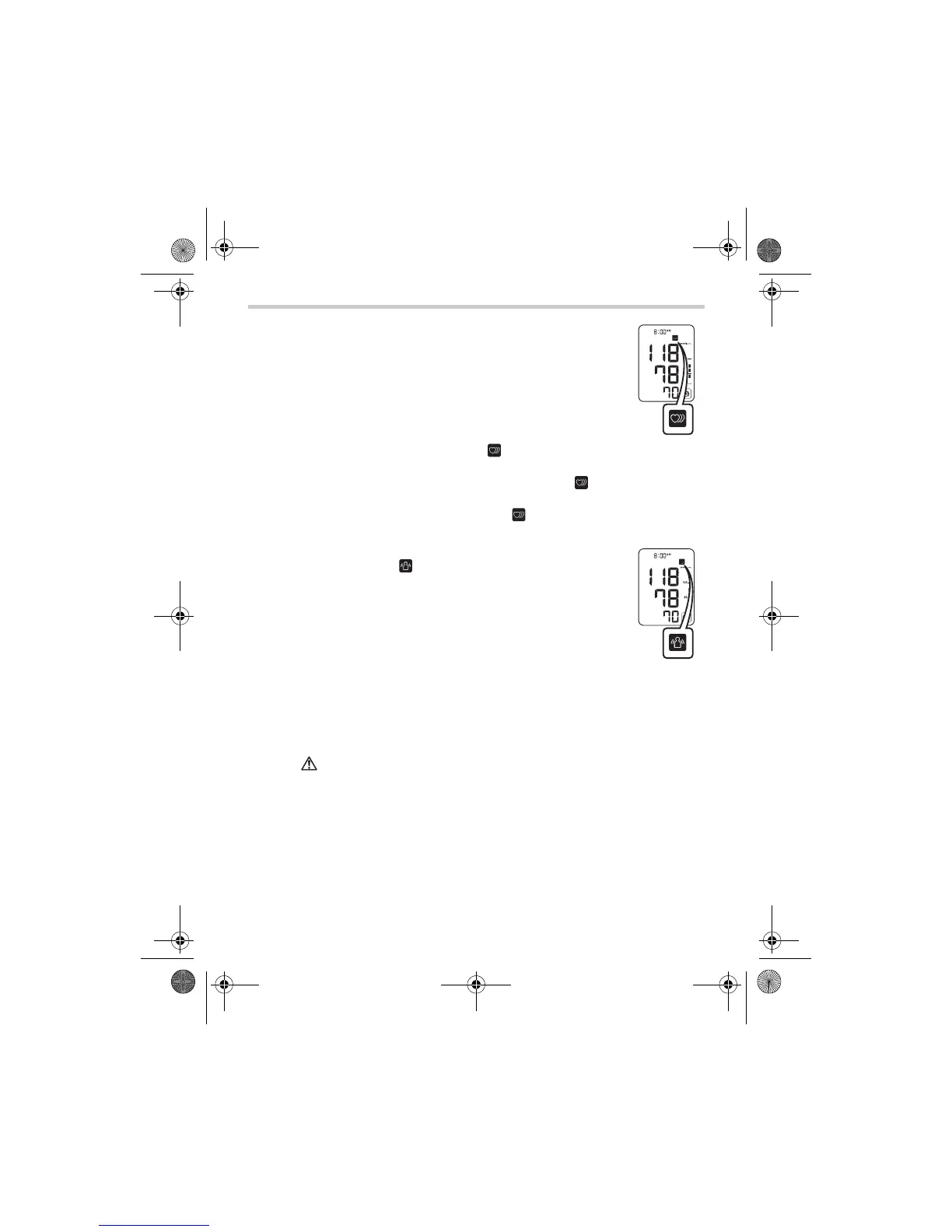
• Your blood pressure monitor includes an irregular
heartbeat feature. Irregular heartbeats can
influence the results of the measurement. The
irregular heartbeat algorithm automatically
determines if the measurement is usable or
needs to be repeated. If the measurement results
are affected by irregular heartbeats but the result
is valid, the result is shown together with the
irreg
ular heartbeat symbol ( ). I
f the irregular
heartbeats cause the measurement to be invalid, no result is
shown. If the irregular heartbeat symbol ( ) is shown after
you have taken a measurement, repeat the measurement. If
the irregular heartbeat symbol ( ) is shown frequently,
please make your doctor aware of it.
• If you move during measurement, the movement
error symbol ( ) will appear on the display.
Keep still and repeat the measurement.
Note: Wait 2-3 minutes before taking another blood pressure
measurement. Waiting between readings allows the
arteries to return to the condition prior to taking the blood
pressure measurement.
Warning:
Self-diagnosis of measured results and treatment are
dangerous.
Please follow the instructions of your doctor.
HEM-7221-C1_C_M.book Page 17 Monday, November 22, 2010 1:19 PM


 To Next Page