9
The unit comes with the battery installed. When you use the unit for
the rst time, follow the steps below. For setting range details refer to
“SPECIFICATIONS”.
NOTE:
If the initial settings are not correct, the measurement results may not be
accurate.
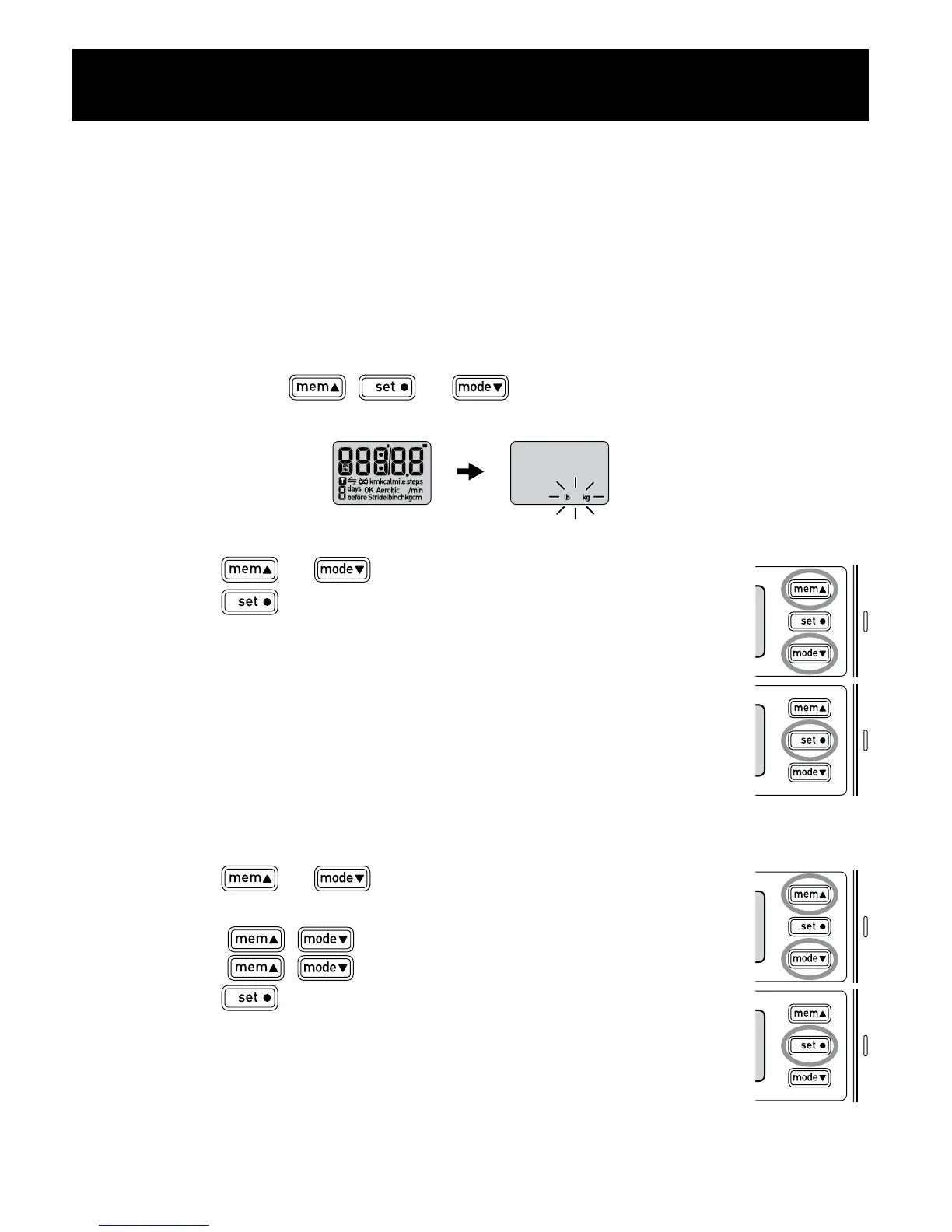
1. Press and hold , or .
After the following display, “lb” and “kg” ash on the display.
2. Setting the weight units.
A) Press or to select the mode.
B) Press to conrm the setting.
3. To set the height/stride length unit, repeat steps A)
and B) in step 2 above.
4. To set the distance unit, repeat steps A) and B) in
step 2 above.
5. To set the time display, repeat steps A) and B) in step
2 above.
6. Setting the weight.
A) Press or to select the desired value for
a setting.
• Press ( ) to advance (go back) one.
• Hold ( ) down to advance (go back) rapidly.
B) Press to conrm the setting.
7. To set the height, repeat steps A) and B) in step 6
above.
8. To set the stride length, repeat steps A) and B) in
step 6 above.
A)
B)
A)
B)
SETTINGS



 To Next Page
 Loading...