9
EN
8 Memory function
The measurements for each day (steps, calories burned,
distance walked, Ex steps, and Ex quantity) are automatically
stored in memory and reset to 0 at midnight (0:00) each day.
8.1 Recall data (Except for the Trip steps display)
1
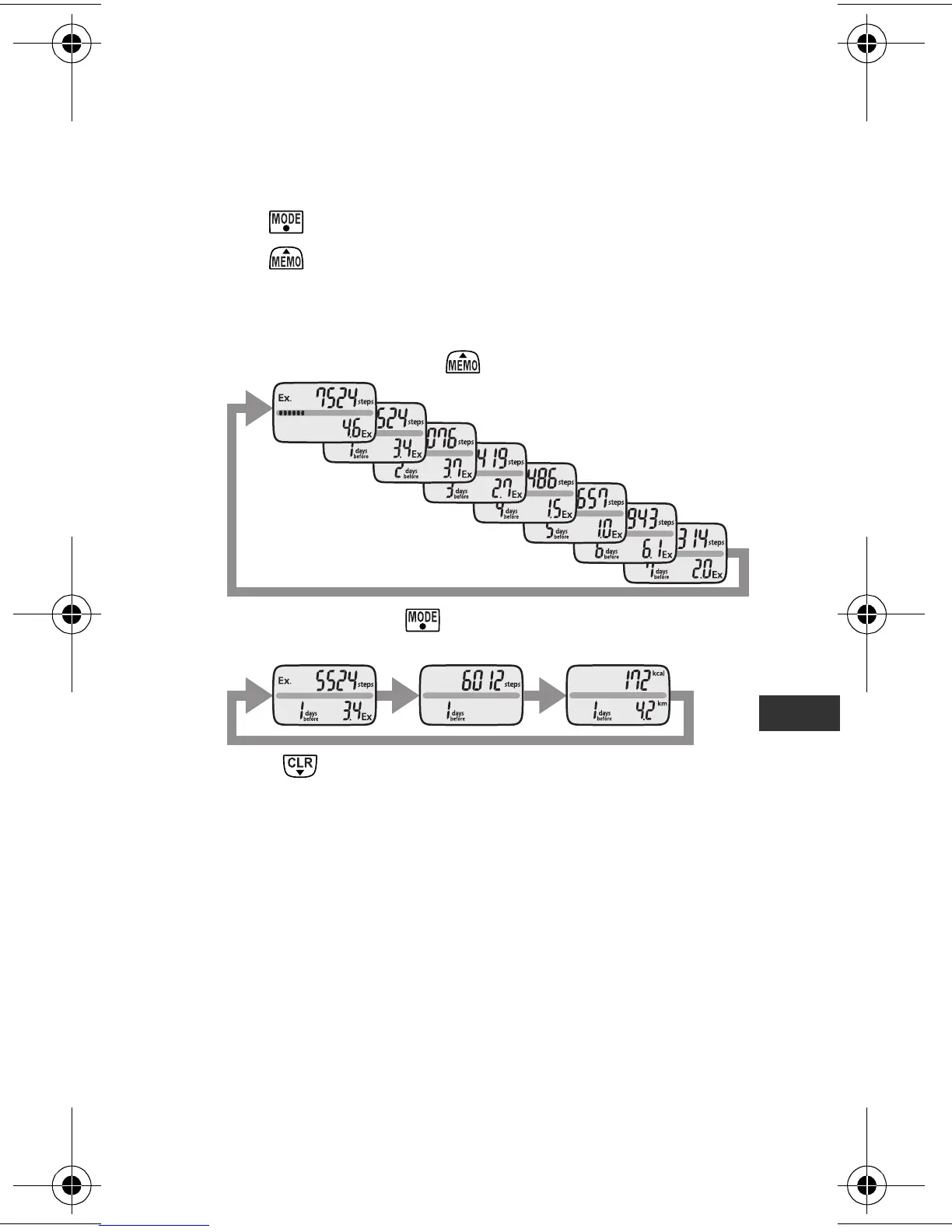
Press to select the type of display you want to see.
2
Press to view the measurement results.
The previous day’s (or–referring to weekly exercise units–
week’s) measurement results are displayed.
• The display shows the results for 7 days ago (or 4 weeks
ago) with each press of .
• You can also press to select the type of display you
want to see while viewing the previous results.
• Press to return to the current display.
Notes:
• The time is not displayed while viewing previous results.
• If no buttons are pressed for more than 1 minute, the display
returns to the previous display.
HJ-304-E_EN-FR-DE-IT.book Page 9 Tuesday, August 5, 2008 11:46 AM









 To Next Page