EasyManua.ls Logo

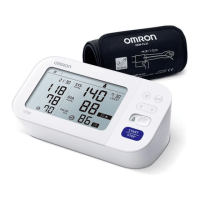
Omron X7 Smart - User Manual

Omron X7 Smart
132 pages
Print Icon
To Next Page IconTo Next Page
Loading...
Instruction Manual
1
EN
FR
DE
IT
ES
NL
RU
TR
AR
Symbols
Automatic Upper Arm Blood Pressure Monitor
M7 Intelli IT (HEM-7361T-EBK)
X7 Smart (HEM-7361T-ESL)
Read Instruction manual and before use.
FR
Lire le mode d’emploi et avant l’utilisation.
DE
Lesen Sie vor der Verwendung Gebrauchsanweisung und .
IT
Leggere il manuale di istruzioni e prima dell’uso.
ES
Lea el manual de instrucciones y antes del uso.
NL
Lees gebruiksaanwijzing en voor gebruik.
RU
     .
TR
Kullanmadan önce, kullanım kılavuzu ve 'yi okuyun.
ϡ΍ΩΧΗγϻ΍ϝΑϗ ϭ Ε΍ΩΎηέϹ΍ϝϳϟΩ΃έϗ΍
AR
Symboles/ Symbole/ Simboli/ Símbolos/
Symbolen/ / Semboller/
ίϣέϟ΍

Table of Contents

Questions and Answers

  • A
    Ashley Miller DDSSep 8, 2025
    Why does my Omron X7 Smart Blood Pressure Monitor display ?
    • D
      David KennedySep 8, 2025
      If your Omron Blood Pressure Monitor displays , it means the battery polarities are not properly aligned. Check the battery installation to ensure correct placement.
  • L
    Lydia HendersonAug 23, 2025
    What to do if Omron Blood Pressure Monitor displays or the arm cuff does not inflate?
    • J
      Joseph HernandezAug 23, 2025
      This issue may occur due to several reasons: 1. The [START/STOP] button was pressed before the arm cuff was applied. Press the [START/STOP] button again to turn the monitor off, then after correctly applying the arm cuff and inserting the air plug, press the [START/STOP] button. 2. The air plug is not fully inserted. Ensure the air plug is securely inserted. 3. The arm cuff is not correctly applied. Apply the arm cuff correctly, then take another measurement. 4. There is an air leak from the arm cuff. Replace the arm cuff with a new one.
  • G
    Garrett BaileyAug 25, 2025
    Why does Omron X7 Smart display or a measurement cannot be completed after the arm cuff inflates?
    • W
      wilsonjohnAug 25, 2025
      This can occur because you moved or talked during the measurement, or the arm cuff did not inflate sufficiently. Remain still and do not talk during measurements. If "E2" appears repeatedly, manually inflate the arm cuff until the systolic pressure is 30 to 40 mmHg above your previous readings. This can also happen if your systolic pressure is above 210 mmHg.
  • D
    Dr. Louis WhiteheadAug 26, 2025
    Why does Omron Blood Pressure Monitor flash?
    • C
      Cynthia JohnsonAug 27, 2025
      This indicates that the monitor is ready to transfer your readings to the smart device. Open the “OMRON connect” app to transfer your readings.
  • N
    nicholsscottAug 27, 2025
    What to do if Omron Blood Pressure Monitor displays or the monitor is turned off unexpectedly during a measurement?
    • D
      Denise BarajasAug 28, 2025
      This happens when the batteries are depleted. Replace all 4 batteries immediately with new ones.
  • P
    Paula MartinSep 22, 2025
    Why is Omron X7 Smart flashing?
    • W
      wilsonpatrickSep 22, 2025
      This indicates that the batteries are low. It's recommended to replace all 4 batteries with new ones.
  • C
    Carolyn ThomasSep 16, 2025
    What to do if I have any other problem with Omron X7 Smart Blood Pressure Monitor?
    • C
      Caroline PerezSep 16, 2025
      If any other problem occurs with your Omron Blood Pressure Monitor, press the [START/STOP] button to turn it off, then press it again to take a measurement. If the problem continues, remove all batteries and wait for 30 seconds before reinstalling them. If the problem persists, contact your OMRON retail outlet or distributor.
  • N
    Nancy YuSep 18, 2025
    What does it mean when Omron Blood Pressure Monitor flashes?
    • J
      Jill MontoyaSep 18, 2025
      This indicates that more than 80 readings have not been transferred. Pair or transfer your readings to the “OMRON connect” app to keep them in memory, and this error symbol will disappear.
  • A
    Aaron WarnerSep 7, 2025
    Why does my Omron Blood Pressure Monitor show or turn off during measurement?
    • M
      Mary OchoaSep 7, 2025
      If your Omron Blood Pressure Monitor displays or shuts down unexpectedly during a measurement, it's likely because the batteries are depleted. Replace all 4 batteries immediately with new ones.
  • B
    Benjamin SalazarSep 4, 2025
    What does mean on my Omron Blood Pressure Monitor?
    • J
      John HarrisSep 4, 2025
      If your Omron Blood Pressure Monitor displays , it indicates that the pulse rate wasn't detected correctly. Make sure to apply the arm cuff correctly and remain still and sit correctly during the measurement. If the symbol continues to appear, it's recommended to consult with your physician.

Summary

Important Safety Information

General Safety Alerts

Highlights potentially hazardous situations and general safety precautions.

Data Transmission Safety

Information on safe usage and restrictions for data transmission features.

2.3 General Precautions

Provides general precautions for measurement, arm placement, and environmental conditions.

Error Messages and Troubleshooting

Cuff Inflation Errors (E1)

Troubleshooting for cuff inflation failures and E1 error codes.

Measurement Completion Errors (E2)

Troubleshooting for errors preventing measurement completion and E2 codes.

Overpressure Errors (E3)

Troubleshooting for errors related to exceeding maximum cuff pressure and E3 codes.

Motion;Vibration Errors (E4)

Troubleshooting for errors caused by movement or vibration and E4 codes.

Pulse Detection Errors (E5)

Troubleshooting for errors related to incorrect pulse rate detection and E5 codes.

Afib Indicator Symbol Issues

Guidance on Afib symbol display and related medical consultation.

Measurement Flash Errors

Troubleshooting for issues where the measurement symbol does not flash.

Afib Measurement Errors (E6)

Troubleshooting Afib measurement errors and E6 codes.

Monitor Malfunction Errors (Er)

Troubleshooting general monitor malfunctions and 'Er' error codes.

Connectivity;Transmission Errors

Troubleshooting connection, pairing, and data transfer issues.

Battery Errors

Troubleshooting battery level indicators and depleted battery issues.

Display;Power Errors

Troubleshooting issues with no display or unexpected monitor shutdown.

Reading Accuracy Issues

Addressing readings that appear too high or too low.

Communication Issues

Resolving general communication problems with the device.

Preparing for a Measurement

Downloading the OMRON connect App

Pairing Your Smart Device

Smart Device Pairing Steps

Instructions for pairing the blood pressure monitor with a smart device via Bluetooth.

Setting Date and Time Manually

Applying the Cuff on the Left Arm

Cuff Placement and Attachment

Detailed steps for correctly applying the arm cuff on the left arm.

Cuff Application Details

Cuff Tube Position and Fit

Ensures correct tube placement and secure cuff fit for accurate measurement.

Sitting Correctly

Sitting Posture Guidelines

Selecting User ID

Taking a Measurement

Measurement Procedure

Step-by-step guide on how to perform a blood pressure measurement.

Saving and Transferring Readings

Details automatic saving of results and transferring them via the app.

Taking a Measurement in Afib Mode

Afib Mode Measurement Process

Describes how the monitor takes 3 consecutive readings in Afib mode.

Afib Indicator Symbol

Explains the Afib symbol and its meaning as a potential finding, not a diagnosis.

Taking a Measurement in Guest Mode

Checking Readings in Comparison Mode

Interpreting Measurement Results and Errors

Afib Detection and Physician Consultation

Explains Afib detection and advises physician consultation if it persists.

High Blood Pressure Indicators

Explains indicators for high systolic (SYS) or diastolic (DIA) pressure.

Measurement and Rhythm Error Indicators

Body Movement Detection Errors

Troubleshooting for errors caused by body movement during measurement.

Irregular Rhythm Detection

Explains irregular rhythm detection and advises physician consultation.

Understanding Heart Rhythms

Using Memory Functions

Weekly Averages Calculation

Reading Averaging and Deletion

High Systolic Pressure Adjustment

Omron X7 Smart Specifications

General IconGeneral
ModelX7 Smart
CategoryBlood Pressure Monitor
Bluetooth ConnectivityYes
Cuff Size22-42 cm
Irregular Heartbeat DetectionYes
AFib DetectionYes
Power Source4 AA batteries or AC adapter
Intellisense TechnologyYes
Clinically ValidatedYes
Average Reading FunctionYes
Cuff Wrapping GuideYes
Body Movement DetectionYes
Measurement MethodOscillometric
Measurement Range (Pressure)0-299 mmHg
Measurement Range (Pulse Rate)40-180 bpm
CompatibilityOmron Connect app
Memory Capacity100 readings per user (2 users)
Dimensions191 mm x 85 mm x 120 mm

Related product manuals