The Omtech K40+ Laser Engraver Control Card is a sophisticated control board designed to enhance the operation of low-wattage laser engravers and cutters, particularly those utilizing glass (DC) or metal (RF) carbon dioxide (CO2) tubes. This control card allows users to operate their laser directly from its control panel or through a direct connection to a computer. Additionally, designs can be stored directly on the board's microSD card, offering flexibility in workflow, although direct execution from standard K40 control panels might not always be possible. While primarily intended for Omtech's engravers, its firmware and ports can also be adapted for similar engravers from other manufacturers and some CNC machines, though such custom configurations are undertaken at the user's own risk.
Function Description
The K40+ control card serves as the central processing unit for your laser engraver, enabling precise control over various aspects of the engraving and cutting process. Once installed and properly connected, it facilitates the movement of the laser head, firing of the laser, and interaction with various ancillary devices. The board supports a 32-bit Arm Cortex-M3 CPU with a maximum clock frequency of 120 MHz, running on Smoothie firmware. This powerful combination ensures smooth and efficient operation, compatible with LightBurn software across Windows, Linux, and MacOS platforms.
The control card integrates several key functionalities:
- Motor Control: It provides signals for multiphase stepper motor drivers for the U, X, Y, and Z axes, allowing for precise positioning and movement of the laser head. Both multiphase and bipolar stepper motor configurations are supported, with dedicated terminals for each.
- Power Management: The board receives 24V DC input power and outputs 5V DC for its internal operations and to power various ancillary devices.
- Sensor Integration: It supports multiple 5V input connections for devices such as interlock open cover sensors, foot-controlled power switches, and thermistors (TH1-TH5). This allows for enhanced safety features and environmental monitoring within the engraver.
- Output Signals: The control card can provide up to nine 5V output signals to control ancillary devices like external exhaust fans, pressurized air assists, and CNC heating elements, labeled as "FAN," "BLOW," "HE1," "HE2," "OUT1," and "OUT2."
- Limit Switch Connections: Dedicated terminals are available for X, Y, and Z axis limit switches, ensuring safe operation by defining the boundaries of the work area.
- Data Connectivity: A USB Type B port allows for direct computer connection, facilitating communication and control via LightBurn software. The integrated microSD card slot provides firmware storage and configuration file management, as well as the ability to store designs directly on the board.
Usage Features
The K40+ control card is designed for ease of use and integration into existing laser engraving setups.
- Software Compatibility: It is fully compatible with LightBurn, a popular laser engraving software, which offers a comprehensive interface for design, control, and job management. The manual provides detailed instructions for setting up LightBurn, including device creation, axis configuration, origin settings, and enabling "Smoothie Clustering" for optimized performance.
- Flexible Axis Control: The board offers multiple options for connecting stepper motors, accommodating both standard and upgraded systems. This flexibility extends to rotary axis connections, allowing users to expand the capabilities of their engraver for cylindrical object engraving.
- Workbed Adjustment: For engravers with automatically adjustable workbeds, the control card provides the necessary connections to control the workbed's stepper motor and limit switches, enabling precise height adjustments for various materials.
- Safety Enhancements: The ability to integrate interlock sensors is a significant safety feature, automatically cutting power to the laser when the protective cover is opened. This is highly recommended for all users to ensure a safe working environment.
- Firmware and Configuration: The microSD card is crucial for storing the board's firmware and configuration files. Users can update the firmware or modify settings by accessing the card, although it is advised to unmount the card during engraving to prevent communication glitches.
Maintenance Features
Proper maintenance of the K40+ control card is essential for its longevity and reliable performance.
- Pre-Installation Check: Before installation, users are instructed to inspect the control board for any damage. If damage is found, customer service should be contacted for repair or replacement, emphasizing that installation should not proceed with a damaged device.
- Secure Installation: The control card must be securely housed within the engraver's casing, with all connections made firmly. This prevents the device from moving loosely and ensures stable operation.
- Electrical Safety: A strong emphasis is placed on electrical safety during installation and maintenance. Users are warned to only work on the device when the engraver and all connected components are turned off and disconnected from power. Checking electrical polarities with a multimeter is highly recommended to prevent damage to the board and other components.
- Dust Removal: Regular cleaning with a soft cloth is recommended to remove dust from the control card. Users are advised against using harsh chemicals or allowing any electrical components to become wet. In case of accidental wetting, the engraver's emergency stop button should be used, power disconnected, and the device left to dry completely before further use.
- MicroSD Card Management: If the microSD card needs replacement, it must be formatted to use the FAT32 file system.
- Professional Repair: For maximum safety and best results, all adjustments, maintenance, and repairs, especially those involving electrical components, should be performed by trained and skilled professionals. This minimizes the risk of fires, malfunctions, and potential radiation exposure.
- Emergency Procedures: In case of damage or malfunction during use, users are instructed to immediately use the engraver's emergency stop button, disconnect power, and ensure the equipment is fully repaired or replaced before resuming operation.
- Packaging Retention: Users are advised to keep the original packaging for potential future returns, but if disposed of, it should be done in compliance with applicable waste disposal regulations.

 Need help?
 General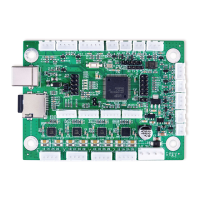

 To Next Page