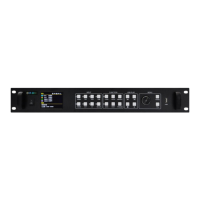
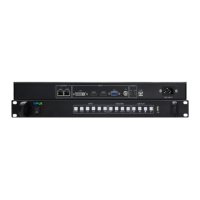
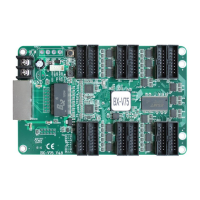
The Onbon OVP-M4X Video Controller is an integrated device designed for large LED screens, suitable for various applications such as platforms, rentals, meeting rooms, and more. It combines the functionalities of a video processor and an LED big screen controller, offering pixel-to-pixel input and output for high-resolution displays, ensuring clear video effects. The device features two Gigabit ports and supports USB connectivity.
Function Description:
The OVP-M4X serves as a comprehensive video controller, managing input signals, processing them, and outputting them to LED screens. Its core function is to provide seamless switching between various input signals and output modes, ensuring a smooth and uninterrupted display. It also supports local USB2.0 multimedia display, allowing for direct playback of content from a USB disk. The controller can be operated via PC software, physical buttons on the device, or through a USB interface.
Important Technical Specifications:
- Pixel Capacity: Supports up to 5,240,000 pixels, with a maximum width of 4000 pixels and a maximum height of 3840 pixels.
- Output: Features 8 channels of Gigabit network output, enhancing stability and facilitating remote maintenance. Each port supports a maximum of 650,000 pixels at 60Hz. Horizontal splicing allows for a width of up to 4000 pixels and a height of up to 3840 pixels, with total pixels not exceeding 5.2 million. The fixed outputting frame frequency is 60Hz, supporting pixel-to-pixel splicing within the specified range.
- Input Interfaces:
- EXT×1: Extended input port, DVI on board. Can be configured as an HDMI port, SDI port, or for wireless screen casting based on user requirements.
- VGA×1: Supports VESA: UXGA@75Hz downward compatible.
- HDMI×2: Supports VESA, HDMI 1.4.
- DVI×1: Supports VESA, compatible with HDMI 1.4.
- CV×1: Supports PAL/NTSC compound video.
- USB×1: USB2.0, supporting 1080p@30fps or 720p@60fps content.
- Supports 6 channels of HD digital and analog input interfaces.
- Onboard DVI monitoring output interface for local image output monitoring.
- Supports 4 channels of digital input DVI/HDMI, with custom input EDID setup.
- Audio Interfaces:
- Audio input×1: 3.5mm audio port.
- Audio output×1: 3.5mm audio port.
- HDMI embedded audio in HDMI video input port.
- Control Ports:
- COM: USB control interface.
- LAN: Internet control interface.
- WIFI: WIFI wireless control.
- Power Supply:
- Input Voltage: 100-240V~50/60Hz.
- Maximum Power: ≤50W.
- Physical Dimensions:
- Size: 482.6mm×300mm×66.6mm.
- Box Type: 1.5U box.
- Weight: ≤4.6Kg.
- Environmental Conditions:
- Working Temperature: -30°C~70°C.
- Environmental Humidity: 15%~85%.
Usage Features:
- Seamless Switching: Enables seamless transitions between all input signals and output modes.
- Hot Backup: Supports input signal source hot backup, meaning if one input signal is lost, the system can immediately switch to a backup source.
- User Modes: Allows users to save and restore up to 8 different user modes for fast recall of display settings (image size, position, status, brightness, contrast).
- Intelligent Guiding: Features an "intelligent guiding" function for easy and fast setup, especially useful for first-time users. This guides users through 3 simple steps to set up the LED screen.
- Display Window Adjustment: Users can adjust the display window (horizontal width, vertical height, horizontal start, vertical start) to match the LED screen.
- Image Quality Control: Provides comprehensive controls for image quality, including brightness (0-100), contrast (0-100), saturation (0-100), sharpness (0-10), dynamic contrast (0-4, with 0 being closed), and color temperature ("warm", "natural", "cold", "custom" with adjustable RED, BLUE, GREEN values from 0-100).
- Cropping Functionality: Offers a CROP function to trim the input image, allowing users to define crop width, height, and horizontal/vertical start positions. The crop width and height cannot exceed the resolution of the present cropped signal source.
- Input EDID Editing: Provides EDID editing for DVI/HDMI input signal sources, allowing users to set recommended resolutions. This can influence the PC's output resolution in WIN7 systems, while in WIN10, manual adjustment on the PC is required. Supports resolutions up to 3840x2160@60Hz.
- VGA Settings: Includes VGA adjustment options for X and Y coordinates (0-300), auto-adjustment for display excursion, and VGA ADC correction for darker screens.
- Planned Task Function: Allows users to set multiple tasks with different user modes at specific times. This function requires clock calibration via PC software.
- Other Settings: Includes options for switch stunt (seamless or fade over), voice settings (switch button and volume), and testing photos (8 options).
- Button Lock: A feature to lock all buttons except the OK button, preventing accidental changes.
- LCD Screen: Equipped with a 2.8" full-color LCD screen (320*240) for displaying system status and menu operations.
Maintenance Features:
- Factory Reset: Allows users to reset the device to default values, including ADC calibration, languages, and firmware version.
- Firmware Version Check: Users can check the present hardware version and factory date.
- Safety Notes: Emphasizes not opening the device due to high-pressure components, using correct power supply (100-240V, 50/60Hz), ensuring proper grounding, and disconnecting power before hardware operations. It also advises on maintaining a clean, dry, and ventilated environment, keeping the device away from high temperatures, water, fire, and flammable materials. In case of smoke or unusual smells, immediate power disconnection and contact with support are recommended.
- Software Integrity: Prohibits any modification, decompilation, disassembling, decoding, or reverse engineering of the software.

 Need help?
 General

 To Next Page