13
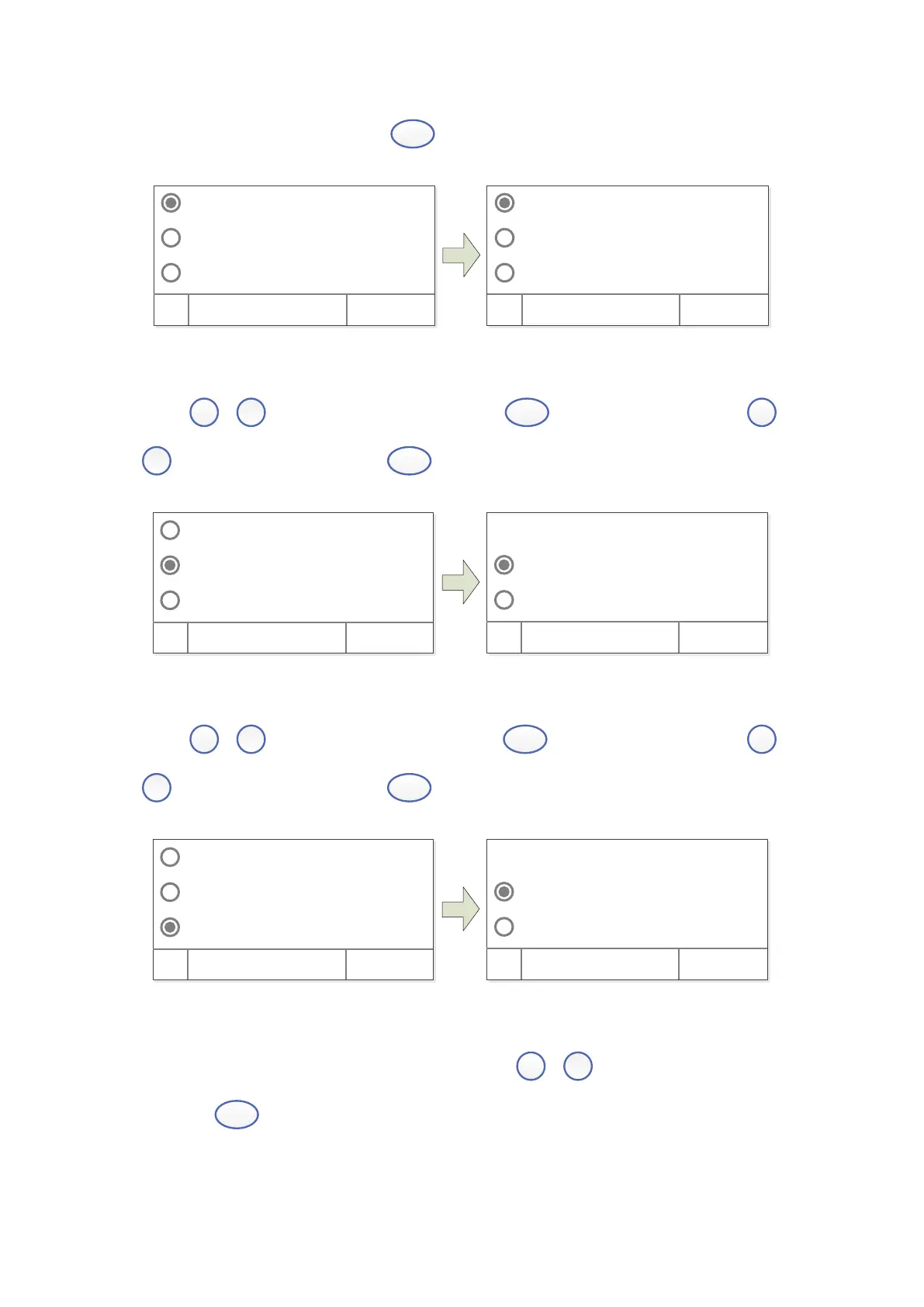
choose “Abs”, “%T”, “Energy”, press
(left) to confirm.
Test Mode
D2 Lamp On
W Lamp On
OK Cancel
Abs
%T
Ener gy
OK Cancel
Turn On/Off D2 Lamp
Press
,
to choose “D2 Lamp”, then press
(left) to enter into. Press
,
to choose “On” or “Off”, press
(left) to turn on/off.
√D2 Lamp On
On √
Of f
Test Mode
D2 Lamp On
W Lamp On
OK Cancel
OK Cancel
Turn On/Off W Lamp
Press
,
to choose “W Lamp”, then press
(left) to enter into. Press
,
to choose “On” or “Off”, press
(left) to turn on/off.
√W Lamp On
On √
Of f
Test Mode
D2 Lamp On
W Lamp On
OK Cancel
OK Cancel
Get Dark Current
Keep the light path without anything blocking, press
,
to choose “Dark Current”,
then press
(left) to resample Dark Current.
Note: During the course, open the lid of the compartment is prohibited.


 To Next Page