12
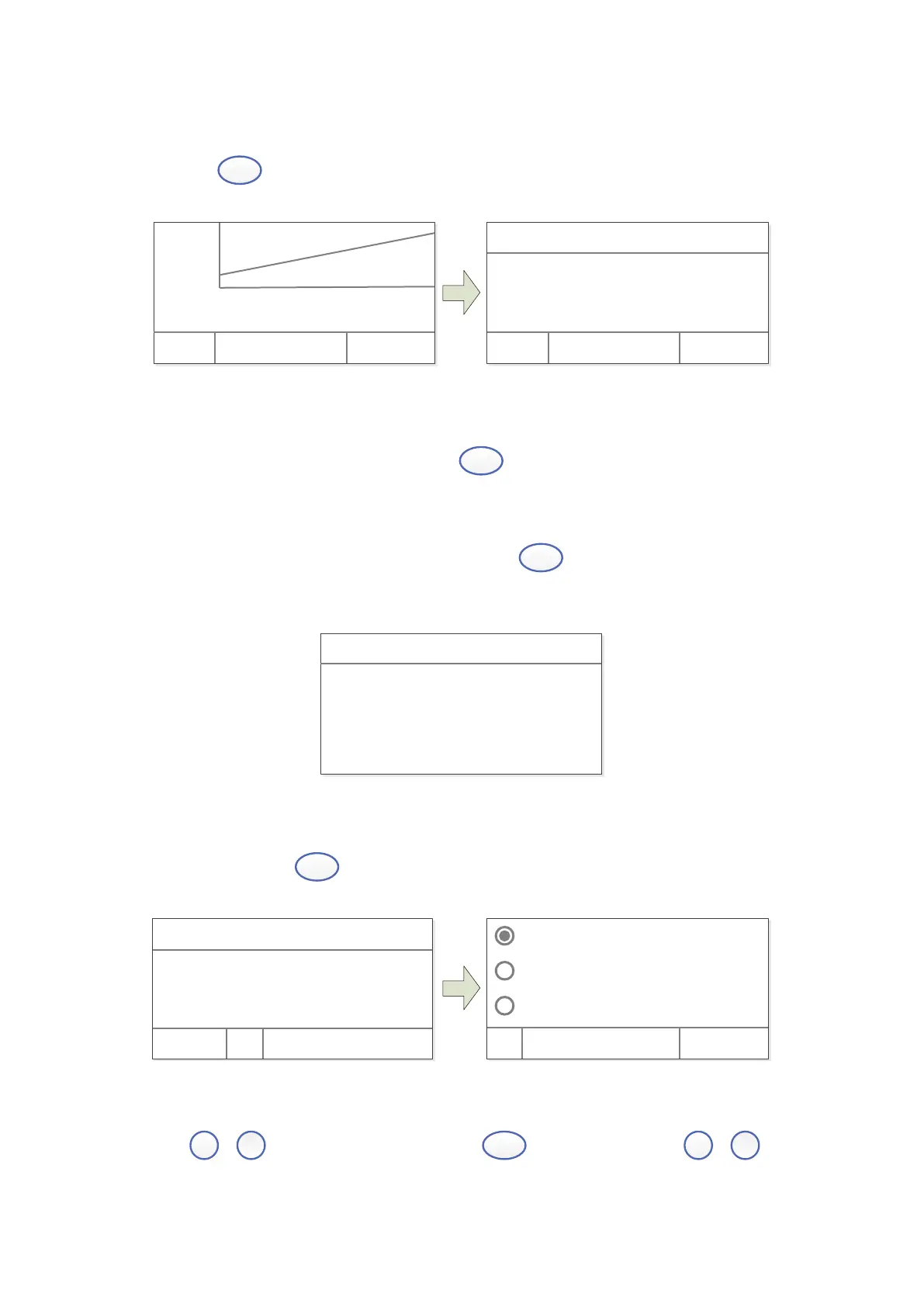
Step 3. Enter into Measuring Interface
Press
(left) to enter into the Quantitation Measuring Interface.
r =0. 996, C=2. 267+1. 211
- 0. 100 0. 900
4. 000
0. 000
Test Cancel
+
+
+
WL: 500. 0nm 0. 000A
No. WL Abs. Conc.
Test Cancel
Step 4. Blank
Put the Reference in the light path, press
to do blank.
Step 5. Measure Samples
Put the sample to be tested in the light path, press
(left) to measure. Then the test
result will display in the data sheet. Repeat this step to finish measuring all the samples.
500. 0nm 0. 000A
No. WL Abs Conc.
1 500. 0 0. 039 0. 078
2 500. 0 0. 042 0. 084
3 500. 0 0. 041 0. 082
3. Utility
Main Interface, press
to go into utility setting.
Test Mode
D2 Lamp On
W Lamp On
OK Cancel
WL: 500. 0nm 0. 000A
100. 0%T
Basi c Quant i t at i ve
Test Mode
Press
,
to choose “Test Mode”, press
(left) to enter, press
,
to


 To Next Page