11
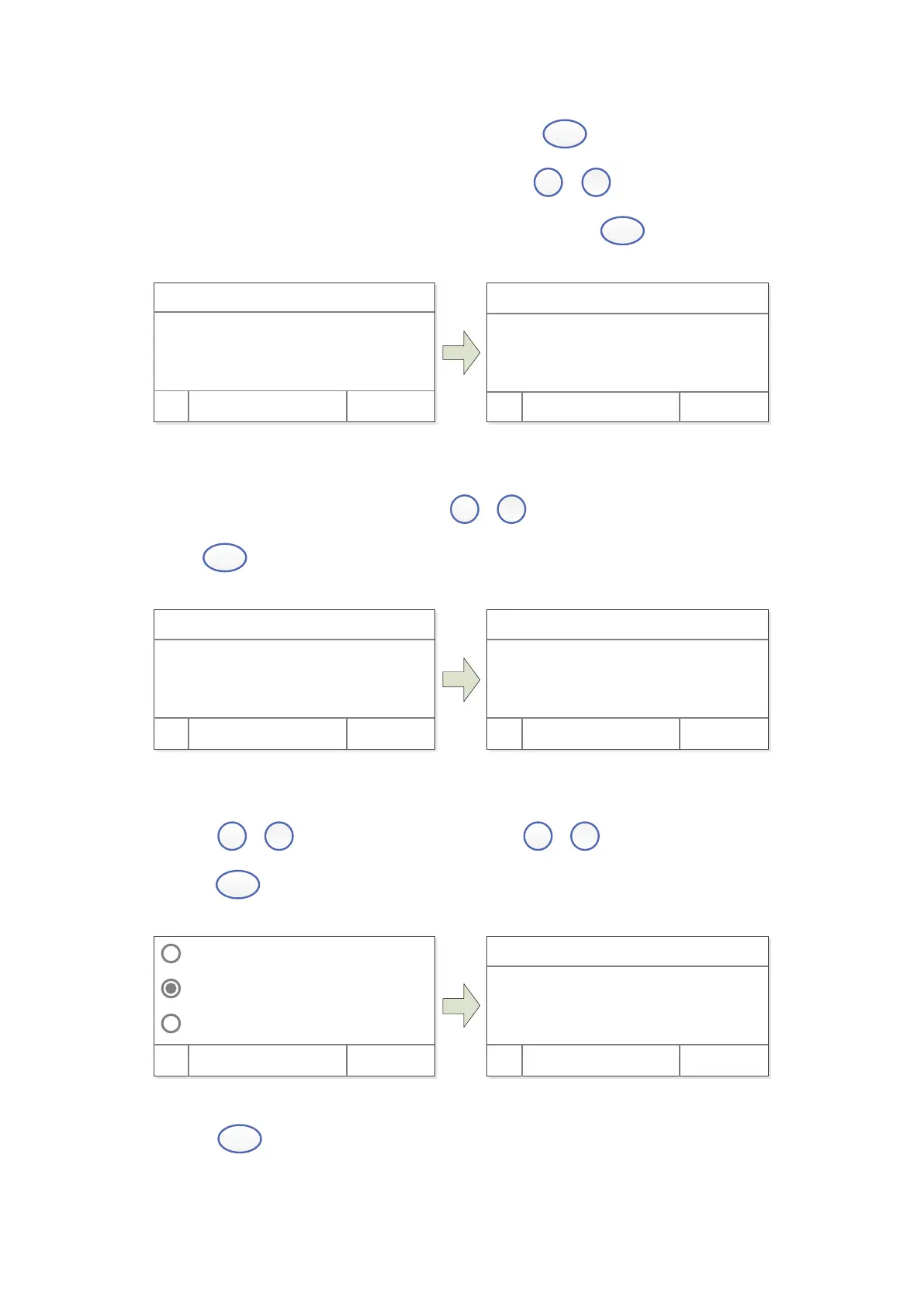
3) Blank. Put the Reference in the light path, press
(left) to do blank.
4) Setup number of Standard Samples. Press
,
to input the quantity of
standard sample(No more than 9 standard curve.), press
(left) to confirm.
WL: 500. 0nm
Coef f i ci ent K:
00000
OK Cancel
WL: 500. 0nm
Number : 3
OK Cancel
5) Calibrate Standard Samples. Put the corresponding standard samples in the light
path as the screen indicates, press
,
to input the concentration, press
(left) to confirm, to finish all the standard samples.
WL: 500. 0nm
Number : 3
OK Cancel
WL: 500. 0nm
I nser t 1# St andar d.
I nput 1# Conc: 00000
OK Cancel
Load the Stored Curve
Press
,
to choose “Load Curve”, press
,
to choose the curve,
press
(left) to confirm.
Cr eat e Cur ve
Load Cur ve
Cl ear Cur ve
OK Cancel
C=1. 000xA+0. 2 500. 0 <
C=0. 02xA+0. 32 470. 0
OK Cancel
C=KxA+B WL.
Press
(left) to enter the test mode after building or loading standard curve.


 To Next Page