EasyManua.ls Logo

Onda V-10 PLUS - User Manual

Onda V-10 PLUS
24 pages
Print Icon
To Next Page IconTo Next Page
Loading...
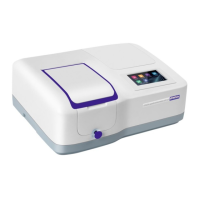
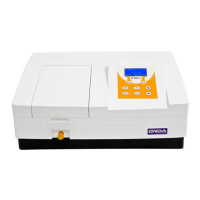
VISIBLE
SPECTROPHOTOMETER
V-10 PLUS
User’s Manual

Questions and Answers

  • J
    James GrantAug 1, 2025
    Why are the measurements inaccurate on my Onda V-10 PLUS?
    • C
      Christopher JacksonAug 1, 2025
      If the measurements from your Onda Measuring Instruments are inaccurate, several factors could be responsible. Ensure that the cuvettes are clean and that your samples are not contaminated. Improve the matching of the cuvettes. Also, consider resampling the dark current.
  • K
    Kevin WallsAug 6, 2025
    What to do if Onda V-10 PLUS Measuring Instruments power on, but no response?
    • A
      Amy EllisonAug 6, 2025
      If your Onda Measuring Instruments do not respond when powered on, check the power cord connection to ensure it is reliable. If the connection is good, the fuse may be burned and require replacement.
  • B
    Breanna BarkerAug 10, 2025
    Why is the sample not stable in my Onda V-10 PLUS Measuring Instruments?
    • A
      Andrew MoraAug 10, 2025
      If the sample in your Onda Measuring Instruments is not stable, consider the following: * Improve the sample. * If the concentration of the sample is too high, dilute it. * Improve the power supply if the voltage is low or unstable. * Replace the lamp if it's damaged or near the end of its life.
  • W
    william78Aug 14, 2025
    What to do if Dark Current Error occurs during self-check of Onda V-10 PLUS Measuring Instruments?
    • P
      Pamela RodriguezAug 14, 2025
      If you encounter a Dark Current Error during the self-check of your Onda Measuring Instruments, it may be due to the lid of the compartment being open. Close the lid and restart the self-check process.
  • A
    amber85Aug 18, 2025
    How to fix System Calibrate Failed error on Onda V-10 PLUS?
    • C
      Cindy ValentineAug 18, 2025
      If the system calibration fails on your Onda Measuring Instruments, there might be an obstruction in the light path. Remove any blockage and then try calibrating again.
  • H
    Heather GutierrezAug 22, 2025
    What to do if Onda Measuring Instruments screen is blank or not clear?
    • M
      meghanfigueroaAug 23, 2025
      If your Onda Measuring Instruments power on with the backlight working, but the screen is blank or unclear, the display contrast may need adjustment. Adjust the contrast potentiometer to resolve this issue.
  • D
    Debra LynchAug 27, 2025
    Why is there measurement uncertainty with my Onda Measuring Instruments?
    • A
      Adrian JohnsonAug 27, 2025
      If you are experiencing measurement uncertainty with your Onda Measuring Instruments, ensure that the device has warmed up for a sufficient amount of time. Increase the warm-up time to improve measurement accuracy.

Summary

Safety

Package Contents

Unpacking

Installation

Environment Required

Specifies the ideal environmental conditions for optimal spectrophotometer performance.

Install Spectrophotometer

Details the steps for physically installing the spectrophotometer unit.

Overview

Symbols

Main Specifications

Description of Appearance

Front View

Illustration and labels for the front view of the spectrophotometer.

Back View

Illustration and labels for the back view of the spectrophotometer.

Keypad and Key Descriptions

Keypad Layout

Details the layout and function of the instrument's keypad.

Key Functions

Provides a detailed explanation of each key's function on the spectrophotometer.

Functions

Photometry

Explains how to perform photometric measurements and display results (Abs, %T, Energy).

Quantitation

Describes the process of using standard samples to establish a standard curve for quantitation.

Getting Started

Turn On and Self-check

Guides the user through powering on the instrument and the initial self-check and warm-up procedure.

Important Guidelines

General Operating

Select Application

Instructions for selecting the desired application mode from the main interface.

Set Wavelength

Steps for setting the desired wavelength for measurement.

Set Parameters

Procedure for entering and confirming operational parameters.

Delete Test Data

How to clear test results and stored data from the instrument.

Measuring

Photometry

Steps to perform photometric measurements, including starting the process and setting wavelengths.

Quantitation

Procedure for starting quantitation, establishing or loading standard curves, and measuring samples.

Establish Standard Curve by Coefficients

Establish Standard Curve by Samples

Load the Stored Curve

Utility

Test Mode

How to select and configure the test mode, including Abs, %T, or Energy display.

Turn On;Off D2 Lamp

Turn On;Off W Lamp

Get Dark Current

Reset Wavelength

About Version

Troubleshooting

Repair and Maintenance

Daily Maintain

Routine daily maintenance tasks, including cleaning the compartment, surface, and cuvettes.

Replace the Fuse

Replace Lamps

W Lamp Position Adjustment

Procedure to adjust the W lamp position for optimal light path alignment.

Warranty

Equipment Disposal

Onda V-10 PLUS Specifications

General IconGeneral
BrandOnda
ModelV-10 PLUS
CategoryMeasuring Instruments
LanguageEnglish

Related product manuals