EasyManua.ls Logo

One Link DVR - Chapter 2: Overview; Front Panel; Rear Panel

Default Icon
23 pages
To Next Page IconTo Next Page
To Previous Page IconTo Previous Page
Loading...
User Manual
2
Chapter 2: Overview
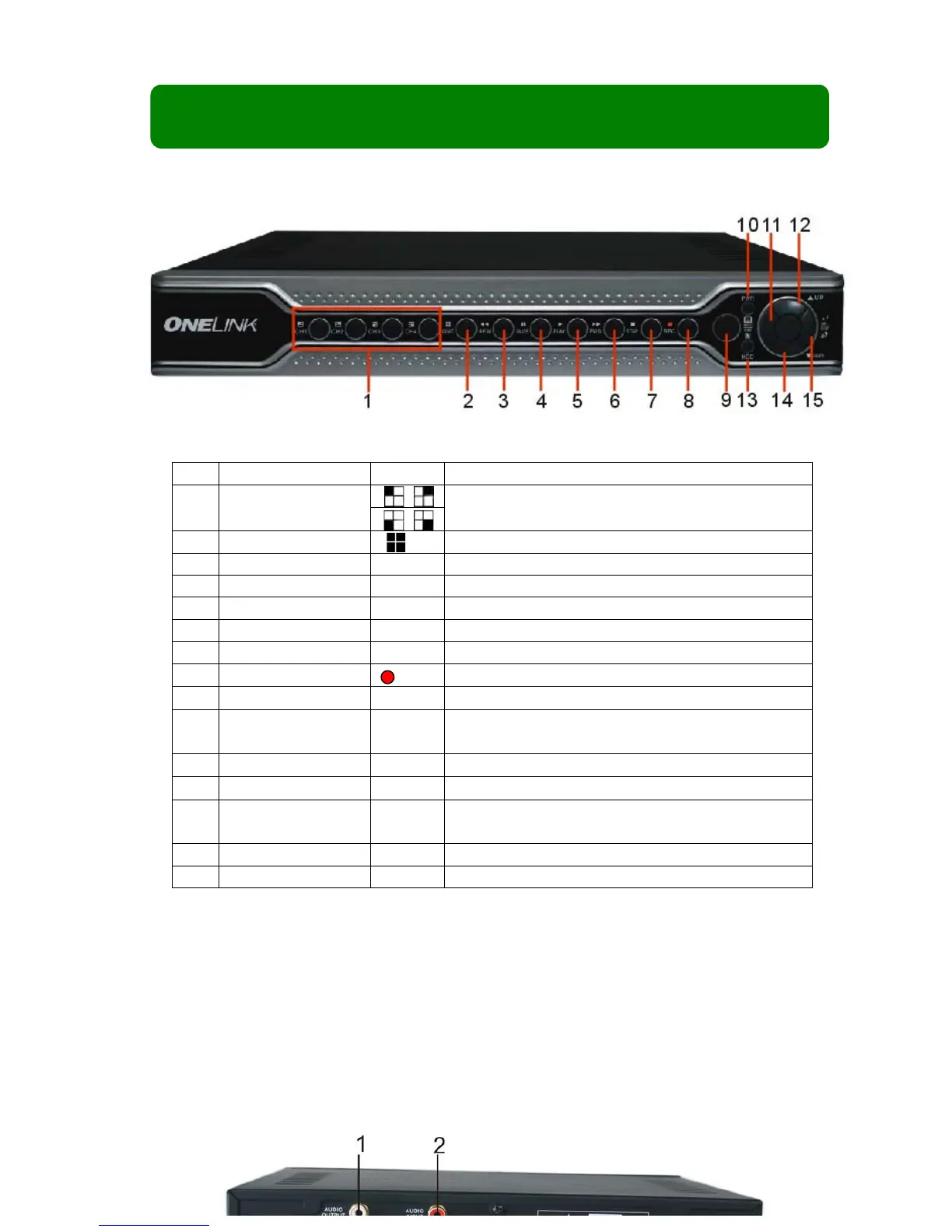
2.1 Front Panel
Item
Key title/Indicator
Marks
Functions
1
Channel Select:
CH1 CH2 CH3 CH4
Select single channel to display
2
QUAD
Display 4 cameras in live display or playback mode
3
REW
Move left / rewind
4
PAUSE
Pause
5
PLAY
Play
6
FWD
Move right / play forward
7
STOP
Stop playback; stop manual recording
8
REC
Start manual recording
9
IR Receiver
Receives signal from remote control
10
Power indicator
PWR
If the Green” indicator is illuminated, the DVR is
powered on.
11
MENU/ESC
Enter into main menu or exit menu
12
Up
Move up
13
HDD indicator
HDD
When the “Red” indicator flashes, it means the hard
drive is being read or written to.
14
Down
Move down
15
SEL/EDIT
Enter into pop up menu; Select key / edit
2.2 Rear Panel