EasyManua.ls Logo

One Link DVR - Installation; Installing Hard Drive

Default Icon
23 pages
To Next Page IconTo Next Page
To Previous Page IconTo Previous Page
Loading...
User Manual
3
1
4
2
5
3
6
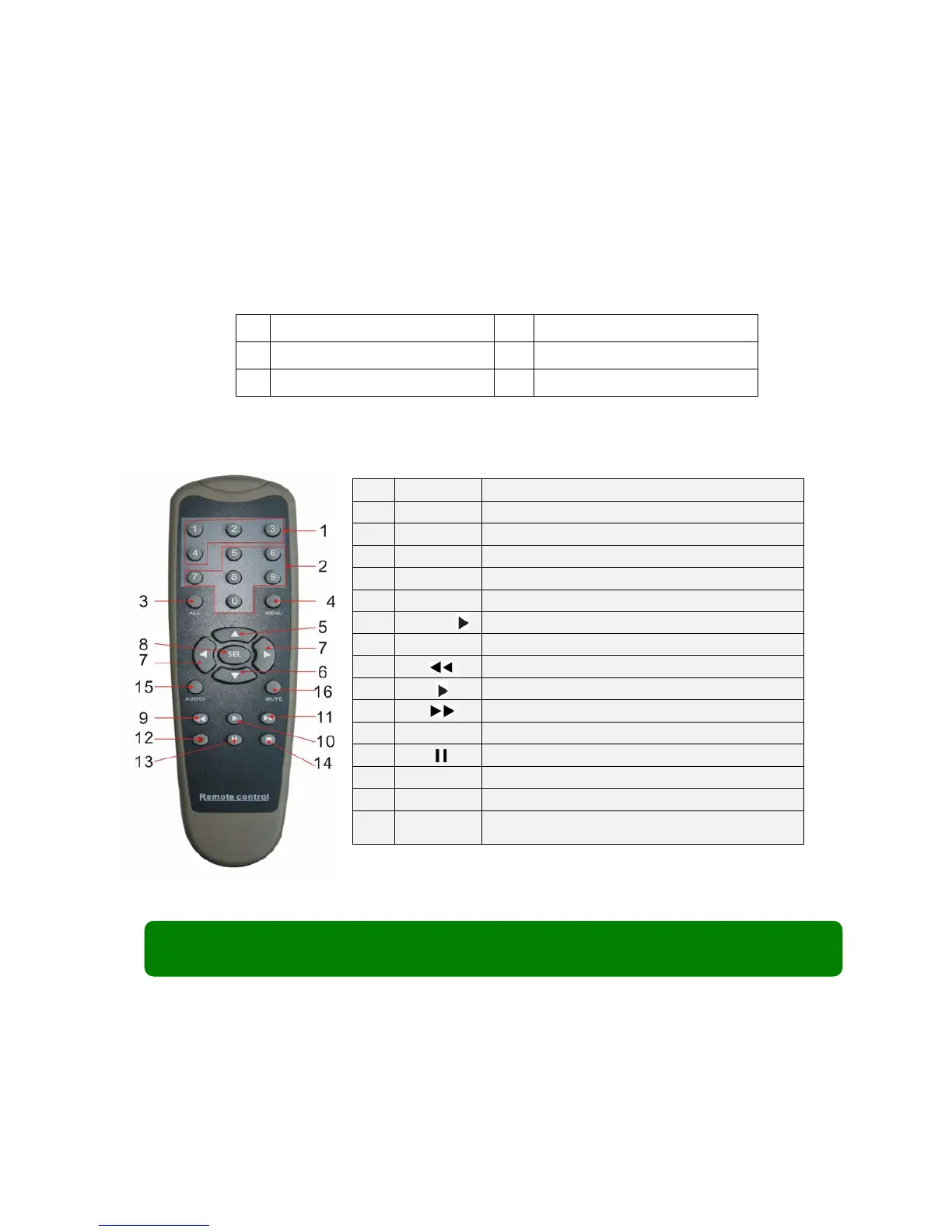
2.3 Remote Control
Chapter3: Installation
3.1 Installing Hard Drive
(If your DVR comes with a pre-installed hard drive, please ignore this part)
Note: Don’t take out HDD when DVR is running, and make sure the HDD is set as
the MASTER according to the hard drive manual.
1
1-4
Channel Select 1-4
2
5-90
Numeric Key
3
ALL
Preview all Channel
4
Menu
Enter/Exit Main Menu
5
Up Key
6
Down Key
7
/
Left / Right Key
8
SEL
Select Key/ Edit Key
9
Rewind key
10
Play Key, Enter to recording search menu
11
Forward Key
12
Manual Recording
13
Pause
14
Stop manual recording; Stop Playback
15
Audio
Undefined
16
Mute
Turn on/off audio output