User Manual
15
5.21 Language
5.22 Reset Menu
The system allows you to reset all your settings to the DVR factory default. You will
need to enter your password to reset the menu.
5.23 NTSC/PAL Output Select
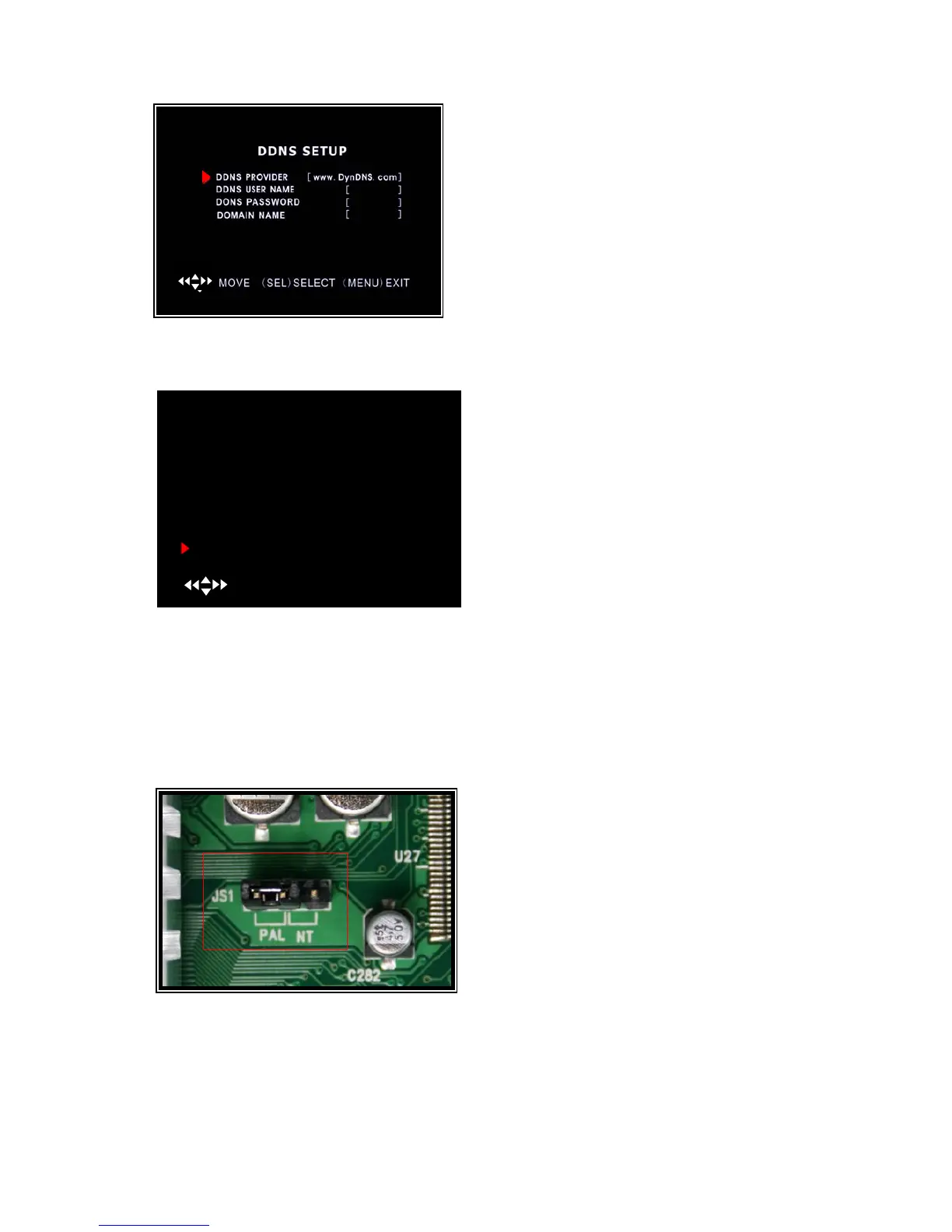
Change the jumper JS1 to select NTSC or
PAL video output format shown on the
silkscreen shown in the picture on the left. The
picture shows the setting for PAL, move the
jumper to the right side for NTSC
DDNS SETUP:If you require an external service
to maintain a dynamic IP address enter the user
information here.
You need to register a www.dyndns.org to get a
free account. After registration,you will have a user
name and password. You can also register your
domain name on the website.
MAIN MENU
CAMERA SETUP
RECORD SETUP
RECORD FRAMERATE
VIDEO QUALITY HIGH
RECORD SCHEDULE
SENSOR SETUP
HARD DRIVE SETUP
MISCELLANEOUS SETUP
NETWORK SETUP
LANGUAGE ENGLISH
RESET MENU
( ) MOVE (SEL) SELECT (MENU)EXIT
You can change the OSD from the default
language to other language if your DVR supports
multi-language.



 To Next Page