8
BATTERY PACK SET-UP
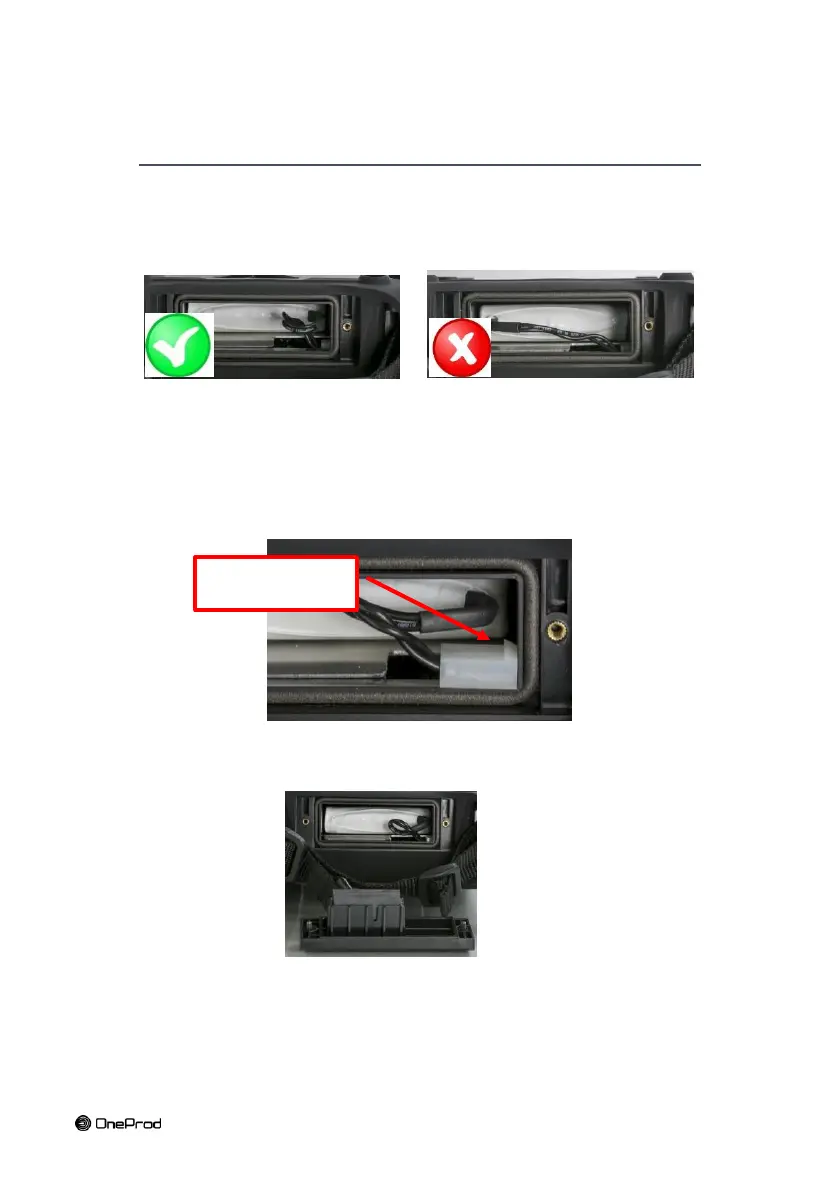
When setting up the battery, make sure not to pinch or crush the power supply cables.
Respect the orientation of the battery. The lead output of the pack should be placed on
the connector’s side to avoid any crushing by the closing hatch.
When inserting the battery, make sure not to harm the pack sheath. Insert the battery
without any excessive force. When in doubt, pull the battery out and check that nothing
hinders its insertion.
Respect the orientation of the connector. The foolproofing device shall be directed
upwards.
To insert the connector, hold it by its conductors for easier handling.
Make sure the pack conductors are not crushed when resetting the battery hatch by
moving them to the right.
Proceed in the reverse order to remove the battery. Remove the connector by slightly
pulling the 2 conductors. It should come off easily. In case of abnormal resistance, do not
force and call the after-sales department.



 To Next Page