54
REMOTE OVERVIEW
OPERATIONS
1.
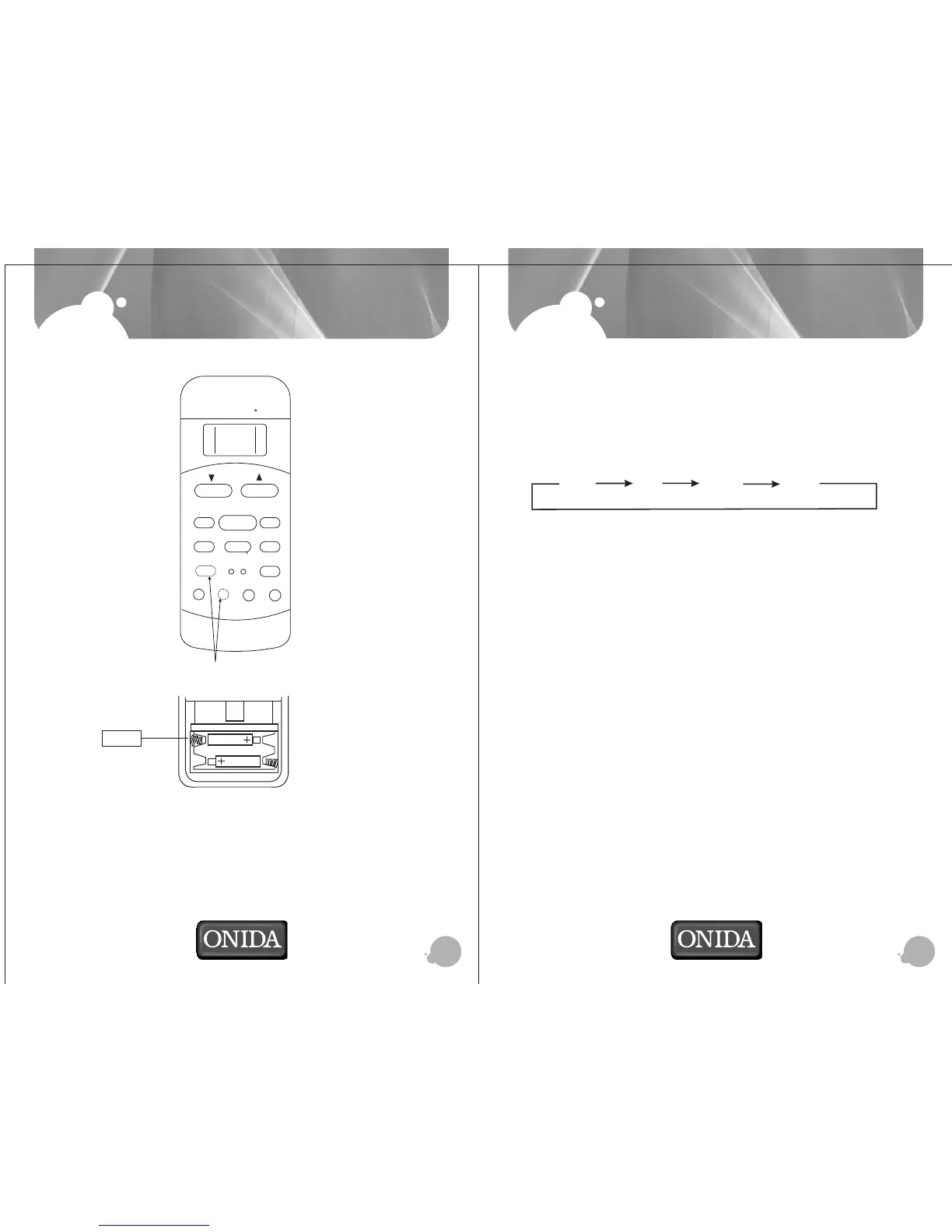
Open back cover and put 2 Nos. AAA size alkaline batteries.
2.
Short one RESET piece after changing the batteries.
3.
The remote signal can be reached upto six metres from the indoor unit.
4. When the button is pressed on remote, indoor unit will “beep” once, indicating
the receipt of signal. If no “beep” sound is heard, press the button once again.
5. Remove batteries if remote control has not been used for long time.
.
BACK VIEW
ADJUST
AUTO
COOL
DRY
HEAT
FAN
HIGH
MED
LOW
MODE
FAN SPEED
DIRECTION
/SWING
TIMER ON
SLEEP
ON/OFF
TIMER OFF
SELF
CLEAN
RESET LOCK
SET TEMPERATURE( C)
FOLLOW
ME
LED
DISPLAY
CLEAN
AIR
TURBO
Optional button
1)TEMP Button : Push this button to decrease the indoor temperature setting in 1oC
increments to 17oC.
2)TEMP Button : Push this button to increase the indoor temperature setting in 1oC
increments to 30oC.
3)MODE Button: Each time the button is pressed, the operation mode is selected in the
sequence of the following:
4)DIRECTION/SWING Button: Press this button once and quickly to change the air flow
direction of the horizontal louver a little. The moving angle of the louver is 6o for each
press. Press the button without releasing for 2 more seconds, the horizontal louver would
swing automatically. Press it again, it would stop moving. When the louver swing/movindg
at a certain position which would affect the cooling and heating effect of the air conditioner,
it would automatically change the swing direction (upward or downward).
5)CLEAN AIR Button(on some models): When push this button, the Ionizer/Plasma Dust
Collector(depending on models) is ener-gized and will help to remove pollen and impurities
from the air.
6)SELF CLEAN(AUTO CLEAN )Button: Press this button under COOL or DRY mode, the self
clean function is activated. Press it again will stop the operation and turn off the unit.
7) FOLLOW ME Button(on some models): Push this button to initiate the Follow Me feature,
the remote display is actual temperature at its location. The remote control will send this
signal to the air conditioner every 3 minutes interval until press the Follow Me button again.
The air conditioner will beep to indicate the Follow Me feature has ended if it does not
received the signal during any 7 minute interval.
8) RESET Button: Once the recessed RESET button is pressed, all of the
current settings will be cancelled and the controller will return to the initial
settings
8) RESET Button: Once the recessed RESET button is pressed, all of the current settings will be
cancelled and the controller will return to the initial settings.
9) ON/OFF Button: Press this button to start the indoor unit. Press again to stop the unit..
AUTO DRY HEAT FAN


 To Next Page