EasyManua.ls Logo

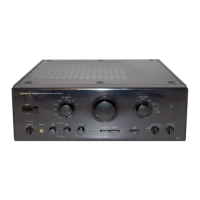
Onkyo A-8190 - User Manual

Onkyo A-8190
8 pages
Print Icon
To Next Page IconTo Next Page
Loading...
eer

Other manuals for Onkyo A-8190

Question and Answer IconNeed help?

Do you have a question about the Onkyo A-8190 and is the answer not in the manual?

Summary

Features

Plenty of Clean Power

Details amplifier power output for A-8190 and A-8170 models.

CD Direct Switch

Explains Onkyo's direct design philosophy for signal path integrity.

Video Input Capability

Describes the unit's two video inputs and one output for monitors.

Signal In-Phase Filters

Explains filters preventing sonic colorations and interference.

Real Phase* Circuitry (A-8190)

Mentions specific circuitry for the A-8190 model.

Safety and Precautions

Important Safeguards

Critical warnings to reduce risk of fire or electric shock.

Precautions

Guidelines for warranty, copyright, fuse, and general care.

System Connections

General Connection Notes

Details jack polarity for input/output terminals.

Component Connectivity

Covers turntable, tuner, CD, tape, and video connections.

Speaker and Outlet Connections

Speaker Connections

Instructions on connecting speakers, polarity, and impedance.

AC Outlets (USA & Canadian Model)

Information on switched and unswitched AC outlets.

Front Panel Facilities

Front Panel Control Overview

Detailed description of all front panel controls and indicators.

Operations

Basic Operations

Covers listening to sources like CD, record, and broadcast.

Advanced Operations

Includes tape dubbing, recording, and video playback.

Troubleshooting and Specifications

Troubleshooting Guide

Lists common problems, causes, and remedies for the amplifier.

Technical Specifications

Provides detailed technical data for A-8190 and A-8170 models.

Overview

This document is a user manual for the Onkyo A-8190/8170 Integrated Stereo Amplifier, a device designed to enhance your audio experience with a focus on clean power and signal integrity.

Function Description

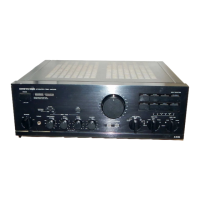
The Onkyo A-8190/8170 is an integrated stereo amplifier that serves as the central hub for your audio and video components. Its primary function is to amplify audio signals from various sources, delivering them to your speakers or headphones with high fidelity. The amplifier is designed with an emphasis on "direct in" signal paths, aiming to minimize interference and maintain the purity of the sound.

A key feature is the CD Direct Switch, which bypasses the preamp section's tone control circuitry, volume control, and input selector for CD playback. This ensures that the CD player's output signal is routed directly to the power amplifier section, preserving the original sound quality.

The amplifier also boasts Video Input Capability, allowing connection of two video inputs (video disc player and VCR) and one video output for a TV monitor. The video signal path is kept entirely separate from the audio circuitry and is located close to the input/output pin jacks to prevent interference and maintain a sharp, clear picture. No dedicated video amplifier is used in this design.

To further enhance sound quality, the amplifier incorporates Signal In-Phase Filters. These filters are designed to prevent unwanted sonic colorations and interference from both analog and digital sources by reducing common mode electrical noise while maintaining phase fidelity, all without resorting to increased negative feedback. The A-8190 model specifically includes Real Phase Circuitry.

The amplifier can drive two pairs of speaker systems simultaneously, with a speaker selector allowing you to choose between Speakers A, Speakers B, or both (A + B). A headphone jack is also provided for private listening.

For audio customization, the A-8190 model features Contra Bass, Bass, and Treble controls, which can be bypassed using the Tone Switch for a more direct sound. The A-8170 model has Bass and Treble controls. A Balance Control allows adjustment of the relative volume between left and right channels. The Mode Selector enables switching between stereo and monaural listening.

The amplifier supports various input sources including a turntable (PHONO), tuner, compact disc player (CD), and two tape decks (TAPE-1/DAT, TAPE-2). It also includes Recording Source Selectors for TAPE-1 REC and TAPE-2 REC, allowing you to record different program sources simultaneously or perform tape-to-tape dubbing.

The Video Mode Switch allows for recording from video sources to tape decks, recording from audio sources to video tape recorders, and BGV Playback (Background Video), which enables playing video programs on a monitor while listening to audio from other sources like a turntable, tuner, CD, or tape decks.

The amplifier also provides AC Outlets (for USA & Canadian models only), including both unswitched (total 200 watts capacity) and switched (50 watts capacity) outlets, which are controlled by the front panel Power switch. The A-8190 model also features Pre-Out terminals for connecting an external power amplifier, allowing the unit to function as a preamp.

Usage Features

To ensure optimal performance and listening enjoyment, several usage features are highlighted:

Power and Safety:

  • The Power Switch turns the unit on and off, indicated by an orange band when power is on.
  • The Servo Operation Indicator turns green when the Super Servo circuitry has stabilized, indicating that sound can be heard. If it turns off during operation, it signals a problem, and the unit should be turned off and serviced.
  • For models with polarized plugs, it's crucial to use them with extension cords or outlets that allow full blade insertion to prevent electric shock.
  • For British & European models, specific wiring color codes (Blue for Neutral, Brown for Live) must be followed when replacing or mounting the AC plug.
  • Worldwide models are equipped with a Voltage Selector on the rear panel, which must be set to match the local power supply voltage before initial power-on.

Connections:

  • All connections should be made before plugging in the power cord.
  • Input and output jacks are color-coded (Red for right channel, Black/Blue for left channel) for easy identification.
  • For turntables, a ground (earth) lead wire must be connected to the GND terminal to prevent hum. Turntables should be placed on a firm, vibration-free surface.
  • Speaker connections require proper polarity: (+) terminal (red) on the amplifier to (+) on the speaker, and (-) terminal (black) on the amplifier to (-) on the speaker.
  • The load impedance of each connected speaker system must be at least 4 ohms (A or B - 4 ohms min., A and B - 8 ohms min.).
  • Speaker leads should not be unnecessarily long or thin, as this can reduce the damping factor.
  • When connecting speaker leads, strip about 1/2 inch of insulation, twist stranded wires, insert them into the side hole of the terminal, and tighten securely, ensuring no uninsulated copper is exposed.

Operation Modes:

  • Normal Standby Mode sets controls to default positions (Muting OFF, Tone DEFEAT, Volume minimum, Input Selector and Speaker Selector as desired) as a starting point for all operations.
  • Listening to a compact disc: Press CD or CD DIRECT Input selector, then play the CD. Note that in CD DIRECT position, MODE, BALANCE, TONE CONTROL, and MUTING functions are bypassed.
  • Listening to a record: Press PHONO Input selector, set CARTRIDGE selector (MC or MM) to match your cartridge, then play the record.
  • Listening to a broadcast: Press TUNER Input selector, then tune the tuner to the desired broadcast.
  • Using video equipment: Press VDP or VCR Input selector, then play the video equipment. Visual reproduction is possible if a monitor or TV is connected to the VIDEO MON. OUT terminal.
  • Using Tape Decks: For playback, select TAPE-1 or TAPE-2. For recording, set the recording source selector (TAPE-1 REC, TAPE-2 REC) to the desired program source (V, TUNER, PHONO, or CD).
  • Tape-to-Tape Duplicating: This allows copying from one tape deck to another. The recording source selectors (DUB 1 ► 2 or DUB 2 ► 1) are used for this purpose.
  • Recording from a Video Source to a Tape Deck: Set the Recording source selector to V and the Video Mode switch to VCR V or VDP V.
  • Recording from an Audio Source to a Video Tape Recorder: Set the Video Mode switch to VCR REC-SOUND and the TAPE-2 recording source selector to the desired audio source.
  • BGV Playback (Background Video): Select the desired audio component with the Input Selector, then select the desired video component (VDP V or VCR V) with the Video Mode switch.
  • Using a Mixing Console or Graphic Equalizer: Connect the mixer/equalizer to the TAPE-1 or TAPE-2 terminals and set the input selector accordingly. This allows for equalizing audio sources for playback or recording.

Tone Control System (A-8190 only):

  • The amplifier features a Variable Tone Boosting System where the effect of the tone controls (contra bass, bass, and treble) gradually reduces as the volume increases beyond a certain level (20 graduation mark). Below this level, tone controls have full effect.

Maintenance Features

Proper care and maintenance are essential for the longevity and trouble-free performance of your Onkyo A-8190/8170 amplifier.

Cleaning:

  • Periodically wipe the front and rear panels and the cabinet with a silicon or other soft cloth.
  • For heavier dirt, use a soft cloth dampened with a weak solution of mild detergent and water, wrung dry, then wipe immediately with a clean cloth.
  • Do not use rough materials, thinners, alcohol, or other chemical solvents or cloths, as these can damage the finish or remove panel lettering.
  • Cleaning of internal parts should only be performed by qualified service personnel.

Servicing:

  • The unit should be serviced by qualified service personnel if:
    • The power supply cord or plug is damaged.
    • Objects have fallen or liquid has been spilled into the appliance.
    • The appliance has been exposed to rain.
    • The appliance does not operate normally or exhibits a marked change in performance.
    • The appliance has been dropped or the enclosure damaged.
  • Users should not attempt to service the appliance beyond what is described in the operating instructions.
  • The AC fuse is located inside the chassis and is not user serviceable. If power does not come on, contact your Onkyo dealer.

Troubleshooting:

  • A troubleshooting guide is provided to address common issues:
    • No power: Check if the AC fuse is blown (contact dealer).
    • Power on but no sound: Check for bad connections, input leads, speaker leads, and pin plugs.
    • Hum, low frequency noise: Check for poor or no input ground, and poor or no phono motor ground.
    • Howling when volume is turned up: Ensure the turntable and speakers are not too close together.
    • Rough or scratchy sound, high range not clear: Check if the stylus of the pick-up is worn or dirty, or if the treble control is set too high.

General Precautions:

  • Avoid placing the unit in direct sunlight or areas with extremely high or low temperatures.
  • Avoid damp or dusty places and areas directly affected by vibrations from speakers. Do not place the unit on or above speakers.
  • Avoid unstable or high places where the unit could fall.
  • Ensure proper ventilation; do not block ventilation openings or place the unit in enclosed spaces that impede airflow.
  • Keep the unit away from heat sources such as radiators, heat registers, or other heat-producing appliances.

By following these guidelines, you can maintain the performance and extend the life of your Onkyo A-8190/8170 Integrated Stereo Amplifier.

Onkyo A-8190 Specifications

General IconGeneral
Power Output80 W + 80 W (8 ohms, 20 Hz - 20 kHz, 0.08%, 2 channels driven, FTC)
Total Harmonic Distortion0.08%
Input Sensitivity200 mV
Speaker Load Impedance4 ohms - 16 ohms
Dimensions435 x 132 x 380 mm

Related product manuals