TX-SR606
DEBUG MODE-5
HDMI DEBUG MODE-1/2
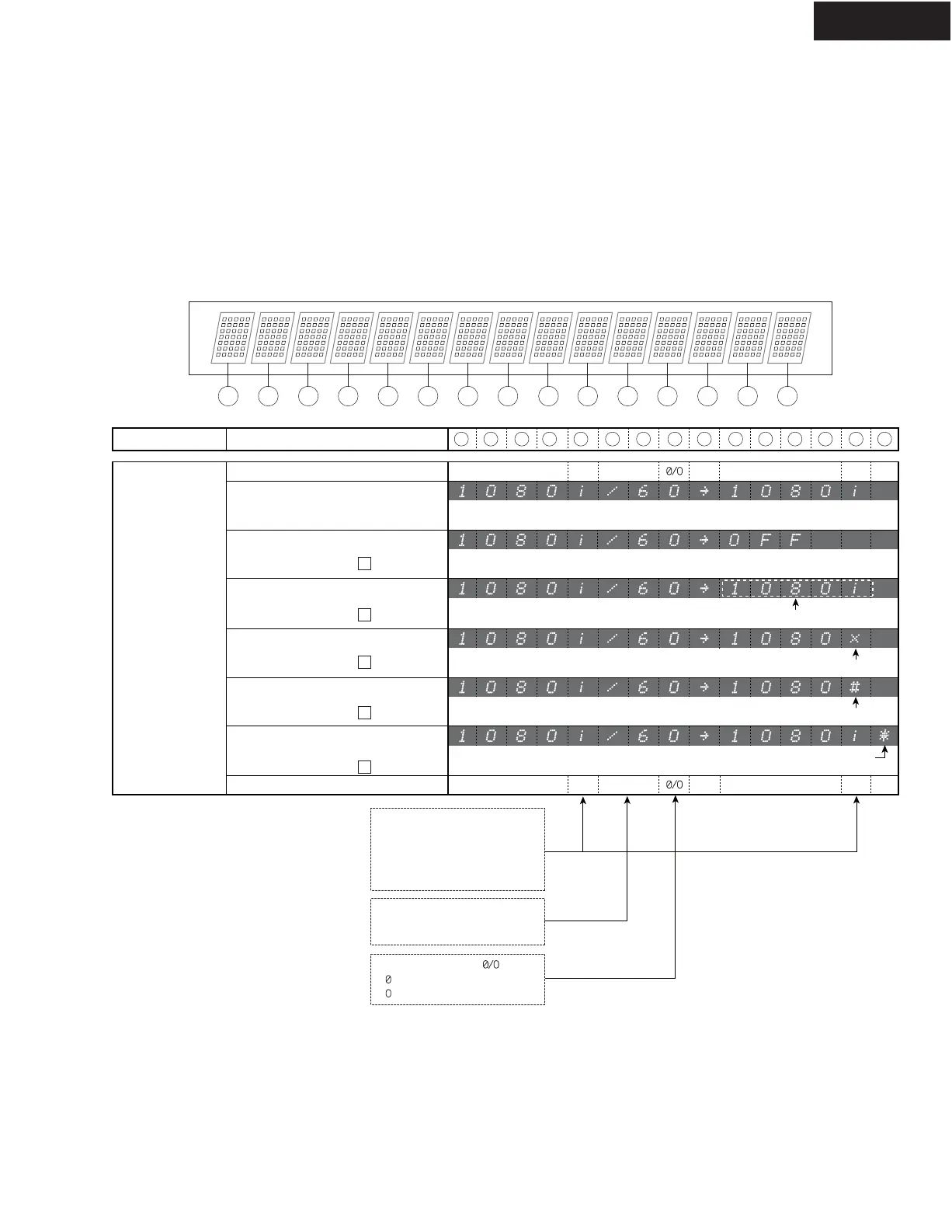
HDMI-related operations can be checked to some extent by displaying HDMI debug mode.
To enter this mode
Hold down DISPLAY
button for 3 seconds. Information display will last for about 8 seconds.
Content of Display
FL Display
1 43291211106785
14
130
Video Input Format Status Description
0 1 2 3 4 5 6 7 8 9 10 11 12
13
14
Source Device Video Format : OK,
Sink Device EDID : OK
i/p/I/P
Source Device Video Format : OK
Sink Device Hot plug : Low
Source Device Video Format : OK
Sink Device HDCP Authentication : Fail
Source Device Video Format : OK
Sink Device Resolution : Error
Source Device Video Format : OK
Sink Device EDID Reading : Error
Source Device Video Format : OK
Sink Device :
Busy(Cannot accept HDMI signal)
Normal Source
Video Formats
Output ResolutionInput Resolution Frame Rate i/p/I/P
Normal State
Error State ---> Remedy
1
Blinks
Error State ---> Remedy
2
Error State ---> Remedy
3
Error State ---> Remedy
Error State ---> Remedy
4
Error mark
Error mark
Error mark
i/p/I/P
i : HDMI, Interlace
p : HDMI, Progressive
I : DVI, Interlace
P : DVI, Progressive
/6 : 60 frame/sec
/5 : 50 frame/sec
Frame Rate
: Analog input
: HDMI input
Video signal input
Progressive/ Interlace
i/p/I/P Output ResolutionInput Resolution Frame Rate
i/p/I/P
Description --->
Description --->
Display --->
(Example)
Segment No. --->
FL segment No. --->
5


 To Next Page
 Loading...