10
Playing an MD
POWER
REMOTE CONTROL RC-339MD
CONTINUE
PLAY MODE
RANDOM MEMORY
REPEAT
>25
M.SCAN
CLEAR
ENTER
NAME
SCROLL DISPLAY
1
A
2345
678910
11 12 13 14 15
16 17 18 19 20
21 22 23 24 25
BCDE
FGHI J
KLMNO
PQRST
UVWX Y
Z
.,
/?!
()
REC
A-B A-SPACE
RC-339MD
M. SCAN
2
1
CONTINUE
1
2
, ,
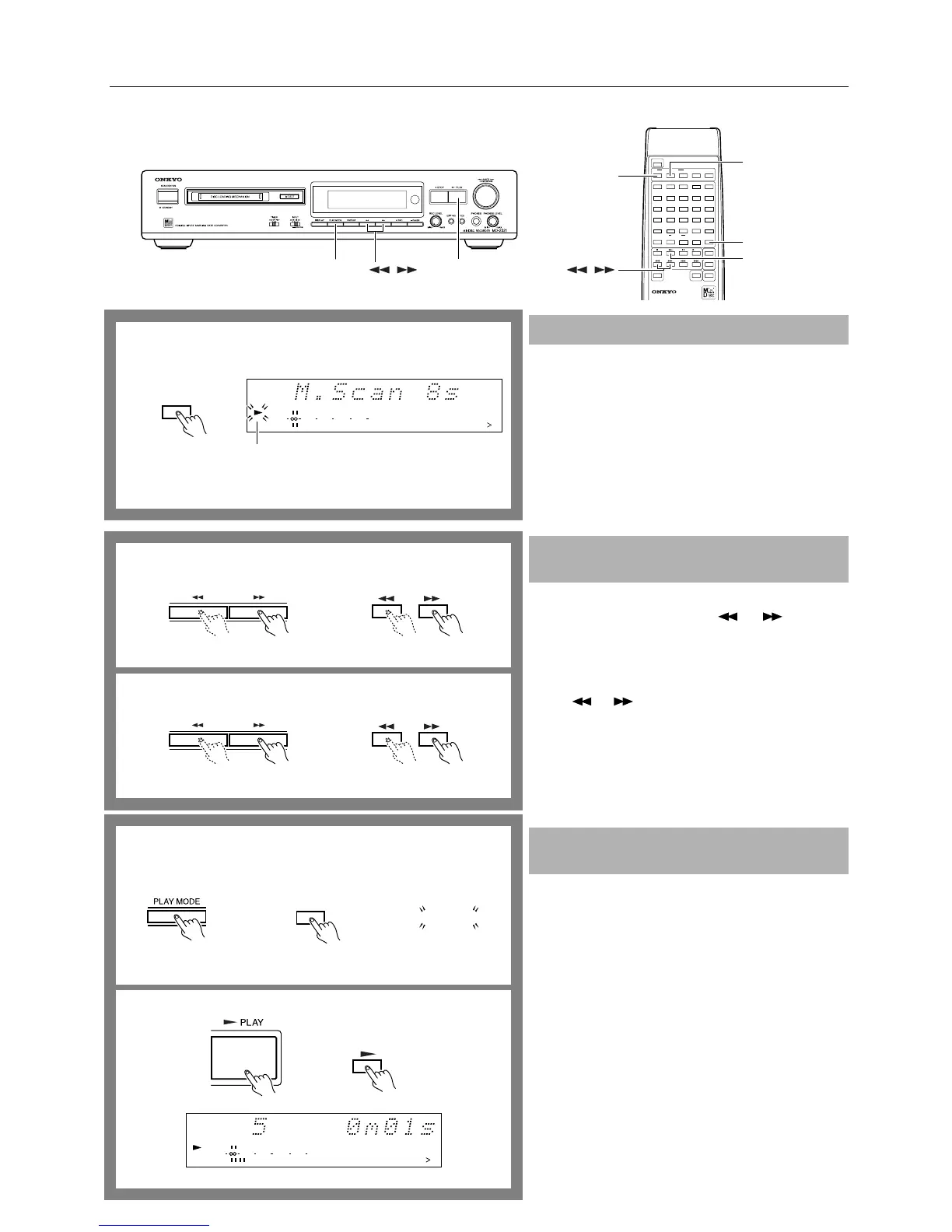
The following function is available only when you use the
remote controller.
When you press the M.SCAN button while the MD
recorder is either playing or stopped, the beginning
(eight seconds) of each track on the disc is played back in
sequence.
The ® indicator flashes during music scan.
Press the ® or M.SCAN button on the remote controller
while the beginning of a track is playing to contiunue play-
ing back the track.
Searching for a part to play by cueing
During playback, hold down the or button and
release it when the part you want to hear starts to play.
Searching for a part to play using the time display (at pause,
high-speed search)
When playback is temporarily stopped (paused), keep press-
ing the or button and release it when the playing
time of the part you want to hear is displayed. Press the
® PLAY button (or the ® button on the remote controller)
to start playing from that position.
Note:
• “Over” indicates that the end of the last track has been
reached.
1. When the MD recorder is stopped, press the PLAY
MODE button several times until “RANDOM”
appears on the display.
The display changes as shown below each time you press
the PLAY MODE button:
Random playback (RANDOM indicator lights up.)
↓
Memory playback (MEMORY indicator lights up.)
↓
Normal playback (No indicator appears.)
To select random mode using the remote controller, press
the RANDOM button.
2. Press the ® PLAY button (or the ® button on the
remote controller).
To exit random mode
When the MD recorder is stopped, press the PLAY MODE
button several times until “RANDOM” disappears from the
display. (Or, press the CONTINUE button on the remote
controller.)
Music Scan
Searching for a part to play (Search play-
back)
Playing tracks in random order (Random
playback)
12345
678910
11 12 13 14 15
DIGITAL IN
010 22040
R
6
L
15
1
M. SCAN
Remote controller
Flashes
Remote controller
Remote controller
2
1
RANDOM
RANDOM
Remote controller
TRACK
12345
678910
11 12 13 14 15
DIGITAL IN
RANDOM
010 22040
R
6
L
15
1
Remote controller


 To Next Page