9
Playing an MD
Number buttons
POWER
REMOTE CONTROL RC-339MD
CONTINUE
PLAY MODE
RANDOM MEMORY
REPEAT
>25
M.SCAN
CLEAR
ENTER
NAME
SCROLL DISPLAY
1
A
2345
678910
11 12 13 14 15
16 17 18 19 20
21 22 23 24 25
BCDE
FGHI J
KLMNO
PQRST
UVWX Y
Z
.,
/?!
()
REC
A-B A-SPACE
RC-339MD
,
AMCS
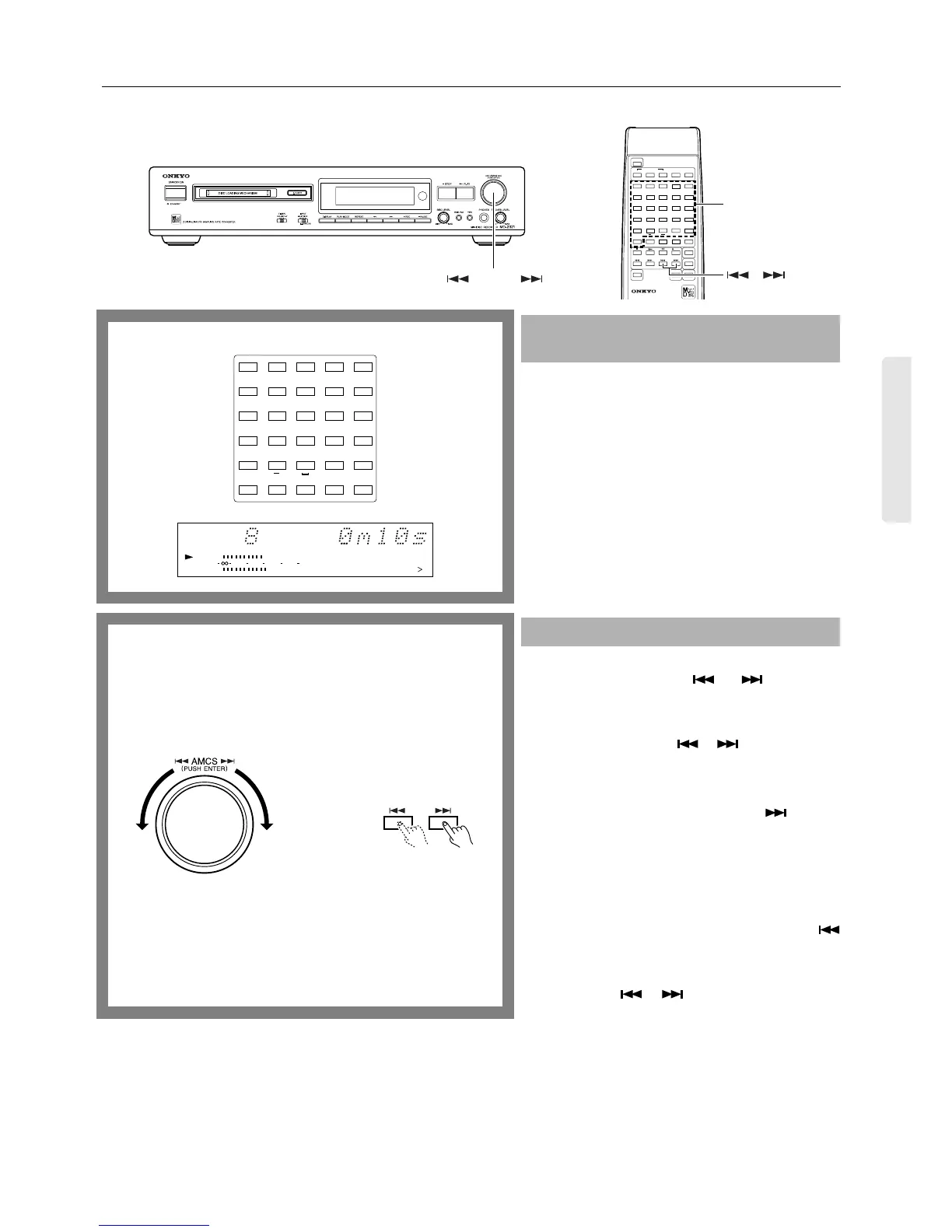
Press the number button on the remote controller to
select the track you want to play.
Note:
To play a track numbered 26 or more...
Press the [>25] button first. Set a value for the 10th place and
then the 1st place using the number buttons in this order.
(You can enter “0” by pressing the [10] button.)
Ex.
To select the 30th track:
[>25] + [3] + [10]
To select the 100th track:
[>25] + [>25] + [1] + [10] + [10]
The [>15] indicator lights up during playback of a track
numbered 16 or higher.
During play, you can change the playing track by turning the
AMCS knob (or by pressing the and buttons on the
remote controller).
If the MD recorder is stopped, turn the AMCS knob to select
the track number you wish to play, and press the knob. (On
the remote controller, use the or button to select the
track, then press the ® button.)
To play the next track or a later track...
Turn the AMCS knob clockwise (or press the button on
the remote controller several times) until the desired track is
located.
To start playback again from the beginning of a track
that is currently playing, or to play the previous track or
an earlier track...
Turn the AMCS knob counterclockwise (or press the
button on the remote controller several times) until the
desired track is located.
In Memory playback mode (see page 19), turn the AMCS
knob (or press the or button) to select tracks in the
stored sequence.
Selecting a playing track using the number
buttons
Changing the playing track using the AMCS
REPEAT
>25
M.SCAN
12345
678910
11 12 13 14 15
16 17 18 19 20
21 22 23 24 25
FGHI J
KLMNO
PQRST
UVWXY
Z
.,
/?!
()
A-B A-SPACE
Remote controller
TRACK
8910
11 12 13 14 15
DIGITAL IN
010 22040
R
6
L
15
1
Remote controller


 To Next Page