EasyManua.ls Logo

Onkyo TX-SV313PRO - Page 8

Onkyo TX-SV313PRO
16 pages
Print Icon
To Next Page IconTo Next Page
To Previous Page IconTo Previous Page
Loading...
TV
Connections
(MONITOR)
1.
Connect
the
TV
VIDEO
input
to
the
TX-SV313PRO
MONITOR
“OUT”.
jack.
There
is
no
need
to
perform
an
audio
connection
since
sound
will
be
sent
directly
from
the
TX-SV313PRO
to
the
Speaker
systems.
2.
The
TX-SV313PRO
does
not
have
an
RF
converter.
Therefore,
it
can
be
used
with
only
a
monitor
TV
equipped
with
a
video
input
jack.
3.
Since
the
television
set,
tuner
(FM/AM)
section
of
this
unit
can
cause
interference
that
may
disrupt
sound
and/or
picture
quality,
the
TV
and
TX-SV313PRO
and
their
respective
connection
should
be
placed
as
far
apart
as
possible.
The
use
of
a
common
TV/FM
antenna
is
not
recommended
(see
antenna
section).
AC
Outlets
@
SWITCHED:
These
outlets
are
switched
on
and
off
by
the
Power
button
on
the
front
panel
and
remote
control
transmitter.
Capacity
is
total
90
watts.
Amplifier
Connections
@
CENTER
PRE
OUT
jack
During
surround
operations,
when
a
center
power
amplifier
is
used
for
the
Center
speaker,
make
the
connections
at
the
TX-
SV313PRO
CENTER
PRE
OUT
jack,
and
the
INPUT
jack
on
the
power
amplifier.
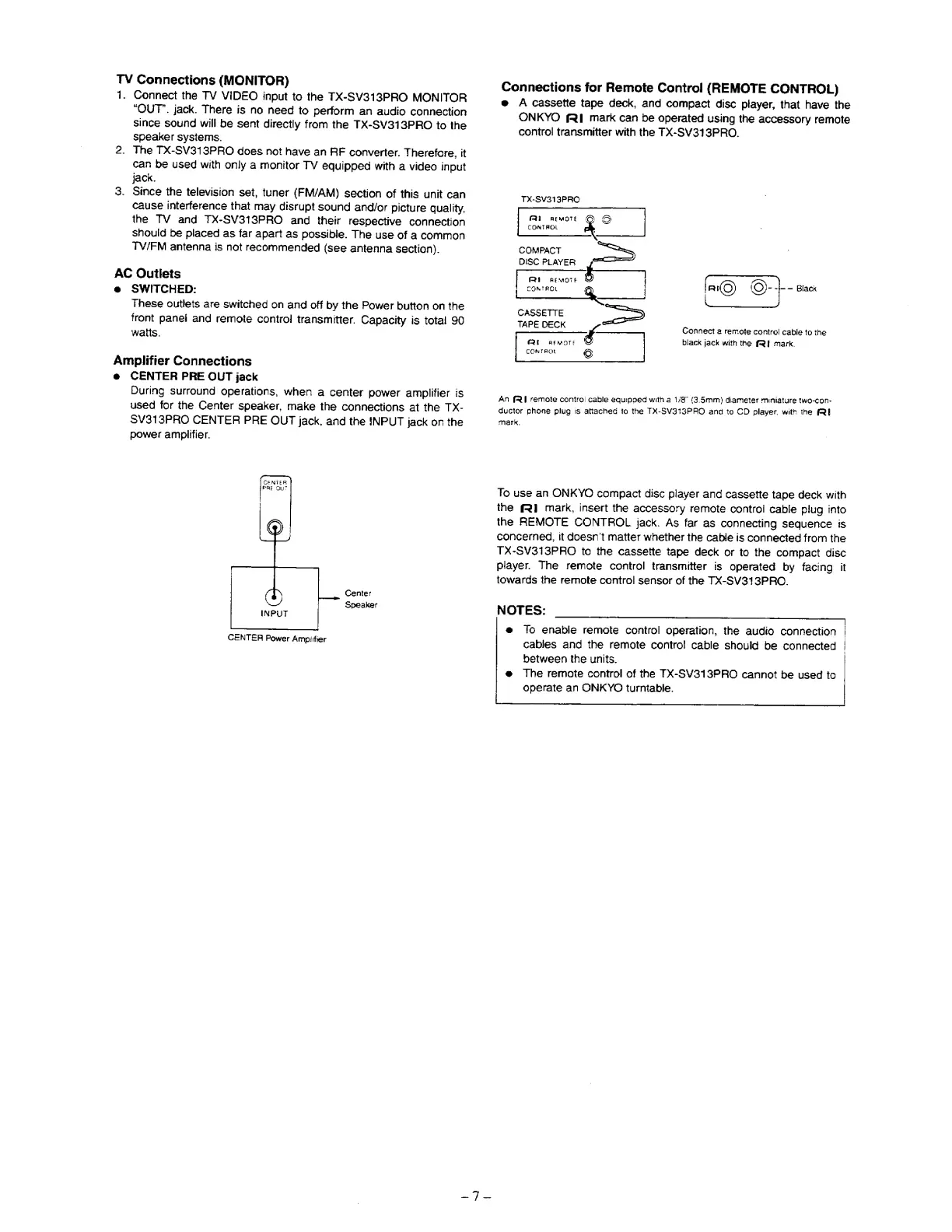
Center
Speaker
CENTER
Power
Ampirfier
Connections
for
Remote
Control
(REMOTE
CONTROL)
e
A
cassette
tape
deck,
and
compact
disc
player,
that
have
the
ONKYO
fl
mark
can
be
operated
using
the
accessory
remote
control
transmitter
with
the
TX-SV313PRO.
TX-SV319PRO
fro
rnemote
CE
OG
CONTROL
EY
COMPACT
Sy
DISC
PLAYER
|
FRI
REMOTE
CONTROL
gq
CASSETTE
=
TAPE
DECK
FQ
REMOTE
3
©
CONTROL
Connect
a
remote
contre!
cable
to
the
black
jack
with
the
(|
mark,
An
Fl
remote
contro!
cable
equipped
with
a
1/8”
(3.5mm)
diameter
miniature
two-con-
ductor
phone
plug
is
attached
ta
the
TX-SV313PRO
and
to
CD
player.
with
the
Ri
mark,
To
use
an
ONKYO
compact
disc
player
and
cassette
tape
deck
with
the
fR1
mark,
insert
the
accessory
remote
control
cable
plug
into
the
REMOTE
CONTROL
jack.
As
far
as
connecting
sequence
is
concerned,
it
doesn’t
matter
whether
the
cable
is
connected
from
the
TX-SV313PRO
to
the
cassette
tape
deck
or
to
the
compact
disc
player.
The
remote
control
transmitter
is
operated
by
facing
it
towards
the
remote
control
sensor
of
the
TX-SV313PRO.
NOTES:
@
fo
enable
remote
control
operation,
the
audio
connection
cables
and
the
remote
control
cable
should
be
connected
|
between
the
units.
@
The
remote
control
of
the
TX-SV313PRO
cannot
be
used
to
operate
an
ONKYC
turntable.