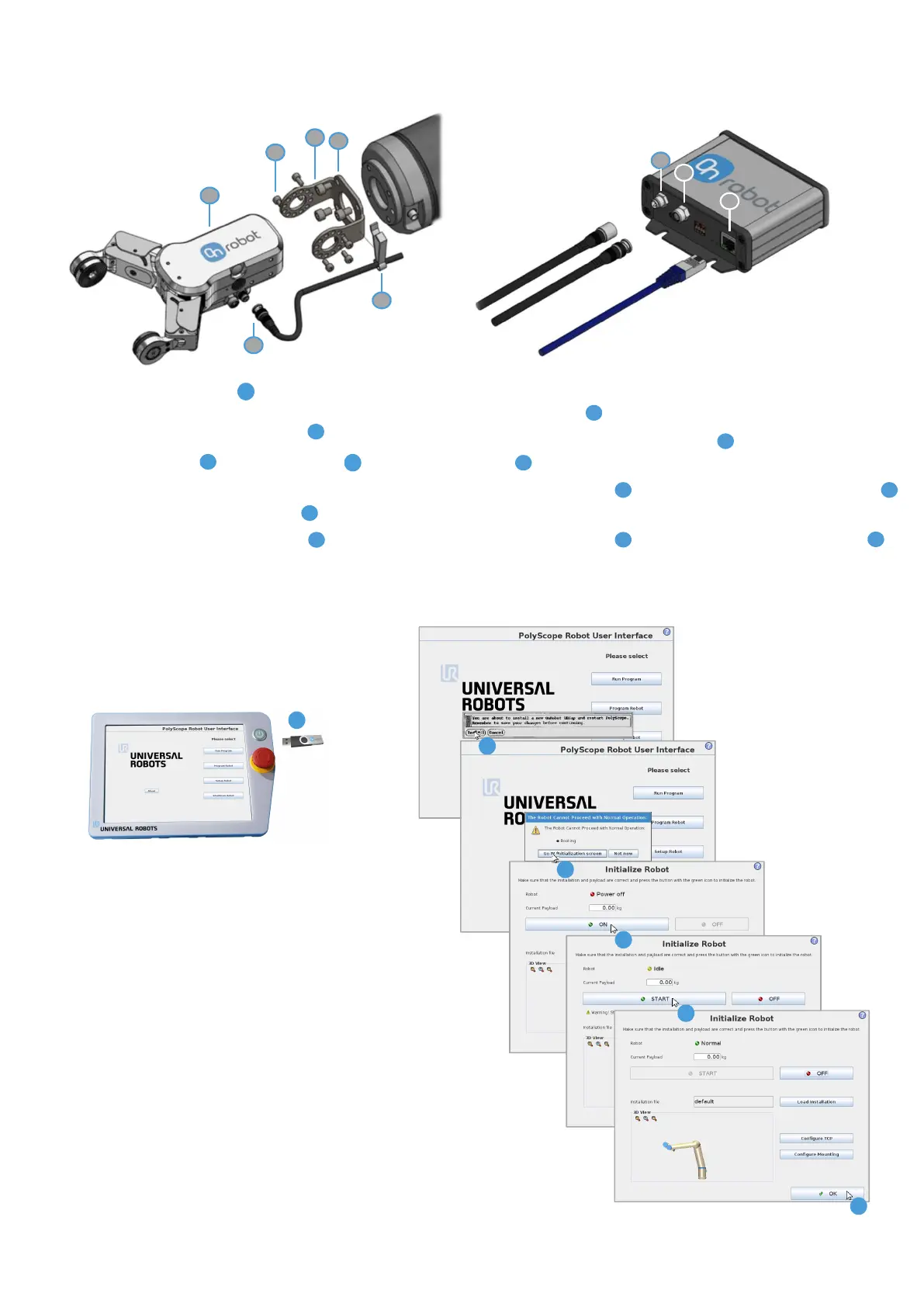
2 Install RG2-FT Software
Package
1. With the system powered on, insert
the USB stick into the teach pendant
2. To confirm the installation process
press “Install”
3. Wait for system to reboot
(it can take a while – approx. 1min)
4. Press “Go to initialization screen”
5. Press “ON”
6. Press “START”
7. Press “OK” – the installation is finished
7
1
5
6
V 1.3 Copyright © 2018 by OnRobot A/S. All rights reserved Page 2 of 4
2
1 Mount RG2-FT
1
3
2
4
5
6
1. Place the bracket on the robot flange
2. Tighten M6 screws (4 pcs)
3. Place RG2-FT on the bracket as shown
on the image
4. Tighten M4 screws (6pcs)
5. Connect the RG2-FT cable to the Gripper
B
L
A
B
M
G
4
6. Fix the RG2-FT cable to the robot with the
cable holder
7. Connect the RG2-FT cable to the Compute
Box
8. Use the cable to connect the Compute Box
to the robot controller
9. Use the cable to power the Compute Box
from the robot controller
N
N
G
E
E
H
E
7
8
9



 To Next Page