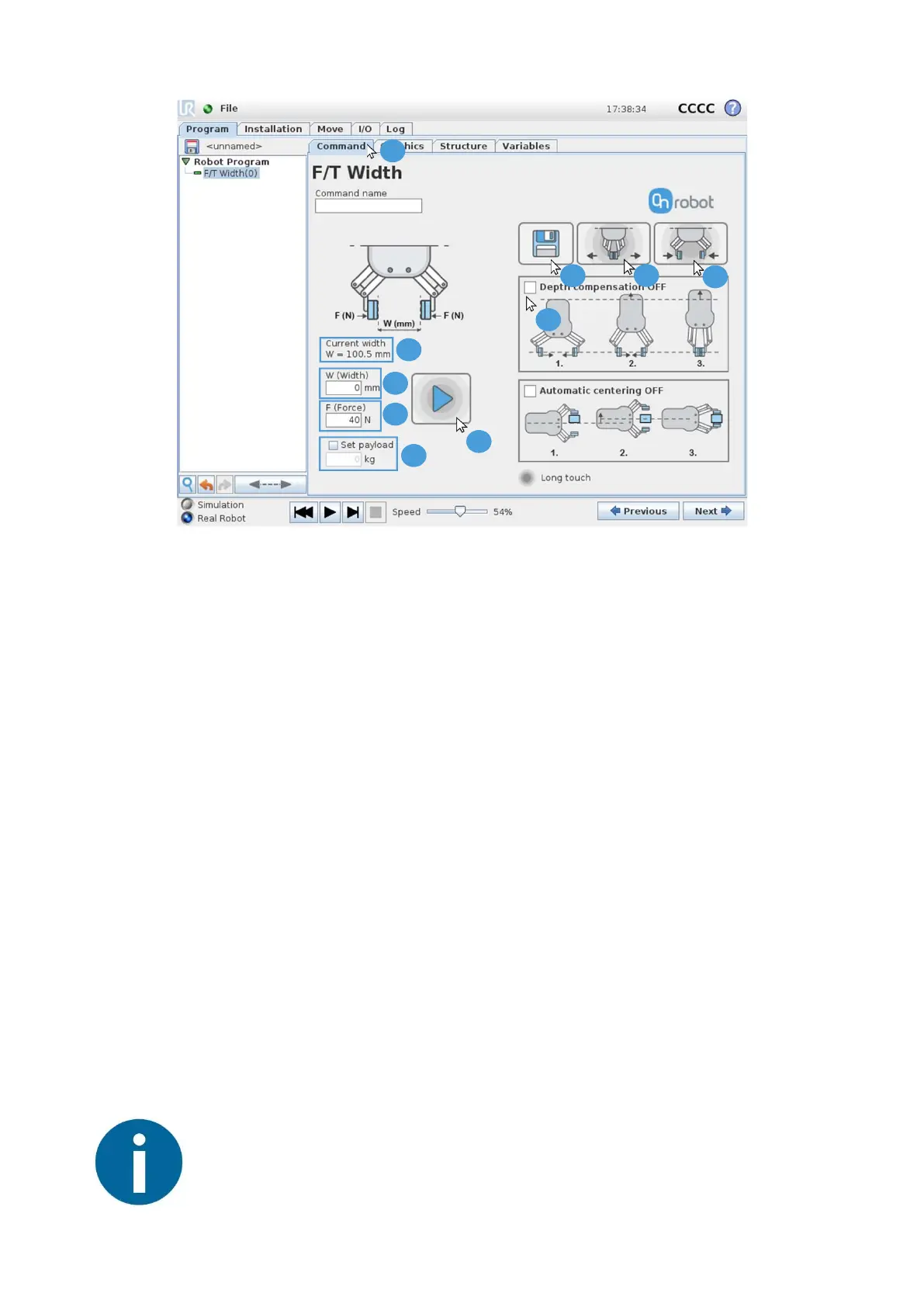
1. Press the “Command” tab
Method 1
A2. The “Current width” shows actual width of the RG2-FT
A3. Set the desired RG2-FT “W(Width)”
A4. Long press the Play button to execute command
Method 2
B2. Open the RG2-FT by using the button (hold-to-run)
B3. Close the RG2-FT by using the button (hold-to-run)
B4. Press the Save button to save the gripper actual width in the current node (Optional)
Functions valid for both methods
5. Set the F(Force)
6. Set the Payload (workpiece weight)
7. Enable or disable “Depth Compensation” (See functionality in User Manual 3.3.1)
8. Enable or disable “Automatic centering” (See functionality in User Manual 3.3.1)
5 Open/Close the RG2-FT with the F/T Width node
V 1.3 Copyright © 2018 by OnRobot A/S. All rights reserved Page 4 of 4
1
7
4
5
6
2
3
4
2
B
3
B
B
A
A
A
After installation, example programs are available on the robot, in
the following folder Programs/OnRobot_UR_Programs
NOTE:



 To Previous Page