Use the Boundary Strip Set Time and Scheduled Cleaning
Set a Scheduled Cleaning
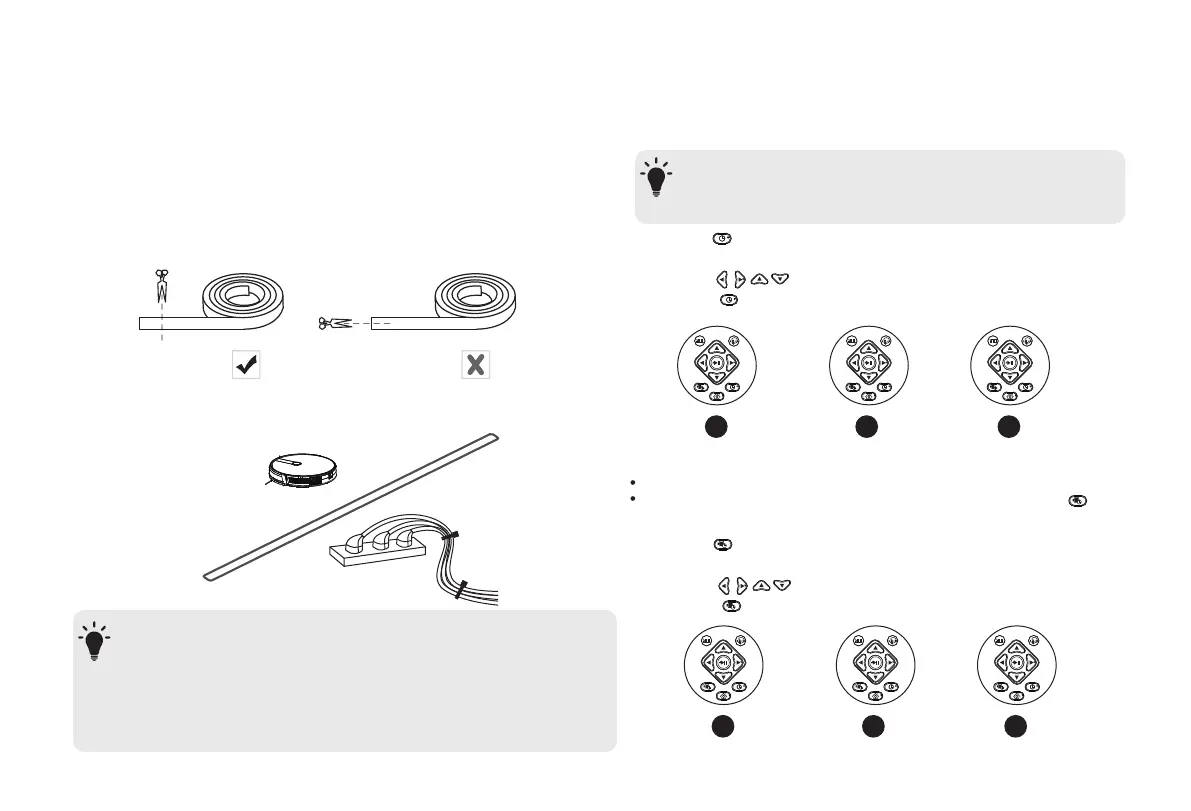
With the Boundary Strip, you can keep Robot away from any
area or item you do not want Robot to clean. Robot will recognize
the Boundary Strip and will not cross into the blocked-off area.
Set Time
1. Identify the area or item you do not want Robot to get close to.
2. If necessary, use scissors to cut the Boundary Strip to a shorter
length. Be sure to correctly measure the length before cutting.
3. Apply adhesive tape to lay the Boundary Strip flat on the floor.
Make sure the strip is placed FLAT on the floor or under an area
rug.
- If the Boundary Strip is rolled up, remove and then re-apply on the floor
with adhesive tape. Otherwise the Boundary Strip may not work well.
- Make sure the Boundary Strip is placed on the same surface plane
Robot is used on.
- Be careful not to damage the floor when using adhesive tape. It is not
recommended for use on carpets.
- Keep the Boundary Strip away from objects that emit excessive heat.
-Make sure the time is set correctly to your local time before
setting a scheduled cleaning.
1. Press on the remote control. The time will blink on the
display
2. Press to set the “hour” and “minute”
1 2 3
1 2 3
3. Press to save the setting.
1. Press on the remote control. The time will blink on the
display
2. Press to set the “hour” and “minute”
3. Press to save the setting.
You can schedule Robot to start cleaning at a specified time.
To cancel a previously scheduled cleaning, press and hold for
3 seconds
T
-Make sure the Robot is turned on
T
11


 To Next Page