INSTALLATION
16
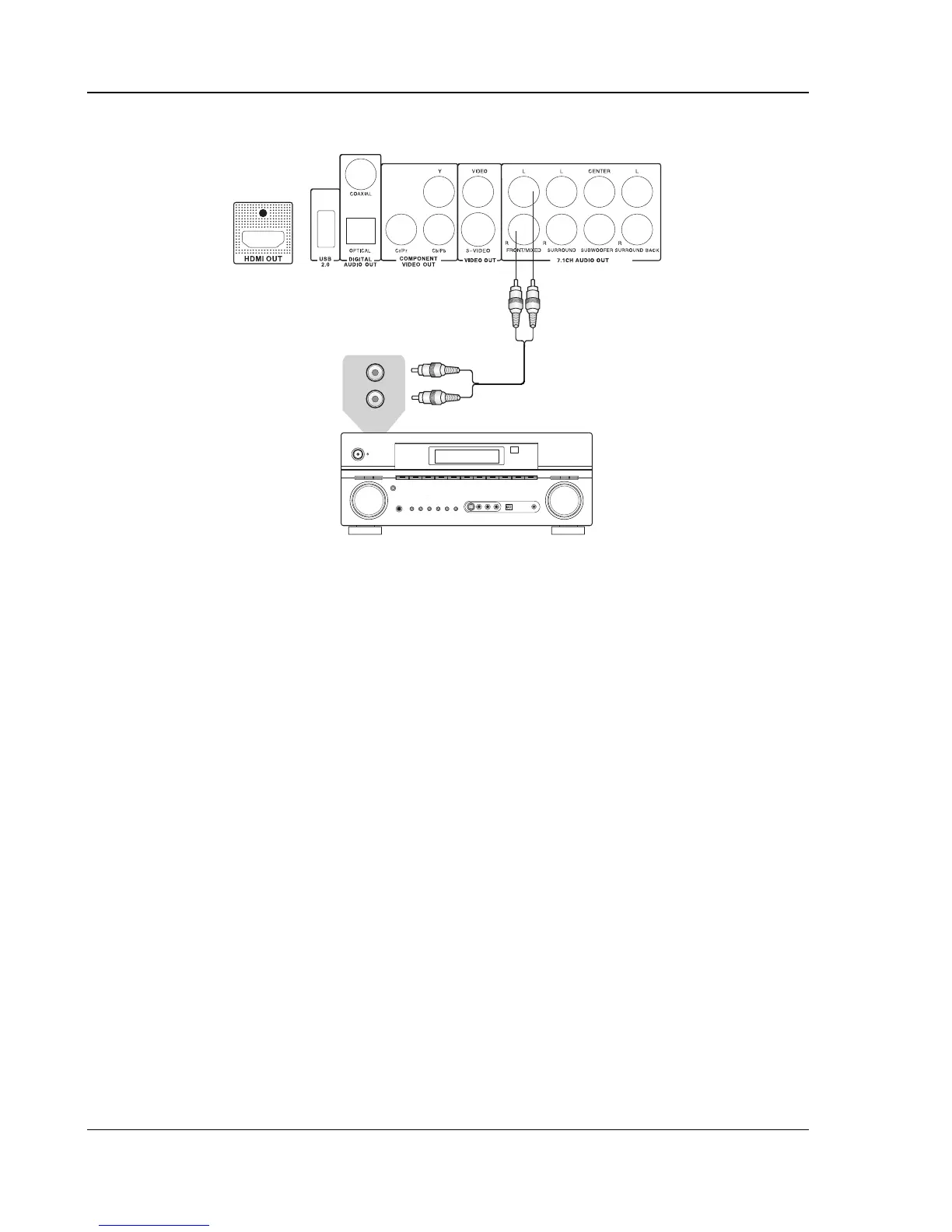
Connecting to a Stereo or Surround Audio System
Audio Interconnect Cable
Rear Panel
AUD
IO/VI
D
EO M
U
LTI-
CHANN
EL
R
E
C
EIVE
R
Stereo or Surround Audio System
AUDIO IN
L
R
Method 8 – Stereo Analog Audio Connection
• If your audio system only offers stereo audio inputs, you can connect it to the FRONT/MIXED
L/R audio outputs of the DVD player using the supplied Red/White audio cables. Depending on
the capability of your audio system, you may set up your DVD player with one of the following
configurations:
• If the audio system does not have surround speakers, please set the down-mix mode to
“Stereo” or “V. Surround”.
• If the audio system has surround speakers and Dolby Pro Logic Surround support, please
set the down-mix mode to “Lt/Rt”.
(Please refer to page
25 for details.)


 To Next Page