ADVANCED OPERATIONS
33
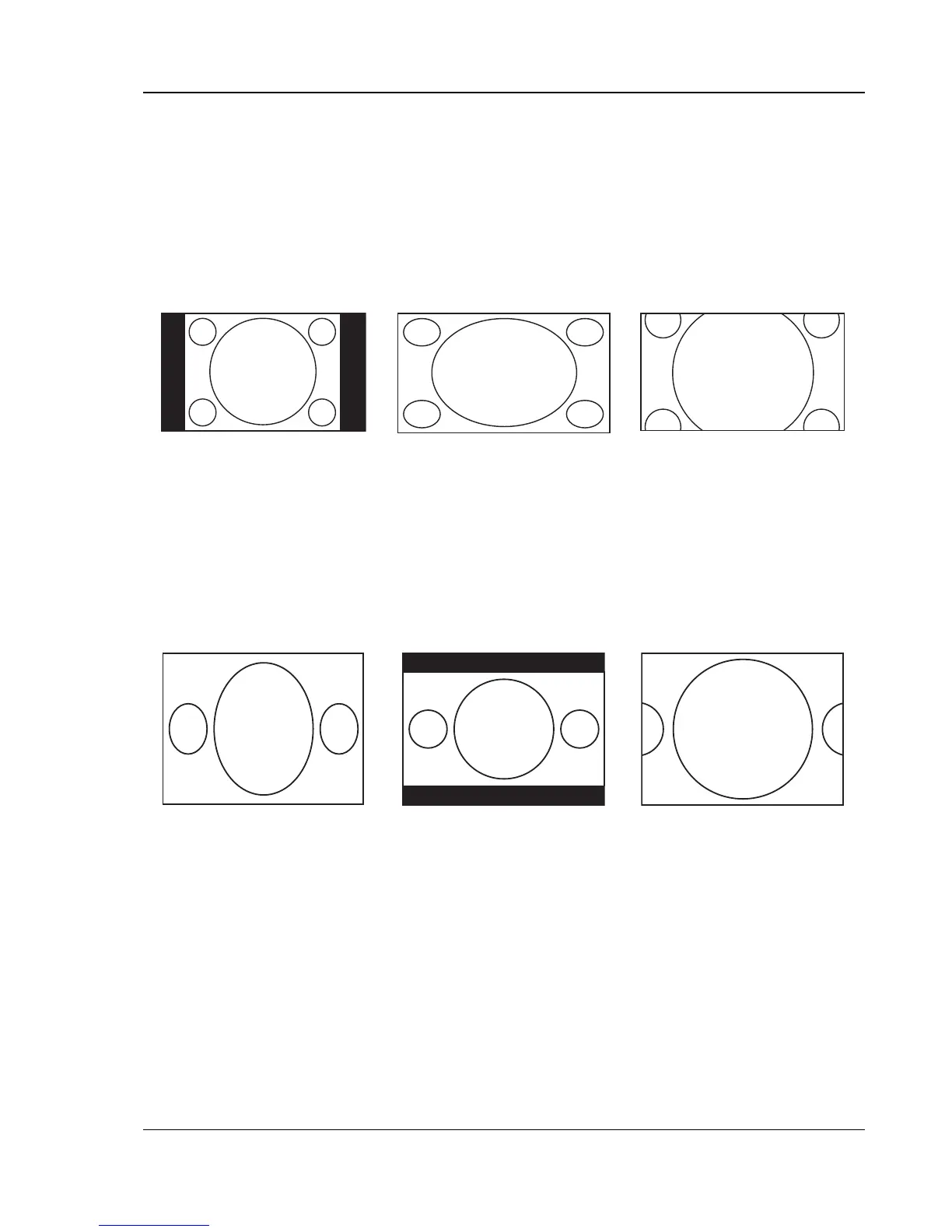
3) Playing 4:3 DVD when “TV Display” is set to “16:9 Wide/Auto”
• 1:1 – The player maintains the correct 4:3 aspect ratio and adds borders to the left and right
sides of the image. The brightness level of the borders can be set by the “Border Level”
setting in the “Video Setup Page” of the setup menu.
• Stretch – The image is horizontally stretched by 1.33 times. This zoom level fills up the 16:9
screen, but figures may look shorter and wider than they should be.
• Full Screen – This zoom level maintains the correct aspect ratio but crops the top and bottom
slightly in order to fit the 4:3 image to the 16:9 screen.
1:1 Stretch Full Screen
4) Playing 16:9 DVD when “TV Display” is set to “4:3 Pan/Scan”
• 1:1 – The player disregards the aspect ratio and fills the 4:3 screen. Figures may look taller and
narrower than they should be.
• Letterbox – The player maintains the correct 16:9 aspect ratio and adds borders to the top and
bottom of the image. The brightness level of the borders can be set by the “Border Level”
setting in the “Video Setup Page” of the setup menu.
• Full Screen – The player maintains the correct aspect ratio but crops the left and right slightly in
order to fit the 16:9 image to the 4:3 screen.
1:1 Letterbox Full Screen


 To Next Page