6.SETTING AND ADJUSTMENT
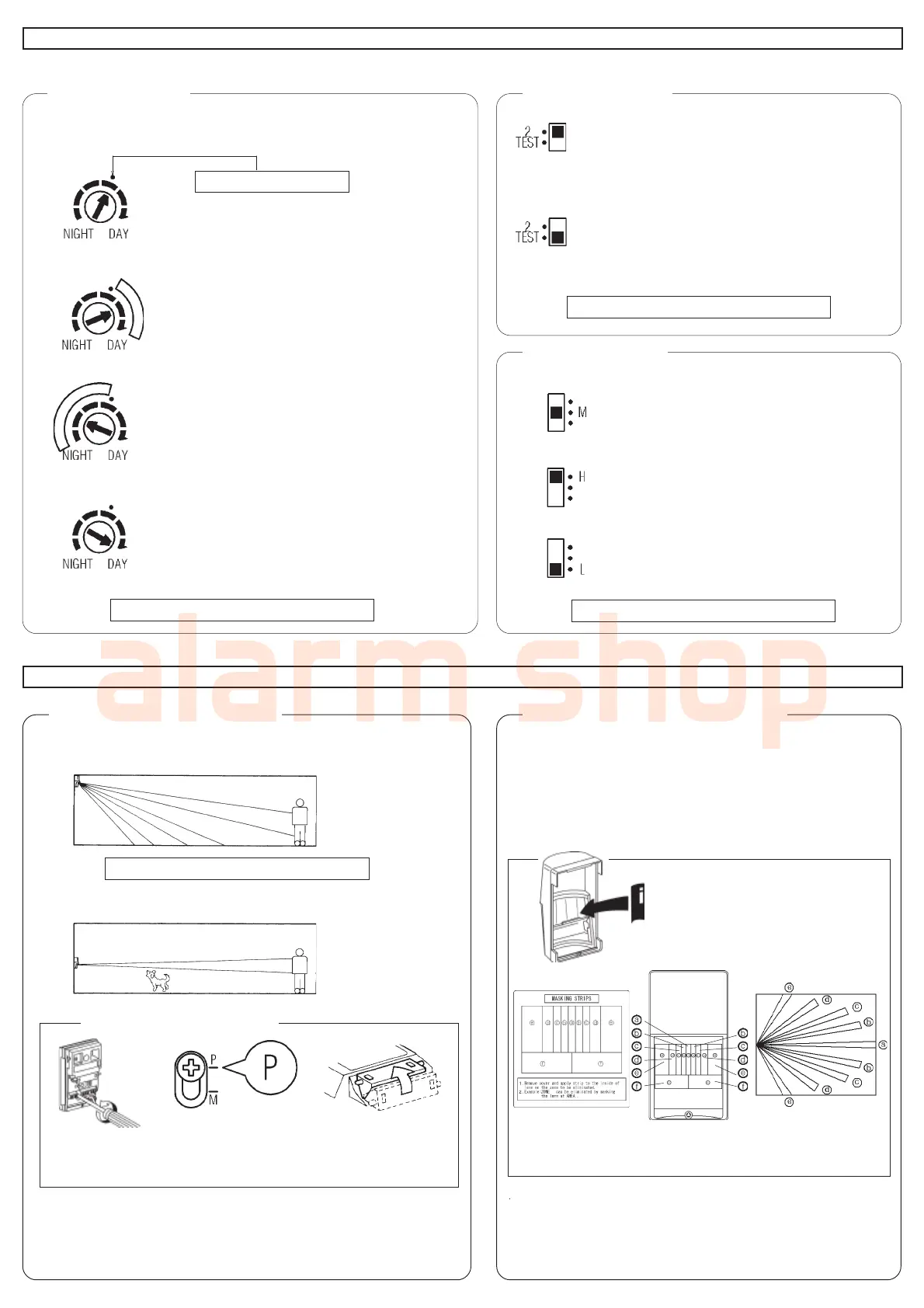
1. Day/ Night Mode
Adjust the Day/Night Mode switch of the detector according to
the brightness of the surrounding area.
: To have the standard detector function
only during evening/night time, set the
dial to the reference position ( · ).
: To have the detector begin to function
while the surrounding area is lighter, turn
the dial gradually to the DAY side.
: To have the detector function only after it
has become dark, turn the dial gradually
to the NIGHT side.
: To have the detector function at all time,
or to perform a walk test, set the dial to
the DAY position.
2. Pulse Count Swich
“2” mode
: Select “2” for normal applications.
(STANDARD Position)
“TEST” mode
: Select “TEST” mode when conducting
WALK TEST , or for use in extremely
stable environments.
3. Sensitivity Switch
: Use “M” position for normal applications.
(STANDARD Position)
: Use “H” Position when you need high sensitivity.
(ex.Pet Alley Area)
: Use “L” position in areas that may be unstable.
7.DETECTION• AREA ADJUSTMENT
Changing vertical detection area
1.Multi-Level Area
Use this area for
normal applications.
2.Pet Alley Area
Provide a horizontal
detection pattern with
no declination of zones,
allowing pets to move
through the area.
Unit is pre-set at “Multi-Level” setting.
Selecting Pet Alley Pattern
Carefully loosen the
adjustment screw.
Slide the cover down
and fasten the screw
at the “P” position.
Flip the Mirror to the
upper position.
Eliminating unwanted detection zones
(LX-402 only)
Unwanted detection zones can be eliminated by simply masking
the lens with the provided masking strip, as follows:
Remove cover and apply strip to the
inside of lens on the zone to be
eliminated.(see illus.)
NOTE ! Pet Alley Area will not function if two changes are not
performed.
Unit is pre-set at “M” position.
NOTE ! Sensitivity setting must be one step higher position
when pet alley area is selected.
NORMAL Position
Unit is pre-set at “2” position.
Unit is pre-set at “NORMAL” position.
Example :
ZONE “a” can be eliminated by masking the lens at
area “a” (see illus.).
1.
2.



 To Next Page