EasyManua.ls Logo

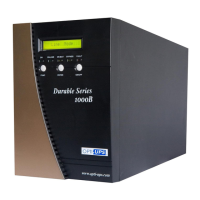
OPTI-UPS DS1000B - User Manual

OPTI-UPS DS1000B
20 pages
Print Icon
To Next Page IconTo Next Page
Loading...
Users Guide
Durable Series
Models DS1000B, 1500B, 2000B, 3000B
DS1000B-RM, 1500B-RM, 2000B-RM,
3000B-RM

Other manuals for OPTI-UPS DS1000B

Questions and Answers

  • J
    joseph50Aug 17, 2025
    What to do if OPTI-UPS UPS is on battery?
    • M
      Martin LarsenAug 17, 2025
      If your OPTI-UPS UPS is operating on battery power, it's crucial to save your data promptly and perform a controlled shutdown of your systems to prevent data loss or corruption.
  • M
    michaelharrisAug 22, 2025
    What to do if my OPTI-UPS UPS displays an Over-Temperature warning?
    • C
      Chad Miller PhDAug 22, 2025
      If your OPTI-UPS UPS displays an Over-Temperature warning, ensure that the unit’s fans and vent holes are not blocked. Also, verify that the surrounding temperature is not above 40 degree C. If these steps don't solve the problem, contact your service representative.
  • M
    Matthew PottsAug 25, 2025
    What to do if OPTI-UPS DS1000B UPS has a Bus Fault?
    • A
      angela64Aug 25, 2025
      If your OPTI-UPS UPS has a Bus Fault (High internal DC bus Voltage), turn off the protected loads, turn off the UPS, and call your local dealer for assistance.
  • D
    Debbie HallAug 27, 2025
    What to do if my OPTI-UPS DS1000B UPS displays an Over-Charge error?
    • N
      Nicholas RobinsonAug 27, 2025
      If your OPTI-UPS UPS displays an Over-Charge error, turn off the protected loads and turn off the UPS. Then, contact your local dealer for further assistance.
  • W
    William ParkerAug 30, 2025
    What does it mean when my OPTI-UPS DS1000B says 'Site wiring Fault'?
    • H
      Holly SanchezAug 30, 2025
      A 'Site wiring Fault' on your OPTI-UPS UPS indicates voltage detected between Neutral and Ground. This could mean the UPS mains connector polarity is wrong; try rotating the connector (Schuko). It can also mean the UPS is installed to a mains supply without ground. See page 15 on how to disable the site wiring alarm.
  • Z
    Zachary BassSep 2, 2025
    What to do if OPTI-UPS UPS reports a Charger Failure?
    • A
      Allison WadeSep 2, 2025
      If your OPTI-UPS UPS indicates a Charger Failure, you should contact your local dealer for support.
  • A
    Aaron CruzSep 4, 2025
    What to do if my OPTI-UPS DS1000B UPS indicates a Battery Test?
    • G
      George McmahonSep 4, 2025
      No action needed. The OPTI-UPS UPS will return to normal operation when it successfully completes the battery test.
  • S
    stacey37Sep 8, 2025
    What to do if OPTI-UPS DS1000B reports Output Short?
    • S
      Stephanie GarciaSep 8, 2025
      If your OPTI-UPS UPS reports an Output Short, contact your local dealer for assistance.
  • D
    Donna FigueroaSep 10, 2025
    Why is my OPTI-UPS UPS showing Output Overload?
    • P
      Paul MarquezSep 12, 2025
      The OPTI-UPS UPS is overloaded because the connected equipment needs more power than the UPS can supply in Line Mode. To resolve this, turn off the least important equipment. If this solves the problem, the UPS will switch from bypass back to normal operation.
  • A
    alexanderreidSep 10, 2025
    What to do if OPTI-UPS DS1000B UPS indicates High output Voltage?
    • A
      Allen CainSep 12, 2025
      If your OPTI-UPS UPS indicates High output Voltage, contact your local dealer for assistance.

Summary

Warranty Details

Important Safety Instructions

General Safety Precautions

Provides crucial safety warnings regarding electric shock, battery handling, and internal parts.

Safety Information

Installation Hazards

Highlights hazards during installation, emphasizing the risk of high voltage and fatal contact.

Installation

Connection to Mains and Loads

Details how to connect the UPS to mains power and output loads, including accessory information.

Users Guide to Operations

Starting and Shutting Down the UPS

Provides step-by-step instructions for starting and shutting down the UPS unit safely.

Control Panel Indicators

Explains the LED indicators and LCD display for monitoring UPS status and alarms.

Troubleshooting UPS Malfunctions

Provides guidance for identifying and resolving common UPS malfunctions and alarm indications.

Maintenance

Replacing UPS Batteries

Offers a step-by-step tutorial for replacing the UPS batteries, emphasizing safety precautions.

Technical Specifications

Power Range 1000-3000 VA (100;110;120 V)

Lists technical specifications for 100/110/120V models, including input/output voltage, frequency, and environmental factors.

Power Range 1000-3000 VA (220;230;240 V)

Details technical specifications for 220/230/240V models, covering power, input/output, and environmental parameters.

19 Rack-mount Model Specs (100;110;120 V)

Presents technical specifications for 19" rack-mount models (100/110/120V) including dimensions and power ratings.

19 Rack-mount Model Specs (220;230;240 V)

Provides technical specifications for 19" rack-mount models (220/230/240V), detailing power, connections, and environmental data.

OPTI-UPS DS1000B Specifications

General IconGeneral
Power Rating1000 VA
Output Power600 W
Output Frequency60 Hz
Input Frequency60 Hz
WaveformSimulated Sine Wave
Communication PortsUSB
Humidity0-95% non-condensing
Input Voltage120 VAC
Output Voltage120 VAC
Battery TypeSealed Lead Acid
Outlets6 NEMA 5-15R
Transfer Time4 ms
Battery Recharge Time6 hours to 90%
Operating Temperature32°F to 104°F (0°C to 40°C)

Related product manuals