Preparing Your Receiver
onnecting Program Sources
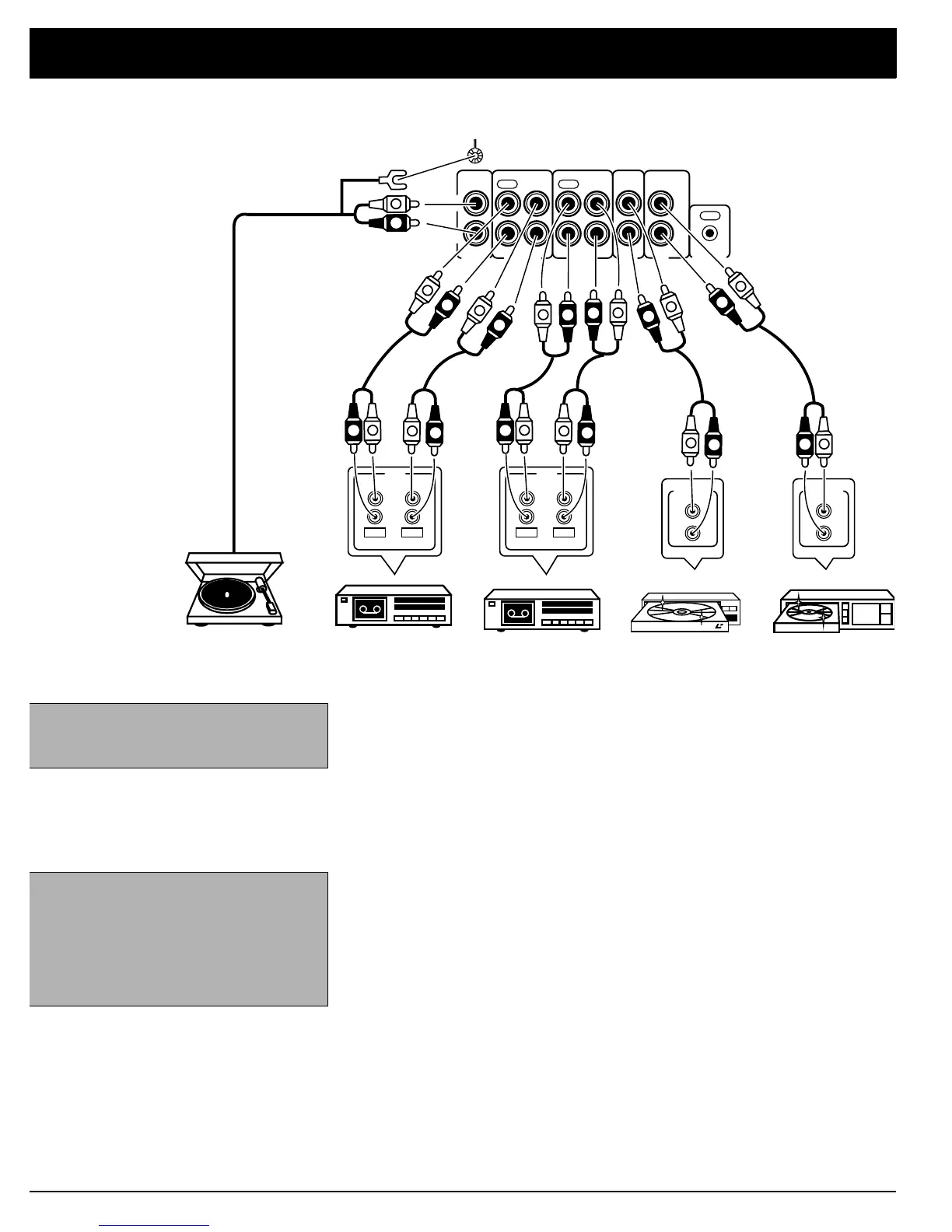
You can connect up to five external program sources to your receiver.
Connecting a Turntable
Connect a turntable with a magnetic cartridge only. Some older turntables use a
ceramic-type cartridge that does not work with this system.
Connect the turntable’s left and right cables to the receiver’s left and right
PHONO
jacks. Then connect the turntable’s ground wire to the receiver’s
GND
terminal.
Connecting Cassette Deck(s)
You can connect cassette decks to the
TAPE 1/VCR
and the
TAPE 2 MONITOR
jacks. Connect the cassette deck’s output jacks to the
TAPE 1/VCR
PLAY
or
TAPE 2 MONITOR PLAY
jacks, and connect the cassette deck’s input jacks to
TAPE 1/VCR
REC
(audio) or
TAPE 2 MONITOR REC
jacks.
Connecting a CD Player
To connect a CD player to the receiver, connect the CD player’s left and right
output jacks to the receiver’s
L
and
R CD
IN
jacks.
Connecting Another Audio Source
Connect the audio outputs of another audio source, such as the audio from a
laser disc player, TV, VCR, or CD player, to the
LD/DVD IN
L
and
R
jacks.
Note: Use shielded audio cables with
phono connectors for all audio connec-
tions.
Note:
If you place the cassette deck
directly above, below, or to the left of the
receiver, the receiver could interfere with
the cassette deck’s operation. If possi-
ble, position the cassette deck to the
right of the receiver or locate it away
from the receiver.
PHONO
TAPE2
MONITOR
CD
LD
/DVD
TAPE 1
/VCR
CONTROL
GND
REC
PLAY
L
R
L
R
IN IN IN
OUT
REC
PLAY
L
R
REC PLAY
LINE
REC
PLAY
INPUT OUTPUT
Cassette Deck
Turntable
OUT PUT
L
R
CD
CD Pla
er
Cassette Deck
L
R
REC PLAY
LINE
REC
PLAY
INPUT OUTPUT
LD/DVD Pla
er
OUT PUT
L
R
R
L
L
R
L
R
R
L
R
L
R
L
R
L
R
L
R
L
R
L
L
R
L
R
R
L




 To Next Page