Delta Elec. Inc. EX779
Company Confidential Optoma__________________ Delta________________
11
2010/04/14
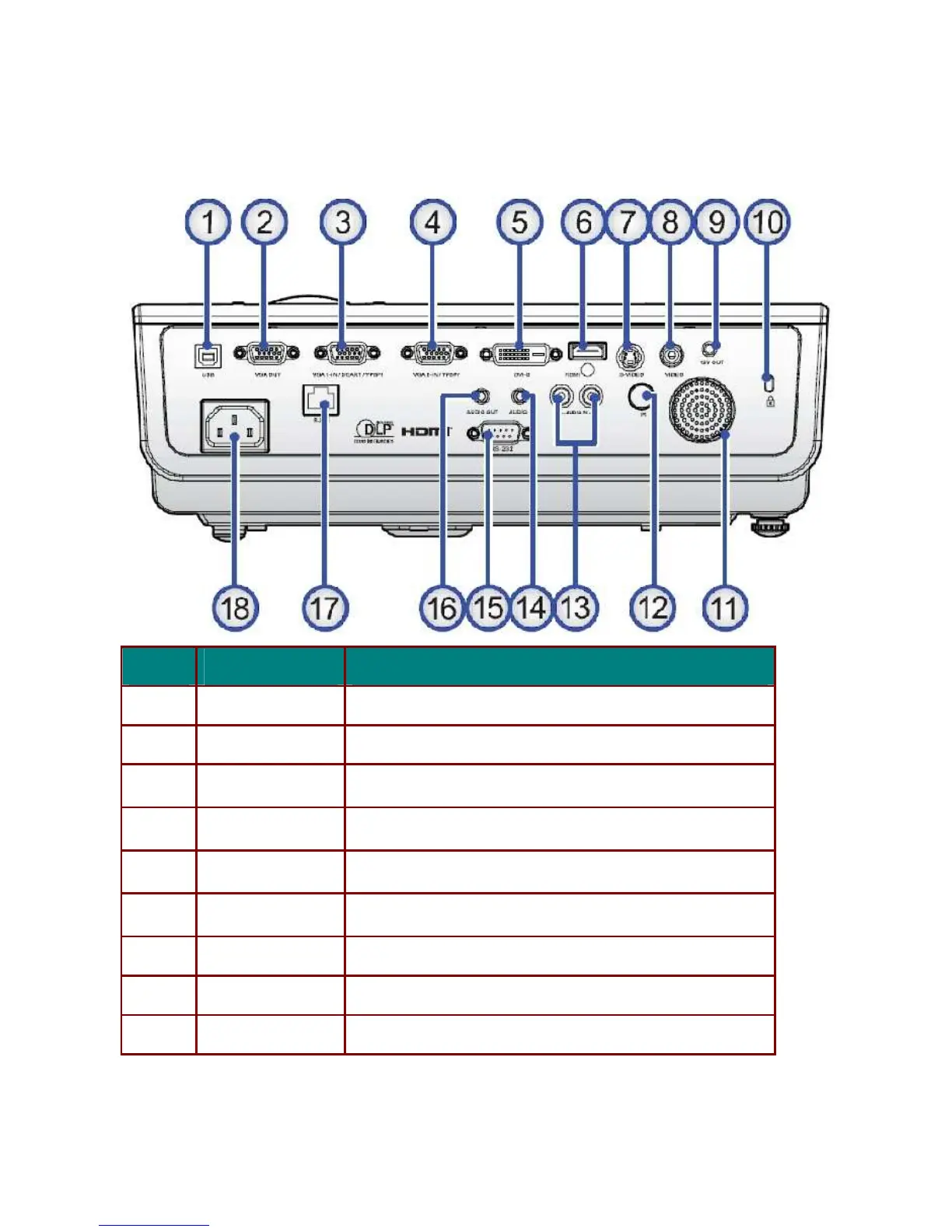
C. Connection ports
I
TEM
L
ABEL
D
ESCRIPTION
1.
USB
Connect the USB CABLE from a computer
2.
VGA OUT
Connect the RGB CABLE to a display
3. VGA IN Connect the RGB CABLE from a computer and components
4. VGA IN Connect the RGB CABLE from a computer and components
5. DVI-D IN Connect the DVI CABLE from a computer and components
6. HDMI IN Connect an HDMI CABLE from an HDMI device
7.
S-VIDEO IN
Connect the S-VIDEO CABLE from a video device
8.
VIDEO IN
Connect the COMPOSITE CABLE from a video device
9.
DC OUT
Output 12Vdc(200ma) for display screen motor use



 To Next Page