Delta Elec. Inc. EX779
Company Confidential Optoma__________________ Delta________________
52
2010/04/14
Step 3: The System will be not under 1W condition before you programming flash updated.
Projector is in STAND BY mode.
Make sure the USB cable is firmly attached between projector and computer.
Press holds the <Left> keys and connects the power cord to the projector at same time,
The LAMP LED (Red) will blink one time and please make sure the system is not under 1W stay.
Press <Down>, <Up>, <Right>, <Up> keys in sequence using keypad buttons, or using the IR
remote controller for those with limited keypads.
The lamp LED (Red) will blink one time and the Flash-Tool mode will be enabled.
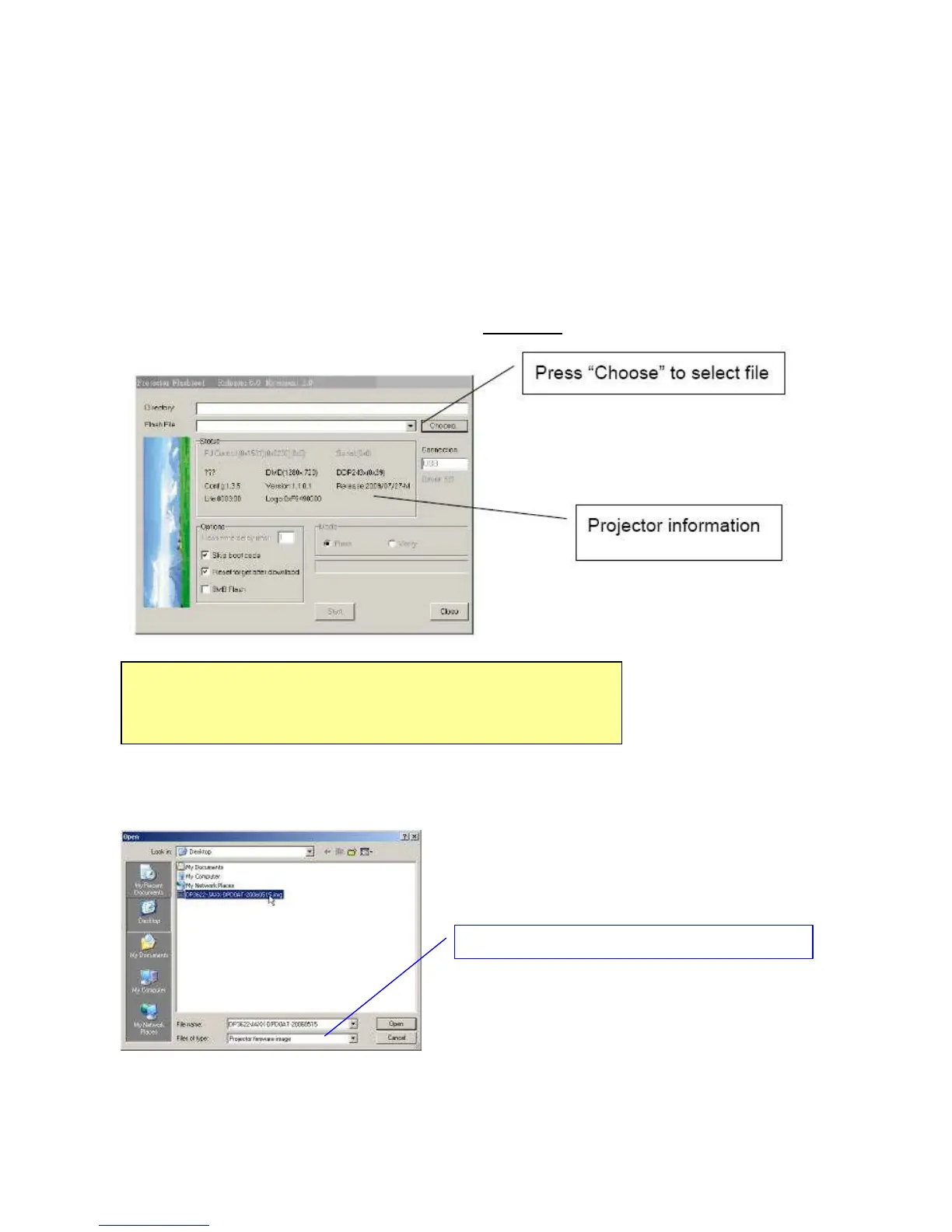
Step 4: Press “Choose” button to locate the new firmware which can be downloaded from
website (For example: DP-3622 JAXX-DPD0A.img). Select the desired *.img file by either
double clicking the file or pressing the “Open” button to load the file.
Note:
The Windows hardware wizard will pop up if the USB device driver is not installed.



 To Next Page