19
EN
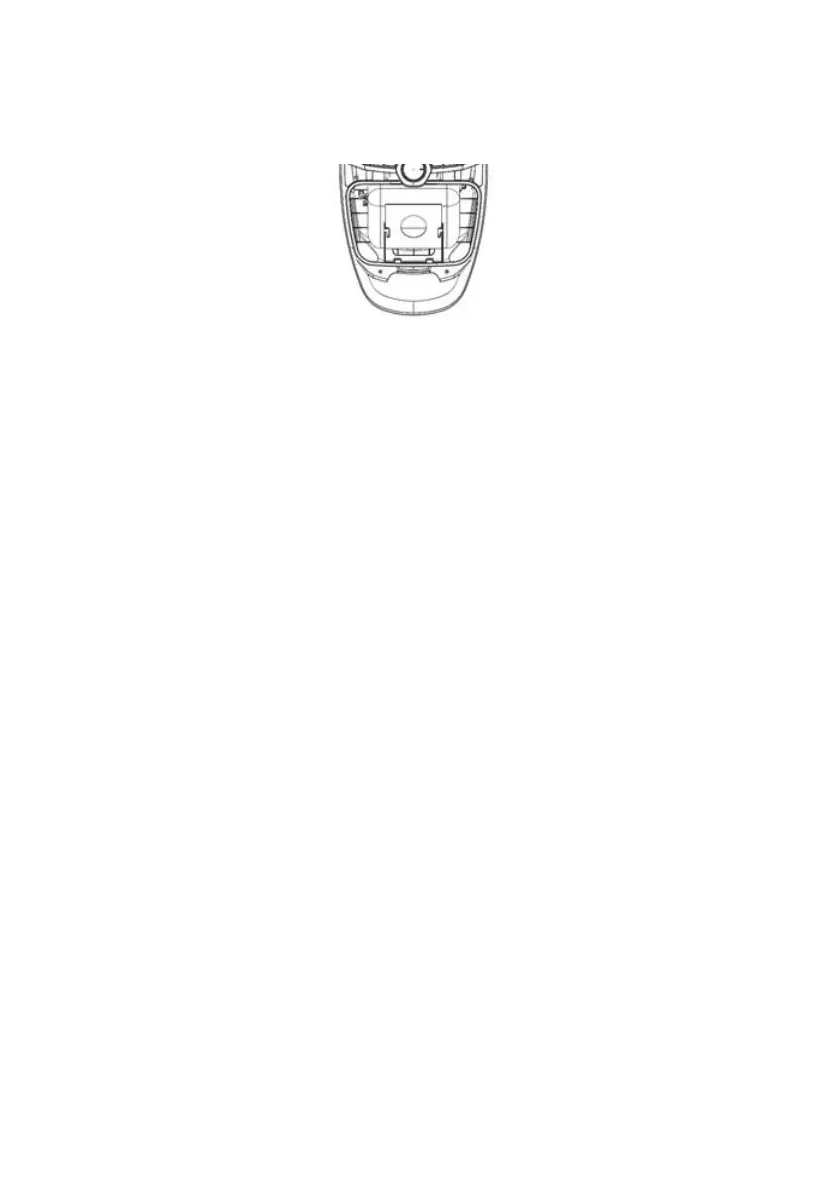
2 Remove the old bag by pulling it out. If you use a paper bag, throw the used
bag in the trash. Never reuse the old bag.
3 Insert the new bag by sliding the bag frame into the bag holder so that the hole
in the bag overlaps with the hole in the bag holder.
4 Insert the bag holder into the p and make sure that the bag is correctly
inserted. Without the bag and the bag holder properly inserted, the cover
cannot be closed.
5 Close the front cover.
Warning!
Before closing the cover, make sure that the bag is correctly inserted, that it does
not protrude from the compartment and that it does not prevent the cover from
closing properly.
Filter cleaning and replacement
The filter must be cleaned or replaced regularly, depending on the intensity of use.
Failure to do so may result in reduced device performance and / or reduced filter
life.
Cleaning/Replacing the exhaust and filter before motor
(front filter)
The exhaust filter is located at the rear of the vacuum cleaner and the motor
protection filter (front filter) is in the rear of the dirt bag compartment. Filters must
be cleaned / replaced if soiled.
Always use the vacuum cleaner with the filters in place.
Before replacing the filter (s), unplug the power cord from the wall socket to
prevent electric shock.
K


 To Next Page